Magnifier Glass Magnifying Flash with AdMob Ads Android
Magnifier Glass Magnifying Flash Overview & Native Android Utility Architecture
Magnifier Glass Magnifying Flash is a native Java Android application source code, engineered for mobile developers and agencies to deploy a camera-driven magnification utility with Google AdMob and Facebook ad inventory pre-wired. The package removes the engineering overhead of assembling a camera preview pipeline, a 20x zoom controller, an LED torch trigger and a frame-freeze subsystem from scratch, since every module ships as readable Java logic bound to Material Components XML layouts. Within production workflows, it operates as a rebrandable utility listing: a studio can restyle the interface, swap ad unit identifiers, compile against Android 16 and submit a store build without touching lower-level camera handling.
Technical Specifications & Deployment Matrix
The matrix below consolidates every verifiable runtime parameter documented for this codebase.
| Engineering Metric | Deployment Specification |
|---|---|
| Base Technology / Framework | Native Android application written in Java |
| Runtime / Language Requirements | Minimum SDK API 24 (Android 7.0); Target SDK API 36 (Android 16) |
| UI Layer | XML layouts built on Material Components |
| Monetization / Communication Protocols | Google AdMob and Facebook ad network SDKs |
| Hardware Dependencies | Device rear camera, LED flash module, display brightness channel |
| Persistence Footprint & Deliverables | Local .db database; captured magnified photos saved to device storage; .apk, .db, .java and .xml files included |
Camera Magnification Engine & Core Execution Pipeline
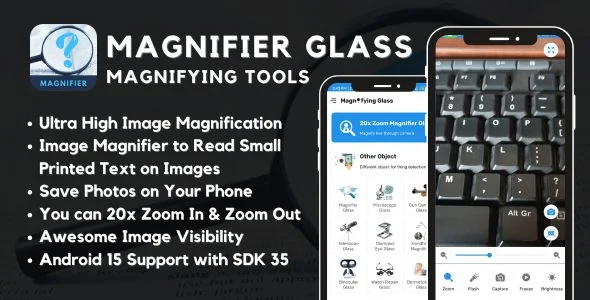
The engine routes the live device camera feed into an XML-defined Material Components view layer, where a zoom controller scales the preview up to 20x magnification. The flashlight subsystem toggles the rear LED hardware so fine print stays legible in dark rooms or at night, while the freeze routine halts the preview buffer so a single frame can be examined without holding the device steady. Brightness adjustment modifies the display output to match ambient reading conditions, and object detection logic analyzes frames within the camera view to identify and highlight items of interest. When the desired zoom level is reached, the capture button writes the magnified frame to device storage so no detail is lost between inspection and later review.
Architectural & Functional Highlights
- 20x Zoom Controller: Scales the live camera preview across a continuous zoom range, letting users magnify small printed text and intricate object details directly through the view layer without external optical hardware.
- LED Flashlight Trigger: Activates the rear flash module on demand, which is critical when examining medicine labels, serial numbers or receipts in low-light environments where sensor noise would otherwise degrade legibility.
- Frame Freeze & Capture: Suspends the preview buffer for static inspection, then persists the magnified frame to device storage via the capture action, decoupling reading time from hand steadiness.
- Object Detection Routine: Applies algorithmic frame analysis to automatically identify and highlight objects in the camera view, directing user attention toward text, images or other items of interest.
- Screen Brightness Control: Adjusts display output up or down from within the app, giving readers an additional visibility channel when the LED flash alone cannot compensate for ambient conditions.
For teams weighing a separate cross-platform monetization codebase outside native Android development, Ai Story Generator represents an independent React Native path that ships its own AdMob configuration and admin panel as a parallel, decoupled project.
Production Implementation & Operational Resilience
Deployment begins by importing the Java and XML sources into an Android Studio workspace, where the Gradle configuration resolves Material Components dependencies and compiles against the API 36 target. Because the minimum SDK sits at API 24, the resulting build covers every handset from Android 7.0 through Android 16, which keeps the addressable install base wide while satisfying current Play Store target-SDK expectations. Before any store submission, production AdMob and Facebook ad unit identifiers must replace the placeholder values, and camera plus storage permissions must be declared so the preview, freeze and capture routines function on first launch.
The primary operational boundary is hardware-bound: the documentation states plainly that magnified image quality depends on the camera capabilities of each phone, meaning the 20x ceiling amplifies whatever optical resolution the installed sensor delivers rather than synthesizing detail beyond it. The freeze feature acts as a partial mitigation for hand movement, and brightness adjustment compensates for unfavorable screen conditions, but no software routine can outperform a weak sensor. Secondary development is fully open within the delivered sources: XML layouts allow restyling of every Material Components surface, and the Java layer exposes the zoom, torch, detection and capture logic for feature-level modification without rebuilding the architecture from zero. For studios assessing standalone Android monetization projects in the gaming vertical, Pixag applies the same banner, interstitial and rewarded inventory model inside a Cocos2d-x game runtime as a separate, non-mergeable codebase.
Frequently Asked Questions
Does the package ship with a pre-built APK alongside the source files?
Yes. The deliverables include a compiled .apk file, so the magnification engine, flashlight behavior and ad placements can be verified on a physical device before any recompilation or rebranding work begins inside Android Studio.
Is a database file part of the delivered source package?
Yes. A .db file ships with the codebase, covering the local persistence footprint the application relies on, alongside the .java sources and .xml layouts required to rebuild both the logic and interface layers.
Does the magnified image quality depend on the physical camera of the device?
Yes. The documentation explicitly states that output quality is bounded by each handset’s camera hardware, so the 20x zoom ceiling amplifies whatever optical resolution the installed sensor delivers rather than generating detail beyond it.
Are both Google AdMob and Facebook ad networks integrated in this source code?
Yes. Both networks are wired into the project, which means production ad unit identifiers for each provider must be configured before a store submission, and a single-network build would require stripping the unused SDK references.