Clean Duplicate Photo & Video – Big File Cleaner – Photo & Video Optimization – Video Compressor
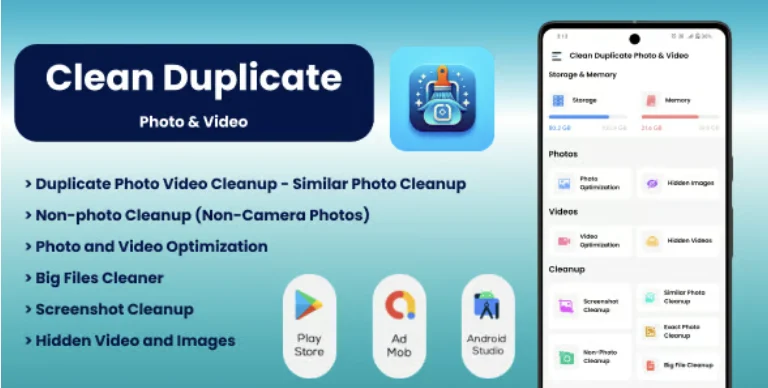
Clean Duplicate Photo & Video Overview & Android Storage Optimization Architecture
Clean Duplicate Photo & Video is a native Android utility application source code, engineered for Android developers, app resellers, and agencies to ship a production-ready storage cleanup product without building a detection engine from scratch. The package targets a measurable mobile bottleneck: duplicate photos, repeated videos, accumulated screenshots, and oversized media files that gradually saturate device storage across Android 9 through Android 14 hardware. Within client-delivery and reseller workflows, it functions as a rebrandable, offline-capable foundation that can be compiled in Android Studio, themed, and published to app stores or delivered as a finished freelance product.
Technical Specifications & Deployment Matrix
The deployment matrix below consolidates the verifiable runtime parameters documented for this package.
| Engineering Metric | Deployment Specification |
|---|---|
| Base Technology / Framework | Native Android application, written 100% in Java (no Kotlin) |
| Runtime / Language Requirements | Android SDK 21 through 34+ (Android 5.0 Lollipop to Android 14); Android Studio with latest Gradle |
| Data Exchange / Communication Protocols | Fully offline execution — no login, remote API, or network dependency |
| Front-End / Engine Dependencies | Zero third-party libraries; layered Activity, Adapter, and Utility class structure with MVVM-inspired organization |
| Database / Persistence Footprint | Local media indexing via bundled .db and .dat structures; native .dex and .so binaries included |
Duplicate Media Detection Engine & Execution Pipeline
The engine scans local media, clusters similar assets, and routes each cluster through deletion or compression pipelines. Execution begins at the Activity layer, where a user-initiated scan request is dispatched to dedicated utility classes that traverse the device media repository. Retrieved assets are normalized into grouped datasets — duplicate photo sets, duplicate video sets, screenshot batches, hidden media, and size-filtered big files — then handed to Adapter classes that render every group as a selectable list. No file operation executes implicitly; the architecture enforces a user-confirmation gate before removal, keeping irreversible actions auditable at the interface layer.
Detection logic is specialized per media category rather than generic. Exif metadata inspection separates camera-captured photographs from non-camera images such as downloads and saved web pictures, allowing targeted cleanup of graphics the user never shot. Screenshot detection isolates screen captures automatically, so stale captures can be purged in a single pass. Hidden media scanning surfaces files stored outside standard gallery visibility, while the big-file module applies configurable size thresholds to surface the heaviest storage consumers. On the video side, duplicate detection runs alongside a compression module that re-encodes high-quality footage to reclaim space, and a batch image pipeline handles both compression and multi-image resizing in one operation.
Studios running multi-title Android catalogs can apply this same Java-first delivery approach across product categories — a team publishing playback experiences such as The Stream can reuse an identical Android Studio build, test, and release workflow for its utility apps.
Core Technical Capabilities of Clean Duplicate Photo & Video
- Similar Image Retrieval: Pairwise comparison logic identifies identical and visually similar photographs, grouping them for batch confirmation and removal instead of manual gallery auditing.
- Duplicate Video Cleanup & Video Compressor: Repeated video files are detected and flagged, while a compression path reduces high-bitrate footage in place to recover storage on constrained devices.
- Image Compression & Batch Resize: A single pipeline compresses and resizes multiple images simultaneously, avoiding per-file processing loops that slow down large media libraries.
- Screenshot & Non-Camera Photo Detection: Automatic screenshot identification pairs with Exif-based analysis to distinguish camera shots from downloaded graphics, enabling category-specific deletion.
- Big File Cleaner & Hidden Media Scan: Size-threshold filtering locates oversized files, and a hidden-media sweep exposes clutter stored outside normal gallery visibility for one-click removal.
Production Implementation & Operational Resilience
Deployment follows the standard native Android path: import the Android Studio project, run a Gradle sync against the latest build tooling, and compile with a minimum SDK of 21 and a target reaching SDK 34+. Because the codebase carries zero third-party dependencies, builds remain stable across Gradle and Android Gradle Plugin upgrades — there are no upstream library versions to pin or reconcile, which matters in agency environments where projects sit in maintenance for years. Offline operation removes an entire class of production failure modes: no network timeouts, no API key rotation, and no backend availability dependency, so the app behaves identically on a device with no connectivity.
The layered class organization — Activities handling presentation, Adapters managing list rendering, utility classes carrying scan and file logic — gives secondary developers clear seams for extension without cross-threading concerns. The MVVM-inspired structure is positioned for future scalability, so adding a new cleanup module means writing a new utility path and adapter rather than refactoring existing flows. Battery-optimized scanning keeps background cost low during large media sweeps, and the user-confirmation gate on every deletion acts as the primary data-safety mechanism. Bundled layered PNG assets allow visual rebranding without regenerating artwork from scratch. Agencies maintaining parallel utility titles, such as shipping Pro Reader alongside this cleaner, can standardize on one documented Java codebase convention across their catalog.
Frequently Asked Questions
Does the deliverable include a compiled APK in addition to the Android Studio project?
Yes. The package ships .apk, .dex, .so, .dat, .db, .java, and .xml files plus layered PNG assets, so the app can be sideloaded onto a device for immediate testing before any source modification or rebranding work begins.
Can AdMob advertisements be added without restructuring the codebase?
Yes. The architecture is documented as easy for AdMob or other ad SDK integration, meaning monetization wiring can be inserted into the existing layered structure without refactoring Activities, Adapters, or the utility classes that drive scan operations.
Is Kotlin experience required to modify or extend this application?
No. The implementation is written 100% in Java with no Kotlin anywhere in the project, so a developer with Java and Android SDK knowledge can read, modify, and extend every module without learning an additional language.
Will the app install and run on devices older than Android 9?
Yes. The project supports Android SDK 21 through 34+, which corresponds to Android 5.0 Lollipop and above, so the compiled application covers devices well below the Android 9–12 versions highlighted in the store listing.
Pre-Wedding Music Video Editor | Pre-Wedding Slideshow Video Maker | Android | Admob Ads
Ultimate News App (Video,Youtube,Weather,Survey)
Insta Downloader – Videos, Images & Audios Downloader | ADMOB, FAN, APPLOVIN, FIREBASE, ONESIGNAL