TravelBnB – Flights Hotels Car Rental Booking Android App UI Template
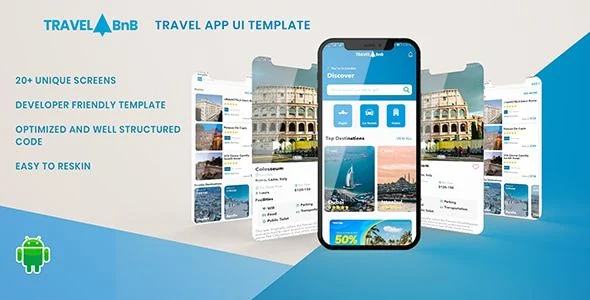
TravelBnB Overview & Presentation-Layer Architecture for Travel Booking Apps
TravelBnB is a native Android UI template engineered for mobile development teams and agencies that need production-grade booking interfaces without rebuilding layout hierarchies from scratch. The package targets the longest phase of travel app delivery — constructing repetitive reservation, search, and profile screens across the hotel, flight, car rental, and tour verticals — and collapses that work into an editable source foundation. Within an agency pipeline it functions as a presentation-layer starting point, distributed as a .java/.xml codebase alongside a ready-to-install .apk, shortening the distance between concept approval and a testable Android 9.0 build.
Technical Specifications & Deployment Matrix
| Engineering Metric | Deployment Specification |
|---|---|
| Base Technology / Framework | Native Android UI template built on Java source files with XML view layouts |
| Runtime / Language Requirements | Android 9.0 platform baseline; Java + XML toolchain via Android Studio |
| Data Exchange / Communication Protocols | None — no backend or API bindings; all screen data is static placeholder content |
| Front-End / Engine Dependencies | 20+ sample screens and 40+ reusable UI components covering the booking journey |
| Database / Persistence Footprint | No persistence layer — presentation-only architecture with no local storage schema |
| Deliverable Formats | .apk preview build, .java activity sources, .xml layout and resource files |
Multi-Vertical Booking UI Composition & Screen Execution Pipeline
TravelBnB executes each booking workflow as XML layouts inflated by Java activity and adapter classes. Every vertical — hotels, flights, car rental, and tours — ships as a dedicated screen set with its own search, results, and detail view hierarchy. Because the template carries no network layer, list content and form state are held as static placeholder data inside the layout and adapter definitions; your team swaps those data sources for live models once a REST client and serialization layer are introduced.
The screen inventory spans the full reservation journey: a main screen with category entry points, flight search and flight details screens, hotel booking flows, a car rental module, login and signup layouts, a user profile screen, city guides, tourist attractions, notifications, and settings. Across these 20+ screens, the codebase distributes 40+ reusable components — input groups, listing cards, filter bars, and media blocks — that can be recombined into new screens instead of being duplicated as monolithic layouts. A social presentation layer adds stories and photo-sharing interfaces, giving travel communities a content surface that runs parallel to the booking funnels. For teams that also need a server-resident flight search monetization path operating outside the Android runtime, Cheap Flights (Flights Booking using Sky-scanner) exists as an independent WordPress affiliate portal rather than a connected backend for this template.
Architectural & Functional Highlights
- Multi-vertical booking modules: Hotel reservation, flight search and details, car rental, and tour booking flows are each implemented as discrete screen hierarchies, allowing a single vertical to be stripped out without breaking the remaining navigation graph.
- 40+ reusable component library: Shared UI building blocks are defined once and referenced across screens, so a change to a listing card or filter component propagates through every vertical that consumes it.
- Social content interfaces: Stories and travel photo-sharing screens provide a media consumption layer alongside transactional booking flows, supporting community-style product concepts.
- Full account and navigation scaffolding: Login, signup, user profile, notifications, settings, city guides, and tourist attraction screens cover the non-booking surfaces required for a shippable travel application shell.
Production Implementation & Operational Resilience
Deployment begins with the included .apk: installing it on an Android 9.0 device lets stakeholders evaluate every screen and interaction pattern before any source is modified. From there, the .java and .xml files import into Android Studio as a standard project, where theme attributes centralize color values and dimension resources govern spacing, making a client rebrand a resource-level operation rather than a layout rewrite. Feature modules can be added or removed at the activity level because the screens are delivered as readable, unobfuscated source.
Operationally, the template defines its own boundaries: it performs no network calls, holds no persistence layer, and ships no authentication client. Every network failure state, payload validation routine, and token refresh cycle is therefore the integrating team’s responsibility to architect. This absence is deliberate for a UI template — it keeps the codebase free of opinionated service bindings, so Retrofit, OkHttp, or Volley clients can be attached without unwinding pre-bundled logic. For a decoupled web storefront serving the same hospitality vertical outside Android, Hotels Holiday – Shopify 2.0 Luxury Hotel Theme functions as a parallel, independently deployed storefront build. Before a store release, verify layout rendering across the API 28+ device matrix and generate a signed release build with your own keystore and ProGuard configuration.
Frequently Asked Questions
Does the template ship with backend connectivity or live API integrations?
No. The package is a presentation-layer template with zero backend or API bindings. Every data surface uses placeholder content, so connecting a live reservation service requires your team to build and attach the server infrastructure independently.
Can the color scheme and feature set be modified after purchase?
Yes. Buyers can add or remove features, restructure screens, and replace the color scheme. The .java and .xml sources are fully editable, so modifications happen at both the layout and activity levels of the codebase.
Are future template upgrades delivered to buyers?
Yes. Subsequent template revisions are delivered to purchasers through their CodeCanyon account, so the source package stays aligned with new screens and component refinements as the template evolves across its release cycle.
Are the login and signup screens pre-wired to an authentication service?
No. The login and signup screens are presentation layouts only. The template contains no authentication client, token storage, or user service connection, so a real identity provider must be implemented before any production release.
Voice Calculator – Speaking Calculator – Calculator – Voice Typing Calculator – Talking Calculator

Cheap Flights (Flights Booking using Sky-scanner)
MyTaxi – Complete Flutter Taxi App | Full Taxi Booking Solution with Intercity & Parcel