Keyboard Themes Emoji Fonts – My Photo Keyboard Themes – Stylish Keyboard Fonts Themes
Product Overview
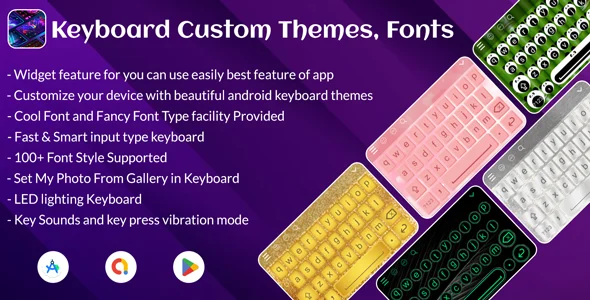
When you first launch into Keyboard Themes Emoji Fonts, you immediately grasp its potential as a comprehensive mobile app template designed to deliver My Photo Keyboard Themes – Stylish Keyboard Fonts Themes. This template is a well-structured foundation for building personalized keyboard applications for both iOS and Android. It targets developers and businesses aiming to offer end-users a highly customizable typing experience, allowing them to personalize their device’s keyboard with custom backgrounds, unique fonts, and a vast array of emojis and stickers.
Highlights & Value
The core strength lies in its intuitive customization. I observed that selecting a photo from my gallery for a keyboard background instantly resized and centered the image on the key layout preview. A transparency slider then appeared, allowing immediate adjustment of the background’s visibility against key colors. This real-time visual feedback streamlines design iterations. Customizing key shapes, colors, and button press animations is equally fluid; changes render instantly on the preview, which is invaluable for quick design adjustments.
Beyond aesthetics, the template includes robust emoji and sticker management. Assets are categorized and searchable within the interface. Applying different font styles directly updates character typography on the keys within the editor, offering precise font-to-key mapping.
Real-World Use Cases
Businesses can leverage Keyboard Themes Emoji Fonts – My Photo Keyboard Themes – Stylish Keyboard Fonts Themes to create branded keyboards, offering a unique touchpoint. Imagine a sports club releasing a keyboard app with team colors, logos, and custom emojis, deepening fan engagement.
Content creators and influencers can design exclusive keyboard themes as premium content or part of a membership, providing a personalized connection with followers.
Developers can quickly build specialized keyboards for niche communities, complete with relevant iconography and language-specific layouts.
Technical & Compatibility
For developers, the Keyboard Themes Emoji Fonts codebase is organized and well-commented, facilitating customization. UI components are separated from core logic, allowing distinct visual modifications without disturbing underlying functionality. Asset management for fonts, images, and sticker packs is handled cleanly, so swapping default content for custom assets is straightforward.
The template targets native iOS and Android development, ensuring optimal performance across devices. It operates as a standalone mobile application, without reliance on WordPress plugins for its core. However, a developer could easily integrate API calls to a WordPress backend for dynamic content, user authentication, or premium theme unlocking, extending its capabilities.
Restart Taxi & Delivery- Perfect Taxi Solution with Parcel Delivery

MyTaxi – Complete Flutter Taxi App | Full Taxi Booking Solution with Intercity & Parcel
Sticker Maker for WhatsApp – Stickers in WhatsApp – Sticker Maker-WhatsApp – Sticker Maker for WA