ECare ANDROID + IOS + FIGMA + SKETCH | UI Kit | ReactNative | Online Clinic App for Doctor & Patient
Product Overview
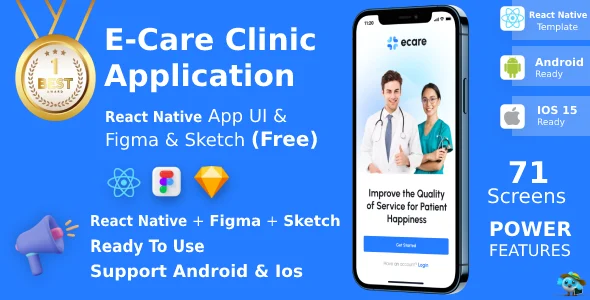
ECare ANDROID + IOS + FIGMA + SKETCH provides a comprehensive foundation, serving as a versatile UI Kit | ReactNative | Online Clinic App for Doctor & Patient. This package is ideal for developers and agencies aiming to rapidly deploy functional telemedicine platforms. From initial design concepts in Figma and Sketch to the actual code implementation in React Native, this kit covers the entire development lifecycle for a modern healthcare application.
When I first explored the files, the organization within ECare ANDROID + IOS + FIGMA + SKETCH | UI Kit | ReactNative | Online Clinic App for Doctor & Patient was immediately apparent. The Figma and Sketch files are structured with well-named layers and components, mirroring common design system practices. This setup means changing a primary button style, for example, updates all instances across the artboards, which streamlines design iteration significantly. The React Native codebase extends this consistency, with components modularized for easy reuse and modification.
Highlights & Value
-
Pre-built Workflows: The kit includes complete flows for patient registration, doctor consultation scheduling, video calls, and prescription management. Each screen transition feels natural, guiding the user through the process without confusion.
-
Cross-Platform Consistency: By leveraging React Native, the same codebase renders natively on both Android and iOS devices. This avoids the headaches of maintaining separate teams or design deviations between platforms.
-
Detailed Design Assets: Access to the original Figma and Sketch files means you have complete control over the visual identity. You can modify layouts, typography, and color palettes down to the pixel, ensuring the app aligns perfectly with your brand.
-
Developer-Friendly Code: The React Native components are written cleanly, following standard practices. Prop-based customization is straightforward, allowing you to alter text, images, and basic behavior without deep structural changes.
Real-World Use Cases
-
Telehealth Startups: Quickly launch an MVP for online consultations, allowing doctors to connect with patients via secure video and chat.
-
Clinic Expansion: Existing medical practices can extend their services to remote patients, managing appointments and follow-ups digitally.
-
Specialized Medical Apps: Adapt the core framework for niche areas like mental health support, physiotherapy sessions, or dietary consultations.
-
Patient Engagement Platforms: Develop portals for patients to access medical records, test results, and educational content securely.
Technical & Compatibility
Setting up the ECare ANDROID + IOS + FIGMA + SKETCH project requires a standard React Native development environment. After cloning the repository, a simple npm install or yarn install fetches dependencies. Running npx react-native run-ios or npx react-native run-android brings the application up on a simulator or physical device quickly. The project structure separates UI components from business logic, making it easier to integrate with your chosen backend API for data persistence and authentication.
The underlying architecture of ECare ANDROID + IOS + FIGMA + SKETCH | UI Kit | ReactNative | Online Clinic App for Doctor & Patient ensures good extensibility. While the kit provides the frontend, integrating with various backend services (like Firebase, AWS Amplify, or a custom Node.js/Python API) is the next logical step. Components like authentication forms and data display lists are generic enough to map to any standard RESTful or GraphQL API endpoints. The design files themselves are compatible with common version control for designers, allowing collaborative work.
Restart Taxi & Delivery- Perfect Taxi Solution with Parcel Delivery

MyTaxi – Complete Flutter Taxi App | Full Taxi Booking Solution with Intercity & Parcel
Sticker Maker for WhatsApp – Stickers in WhatsApp – Sticker Maker-WhatsApp – Sticker Maker for WA