Domik – Creative Responsive Architecture WordPress Theme
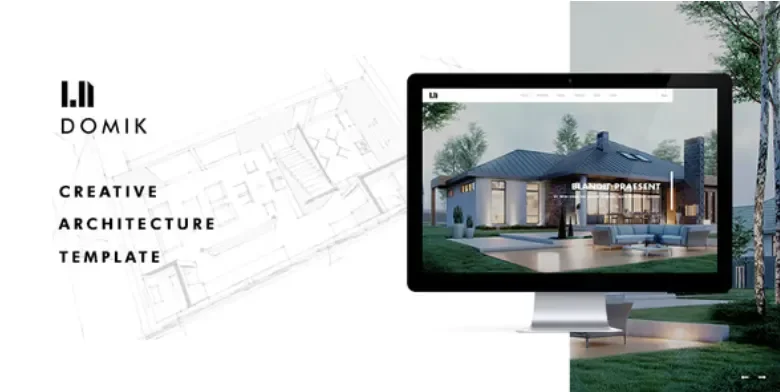
Domik Architecture WordPress Theme Overview & Portfolio Presentation Layer
Domik Creative Responsive Architecture WordPress Theme is a WordPress theme engineered for architecture studios and interior designers to publish project showcases without writing custom front-end code. The package resolves the bottleneck of translating drawings, renders, and site photography into device-consistent layouts by shipping curated demo presets, one-click import routines, and prebuilt portfolio structures. Within agency delivery pipelines it operates as the presentation layer: teams install the theme, import a demo, then populate case studies, services, and team pages while the codebase manages grid rendering, taxonomy filtering, and responsive image output.
Technical Specifications & Deployment Matrix
| Engineering Metric | Deployment Specification |
|---|---|
| Base Technology / Framework | WordPress theme package built on the native PHP template hierarchy with layered CSS and JavaScript front-end assets |
| Runtime / Language Requirements | Standard WordPress hosting meeting current core minimums for PHP and MySQL |
| Data Exchange / Communication Protocols | Server-rendered HTML through WordPress core APIs; content persisted via native post, taxonomy, and media structures |
| Front-End / Engine Dependencies | Compact script bundle handling project filters, gallery lightboxes, parallax motion, and sticky CTA behavior; WordPress responsive image delivery (srcset) |
| Database / Persistence Footprint | No separate custom schema is documented; portfolio items, categories, tags, and location terms map to core WordPress content tables |
Portfolio Rendering Engine & Execution Pipeline
The engine renders portfolio content through the native WordPress template hierarchy and its taxonomy archives. An inbound visitor request resolves either an archive template or a single-project template; the engine queries the relevant portfolio entries and their assigned terms, then outputs grid, masonry, or fullscreen gallery markup that the script layer enhances with client-side filtering and lightbox overlays. One-click demo import pre-populates posts, media attachments, and menu configuration so a staging environment mirrors the reference layouts before any real content is swapped in. Global style controls propagate typography, color, and spacing decisions across reusable sections, keeping DOM output consistent when teams duplicate blocks for additional case studies.
For studios comparing interior-focused options on the same WordPress runtime, Intoriza – Interior Architecture WordPress Theme targets a comparable taxonomy-driven workflow with its own preset system. Both packages operate independently, so project scoping should match the layout vocabulary each one ships rather than assuming shared components.
Core Technical Capabilities of the Domik Theme
- Curated demo import pipeline: One-click import writes demo posts, media, and configuration data onto a fresh WordPress install, collapsing hours of manual layout assembly into a single deployment action that teams then overwrite with client content.
- Taxonomy-driven project navigation: Categories, filters, and location tags map onto WordPress taxonomy archives, allowing visitors to narrow references by building type or geography without developers writing custom query logic.
- Multi-mode gallery rendering: Fullscreen, grid, and masonry layouts ship with lightbox overlays, so photography-heavy project pages deliver responsive image variants instead of fixed-ratio assets that inflate page weight.
- Conversion-oriented section library: Contact forms, quote request blocks, and sticky CTA elements attach lead-capture entry points to project pages, services, and pricing tables, moving visitor interest toward booked meetings.
- Semantic SEO markup: Clean schema output, breadcrumbs, and semantic HTML give crawlers explicit structural signals as the project archive grows across hundreds of entries.
Production Implementation & Operational Resilience
Because the package loads responsive image variants and keeps its JavaScript footprint small, LCP and CLS on image-heavy archives remain within workable bands. Teams deploying on shared hosting should still verify server-side caching and image compression independently, since the theme cannot compensate for missing infrastructure-level optimization. Parallax and motion details are applied as enhancement layers rather than structural dependencies, which limits layout shift when scripts load late or fail. Error states in filtering and navigation fall back to standard archive pagination, so a disabled script degrades to a functional listing rather than a blank viewport.
Customization concentrates on global style controls and reusable builder-friendly sections rather than framework plumbing: agencies adjust design tokens once, and every duplicated section inherits the change. Studios extending beyond visual overrides are working within ordinary WordPress template conventions, so any child-level modifications stay isolated from the imported demo data.
Architects pursuing decoupled implementations outside the WordPress runtime can evaluate Innovatek – Architecture Interior React Template as an independent front-end path; its component architecture runs on a separate stack and cannot be merged into this theme’s PHP template layer. Firms whose deliverables shift toward individual property marketing rather than portfolio archives will find Aspiro – Single Property WordPress Theme built for that listing-centric use case on the same runtime.
Frequently Asked Questions
Does the theme include ready-made pricing tables, testimonials, and FAQ sections for client-facing pages?
Yes, the package ships conversion-oriented section templates covering pricing tables, testimonials, and FAQ blocks, so studios can answer basic procurement questions without assembling each layout from empty containers or external page tooling.
Can blog templates handle process notes, press coverage, and competition entries alongside the portfolio?
Yes, dedicated post templates support editorial workflows for process documentation, press highlights, and competition entries, letting studios run a content channel that complements the project archive within a single installation.
Are the theme files translation-ready for multilingual studio sites?
Yes, the codebase ships translation-ready string files, so localizers can produce language variants for multilingual studio audiences using standard WordPress translation tooling rather than editing template source files or hardcoded strings.