Elsey – Responsive eCommerce Theme
Elsey Responsive eCommerce Theme Overview & Storefront Architecture
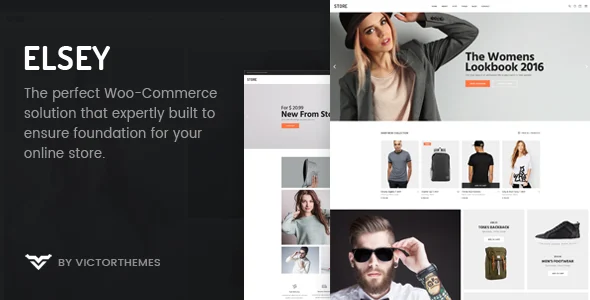
Elsey Responsive eCommerce Theme is a WordPress and WooCommerce storefront package engineered for agencies and merchants who need to launch fashion, electronics, furniture, watch, or lookbook shops from a single codebase. The package targets a recurring bottleneck in e-commerce theming — layout rigidity — by shipping seven distinct shop display states, four header navigation variants, and a full set of product page templates that map onto native WooCommerce template hierarchy overrides rather than hard-coded markup. Within agency delivery workflows, it operates as the presentation and merchandising layer: PHP templates, CSS, and JS assets render product archives, single product views, and cart components while WooCommerce persists all catalog and order data.
Technical Specifications & Deployment Matrix
| Engineering Metric | Deployment Specification |
|---|---|
| Base Technology / Framework | WordPress 6.0.x through 6.8.x, WooCommerce 6.x through 9.x, Bootstrap 4.x grid and component layer |
| Runtime / Language Requirements | PHP 7.3+ baseline with PHP 8 compatibility fixes applied across the 2.0.x release line; delivered as PHP, CSS, and JS files |
| Data Exchange / Communication Protocols | Ajax-driven cart drawer, product filtering, and animated product slider interactions |
| Front-End / Engine Dependencies | WPBakery Page Builder 8.4.x, Elsey Core plugin 1.6.7, Contact Form 7, Google Fonts library, Google Maps API, FontAwesome and Line icon sets |
| Database / Persistence Footprint | Native WordPress and WooCommerce tables with no custom schema declared; widget-ready sidebars and translation-ready language files |
WooCommerce Template Pipeline & Merchandising Execution
The rendering pipeline is anchored in WooCommerce template hierarchy overrides: inbound storefront requests resolve to the theme’s archive and single-product templates, WPBakery shortcodes inject layout sections into the DOM, and Ajax handlers refresh cart and filter states without full page reloads. Seven shop display states — default, fullwidth, masonry, category, simple, and parallax, each combinable with left-sidebar, right-sidebar, or sidebar-free configurations — are switched through theme options rather than duplicated template files, which keeps asset fragmentation controlled across storefront variants. Single product rendering covers the complete WooCommerce catalog model: simple, variable, grouped, external, downloadable, on-sale, out-of-stock, and sticky-info products each resolve through dedicated template logic. Blog views follow the same override pattern with standard, fullwidth, sidebar, and masonry layouts, while ancillary pages — about, team, services, FAQ, gift vouchers, return and exchange terms, and a 404 view — round out the page inventory for a complete store launch.
Runtime commerce behavior is handled by several interactive modules. The off-canvas cart drawer synchronizes cart state with WooCommerce session data through Ajax, the wishlist module persists product references so shoppers can compare items before ordering, and the order-tracking view queries WooCommerce order status directly. Advanced filter widgets narrow the catalog by attribute, and the mega menu builder accepts column, widget, and icon assignments for deep navigation trees. For agencies maintaining a portfolio of client builds on the same WordPress and WooCommerce stack that also need a stripped-down minimal storefront as a second deliverable, Metro occupies that slot within the same repository without introducing a new runtime.
Core Technical Capabilities of Elsey
- Seven-state shop layout engine: Default, fullwidth, masonry, category, simple, and parallax archives with three sidebar configurations, selected through theme options to avoid template duplication and reduce CSS payload drift.
- Off-canvas Ajax cart and order tracking: Cart drawer state synchronizes with WooCommerce sessions asynchronously, and shoppers query order status by reference without leaving the storefront.
- Mega menu and four header variants: Column, widget, and icon assignments build multi-level navigation; four header layouts swap through theme settings rather than file edits.
- Live Customizer styling and typography: Color regions adjust with live preview, and 790+ Google Fonts or uploaded custom fonts combine with configurable weights, line heights, and raw CSS properties in the theme options panel.
Production Implementation & Operational Resilience
Deployment follows the standard WordPress theme chain: activate the parent theme, install the Elsey Core plugin and WPBakery Page Builder, then import demo content to bootstrap layouts. Because layouts are composed through drag-and-drop WPBakery shortcodes with organized parameter fields, custom PHP is rarely required for page construction. A bundled child theme replicates the parent structure so that custom CSS and template modifications survive parent updates — updates for the theme, Elsey Core, and WPBakery arrive directly inside the WordPress admin panel, removing manual FTP-based file replacement from the maintenance loop.
Resilience measures span several layers. Cross-browser rendering is validated across Firefox, Safari, Opera, Chrome, and Edge, and the theme ships retina-ready, high-resolution asset handling. Translation files accompany each release, and the 2.0.x line specifically addressed PHP 8 warning behavior, PHP warning fixes, and WooCommerce template file updates — evidence of an actively maintained compatibility window. Known operational boundaries should be planned for: the package is not Gutenberg-optimized, so page building stays within WPBakery rather than the block editor; demo imagery from Unsplash and Shutterstock is used for demonstration only and must be replaced with licensed media before launch. For decoupled storefront implementations running entirely outside the WordPress runtime, Outstock ships as a Vue Nuxt 3 template operating against its own stack.
Frequently Asked Questions
Does Elsey support native Gutenberg block editing for page construction?
No. The package is explicitly not Gutenberg-optimized; page layouts are composed through WPBakery drag-and-drop shortcodes, while the block editor remains usable only for standard post content editing.
Are the demo images bundled with the theme package?
No. Imagery from Unsplash and Shutterstock serves demonstration purposes only and ships as placeholders; production deployments must supply properly licensed media before going live.
Can theme and plugin updates be applied directly from the WordPress dashboard?
Yes. Elsey releases, the Elsey Core plugin, and the bundled WPBakery version update through the admin panel, and child theme inheritance preserves custom CSS across those parent-level updates.
-
2.0.5 LatestOct 25, 2026