Pre-Wedding Music Video Editor | Pre-Wedding Slideshow Video Maker | Android | Admob Ads
Product Overview
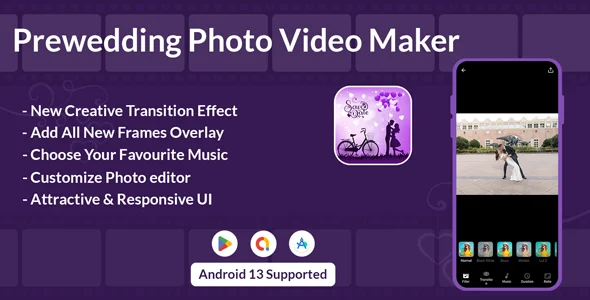
The Pre-Wedding Music Video Editor is a robust mobile application template designed for creating personalized pre-wedding videos on Android devices, offering a complete Pre-Wedding Slideshow Video Maker | Android | Admob Ads solution for entrepreneurs and developers. This Pre-Wedding Music Video Editor | Pre-Wedding Slideshow Video Maker | Android | Admob Ads template provides a ready-to-deploy project, ideal for anyone looking to launch a dedicated video creation app focusing on a specific niche. It streamlines the development process for building an interactive tool where users combine photos, music, and effects into memorable video stories, suitable for a general user base wanting a straightforward video editing experience on their mobile.
When you first open the compiled app, the interface presents a clear ‘Start’ button, leading directly to the photo selection screen. From there, you navigate your device’s gallery, picking images that form the base of your video. The UI displays selected photos with a small numerical badge, indicating their order in the sequence, which is helpful for managing longer slideshows. After choosing your images, the editor view loads, where you can then add music, apply filters, or overlay text and stickers. The app handles the core video generation process efficiently in the background, rendering a preview before final export.
Highlights & Value
- Photo Selection & Editing: Users can select multiple images from their device gallery or capture new ones. Each photo can be individually adjusted within the editor, allowing for basic cropping and rotation before integration into the video timeline.
- Music Integration: The app features an audio picker, letting users browse their local device storage for music tracks. Once selected, a waveform visually represents the chosen audio, and you can trim its start and end points to match the video’s duration.
- Creative Overlays: A dedicated section provides various stickers and text options. Text can be customized with different fonts and colors, appearing directly on the video preview. Frames are also available, adding a decorative border effect to the final output.
- Filters & Effects: A range of visual filters are available, applying a consistent aesthetic across the entire video. Tapping a filter immediately updates the video preview, allowing for real-time adjustments and comparisons.
- HD Video Export: The final output is rendered in high definition, saved directly to the device’s video gallery. The export progress is shown via a percentage bar, ensuring users know the status of their video creation. This feature makes the Pre-Wedding Slideshow Video Maker | Android | Admob Ads a practical tool for sharing high-quality content.
- Admob Monetization: Integrated Admob banner and interstitial ads are ready to be configured. The ad placements are non-intrusive, appearing at natural breaks or within the editing UI without disrupting the creative flow.
Real-World Use Cases
- Niche App Launch: Developers can quickly deploy a specific video editing tool focused entirely on pre-wedding content, catering to a distinct audience without extensive from-scratch development.
- Monetized Content Creation: Entrepreneurs can use the integrated Admob units to generate revenue from user engagement and video exports, turning a creative utility into a sustainable mobile business.
- Event Planning Support: Individuals planning a wedding can utilize the app to create personalized slideshows or short videos for their events, incorporating their chosen photos and music.
- Portfolio Building: Mobile developers looking to showcase app development skills can use this template as a base, demonstrating their ability to customize and deploy functional Android applications.
Technical & Compatibility
This project is built using Android Studio and Java, targeting modern Android API levels. It includes a Gradle-based build system, which simplifies dependency management. When you open the project in Android Studio, the directory structure is standard, making it easy to locate core classes for customization, such as activity files for the main screen or adapter classes for gallery selection. Admob integration requires updating the strings.xml file with your specific ad unit IDs, and the manifest already contains the necessary internet and storage permissions for media access and ad loading. The project compiles without issues on recent Android Studio versions, providing a solid foundation for further development. This robust structure ensures the Pre-Wedding Music Video Editor is ready for a smooth deployment process.
Restart Taxi & Delivery- Perfect Taxi Solution with Parcel Delivery

MyTaxi – Complete Flutter Taxi App | Full Taxi Booking Solution with Intercity & Parcel
Sticker Maker for WhatsApp – Stickers in WhatsApp – Sticker Maker-WhatsApp – Sticker Maker for WA