WordPress Admin Theme – WPShapere
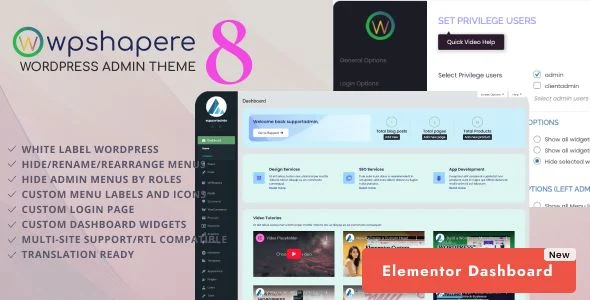
WPShapere WordPress Admin Theme Overview & White Label Administration Engine
WPShapere is a WordPress admin theme plugin, engineered for agencies and freelance developers to white label and restructure the entire wp-admin environment before client delivery. The package targets a concrete production bottleneck: stock WordPress dashboards expose default branding, immovable menu clutter, and generic login screens that weaken a professional CMS handoff. Within agency workflows, it functions as a presentation-layer customization engine, letting administrators govern menu visibility, color schemes, logos, dashboard widgets, and admin bar elements from a single options panel.
Technical Specifications & Deployment Matrix
| Engineering Metric | Deployment Specification |
|---|---|
| Base Technology / Framework | WordPress plugin built with PHP, JavaScript, and CSS |
| Runtime / Version Requirements | WordPress 6.8.x through 6.9.x |
| Plugin Compatibility Set | WooCommerce 9.x, bbPress 2.6.x, BuddyPress 10.x, Easy Digital Downloads, Elementor and Elementor Pro, Gravity Forms, WPML |
| Browser Support Floor | IE9, IE10, IE11, Chrome, Edge, Firefox, Safari, Opera |
| Configuration Persistence | Options panel storage with full export/import of settings; multisite network-wide or per-blog modes |
| Text Direction Support | RTL compatibility |
Admin Menu Management & Branding Execution Pipeline
WPShapere overrides the WordPress admin chrome—menus, admin bar, login screen, widgets—without editing core files. Configuration is written through an options panel that stores branding, color, and layout decisions, then applies them at render time across every backend screen. Menu restructuring runs through the WordPress menu API: individual items can be hidden from display, renamed for client-facing clarity, reordered via drag logic, and assigned custom icons drawn from the Dashicons or FontAwesome sets. The Privilege Users mechanism adds a capability-check layer, designating specific administrator accounts that retain access to the full menu tree while non-privileged users see the reduced, curated navigation.
The login screen receives its own theming track, decoupled from dashboard styling: custom logos, background design, and dedicated CSS produce a branded entry point that replaces the default WordPress presentation. Dashboard widget management operates in two directions—native widgets can be removed from the layout entirely, while custom content widgets and RSS widgets can be registered and positioned. Admin bar control follows the same pattern, stripping the WordPress logo, inserting custom links, and appending branded footer content. Outbound transactional emails can also be white labeled so client correspondence carries no upstream WordPress identity, and automatic background core updates can be disabled for environments where release control must stay manual.
Architectural & Functional Highlights
- White Label Branding Pipeline: Uploads a custom logo to both the login page and the admin bar, removes the WordPress logo, and injects branded footer content so every backend surface reflects the client-facing identity.
- Admin Menu Management Engine: Hides, renames, reorders, and re-icons menu items per installation, with role-aware visibility so non-administrator users encounter only the navigation the agency approves.
- Theme Presets & Color System: Ships sixteen pre-made pro themes plus a flat/default design mode, layered over unlimited color options managed from the options panel without stylesheet authoring.
- Custom CSS Injection Surfaces: Dedicated CSS fields for login and admin pages allow pixel-level correction beyond preset controls, scoped precisely to each rendering context.
- Settings Portability: A full export/import routine serializes the configuration so identical branding and menu structures can be replicated across staging and production installs.
Production Implementation & Operational Resilience
In agency staging environments, the multisite implementation offers two operational models: a super admin can lock one customized backend theme across the whole network, or each individual blog administrator can be granted autonomy over their own admin appearance. For gradual client rollouts, the Privilege Users guardrail prevents lockout scenarios—designated administrators always see the complete menu tree, so a misconfigured hidden item never blocks recovery access. Agencies shipping content-heavy builds can combine menu restructuring with front-end tooling such as Barn2 Posts Table Pro, whose AJAX-driven filterable tables render on the storefront while the plugin’s configuration screens slot into the reorganized navigation like any standard settings page.
Compatibility has been verified against widely deployed plugins including Contact Form 7, Visual Composer, WP Super Cache, WP Total Cache, and WooCommerce, reducing the risk of stylesheet or script collisions inside the restyled chrome. For teams that additionally deploy adaptive form builders on the same client site, Tripetto Pro WordPress Plugin delivers branching conversational forms on the front end while its admin screens inherit the customized appearance like every other backend page. Secondary development should stay within the provided custom CSS fields and options panel rather than modifying plugin internals, since updates flow through the standard distribution channel. RTL support covers right-to-left locales, and the browser floor extends back to IE9 for legacy client workstations, though modern evergreen browsers remain the practical target.
Frequently Asked Questions
Does WPShapere function across WordPress multisite networks?
Yes. A super admin can enforce one customized admin theme network-wide, or the architecture permits each individual blog administrator to configure a distinct backend appearance for their own site through the per-blog options mode.
Can specific administrator accounts retain access to every menu item while others see a reduced set?
Yes. The Privilege Users feature designates one or more administrator accounts that bypass menu restrictions, while hidden menu items remain inaccessible to non-privileged users across the customized dashboard environment during client handoff.
Are pre-built admin color schemes included with the package?
Yes. Sixteen pre-made pro themes ship alongside a flat/default design mode, and each scheme exposes unlimited color options so agencies can match an existing client brand palette without writing any CSS.
Can saved configurations be transferred between staging and production servers?
Yes. The export and import routine serializes the full options set to a local file, which can be imported on another installation at any time, replicating menu structures, branding assets, and login page styling.