WhatsApp Chat – WordPress WhatsApp Chat
WhatsApp Chat for WordPress Overview & Client Messaging Architecture
WhatsApp Chat for WordPress is a self-hosted WordPress plugin built on PHP, JavaScript, JSON, HTML, and CSS, engineered for site owners and agencies to embed a WhatsApp messaging channel directly into front-end page output. The plugin resolves the bottleneck of losing visitors who will not complete contact forms or ticket flows by handing them a messenger interface they already operate daily. Within agency delivery workflows, it functions as a configurable widget layer whose placement, audience targeting, and activation behavior are controlled from the WordPress administration panel.
Technical Specifications & Deployment Matrix
| Engineering Metric | Deployment Specification |
|---|---|
| Base Technology / Framework | WordPress plugin running the Elfsight widget architecture |
| Runtime Requirements | WordPress 5.5.x through 6.9.x; high-resolution display support enabled |
| Data Exchange Protocols | Client-side chat session handoff to WhatsApp messenger accounts |
| Front-End Dependencies | JavaScript, JSON, HTML, CSS; Elementor compatible; Gutenberg optimized |
| Browser Matrix | Firefox, Safari, Opera, Chrome, Edge |
| Persistence Footprint | Widget configuration stored in WordPress; conversation transcripts remain inside the WhatsApp account |
Conditional Rendering Engine & Messaging Pipeline
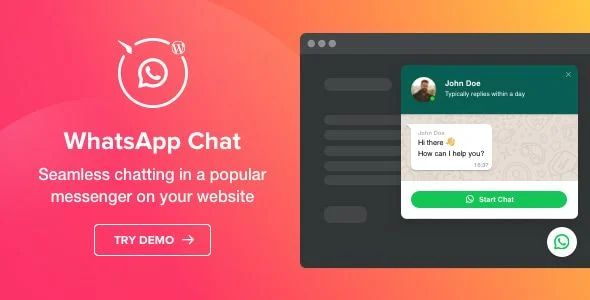
The plugin renders configurable chat UI elements and routes message delivery through WhatsApp accounts. On the server side, PHP registers the widget configuration — placement mode, header content, welcome copy, and targeting rules — which the JavaScript layer consumes as a JSON payload to construct the interface during page render. Three placement modes are available: a floating bubble anchored to the viewport edge, an inline embed bubble, and a full embed chat window rendered directly within page content. Each instance composes a header block from an account picture (default, library, or custom upload), an editable chat name, and a caption that can display a reply-time estimate or custom text, followed by a welcome message area supporting font weight controls, list formatting, and link insertion.
Display governance operates as a rule evaluation chain applied before the widget mounts. Page filters determine whether the chat appears on all pages, a selected subset, or everywhere except an exclusion list; a separate device rule toggles mobile visibility. Activation behavior is driven by one of four open triggers: elapsed time on site, elapsed time on the current page, scroll position, or exit intent, which surfaces the window when cursor movement signals an attempt to close the tab. For teams evaluating commerce channels operating outside the WordPress runtime, WhatsStore SaaS functions as an independent WhatsApp storefront builder rather than a co-deployed module.
Core Technical Capabilities of WhatsApp Chat for WordPress
- Placement engine: floating bubble, embed bubble, and embed chat window modes let the widget serve as either a persistent viewport element or an inline content block on a per-template basis.
- Trigger-based activation: four programmable open conditions — site dwell time, page dwell time, scroll depth, and exit intent — govern exactly when the chat window surfaces for each visitor session.
- Styling layer: four paintable surfaces (bubble background, bubble icon, header background, Start Chat button), a square-to-rounded button shape switch, and an icon library covering varied use cases, with editable bubble and button text throughout.
- Notification channels: new-message alerts render either as a badge counter on the bubble or as a modified browser tab title, and both variants can operate simultaneously.
Production Implementation & Operational Resilience
In staging and multi-client deployments, the page include/exclude filters let agencies pilot the chat on a single template before widening scope, and the device display rule prevents layout conflicts on mobile viewports where width constraints matter. The changelog documents targeted resilience work: version 1.1.0 corrected a chat responsiveness defect, a where-to-display setting bug, and a button rendering issue on macOS; version 1.2.0 resolved welcome-message timing errors, long welcome-message overflow on mobile devices, and chat window width calculation. Because message threads resolve inside the visitor’s WhatsApp client rather than a server-side queue, the widget adds no per-conversation load to the WordPress database — persistence stays limited to configuration values.
On WooCommerce storefronts where support agents need order context while fielding chat inquiries, running the widget alongside Help Scout Integration for WooCommerce connects messenger conversations with order-linked support workflows. Customization boundaries are defined by the widget’s settings surface: colors, shapes, icons, copy, and targeting rules are all editable without touching source files, while deeper behavioral changes require direct modification of the bundled JavaScript and PHP files.
Frequently Asked Questions
Can the chat bubble follow the page as a visitor scrolls?
Yes, the floating bubble template keeps the chat anchored to the viewport throughout scrolling, with left, right, and center alignment options configurable from the widget settings panel.
Can I schedule the chat to appear only during business hours?
Yes, chat scheduling introduced in version 1.1.0 defines the specific days and times the widget displays, and version 1.2.0 added a timezone setting so those windows align correctly with your operating region.
Can hyperlinks be placed inside the welcome message?
Yes, the welcome window supports links alongside editable text, font options, weight controls, and list formatting, allowing documentation URLs or promotional destinations to be embedded in the pre-chat greeting.
Can the chat be limited to specific visitor categories?
Yes, a targeting setting segments the audience into all, new, or returning visitors, so the chat can be surfaced selectively — for example, only to first-time visitors still evaluating the site.