WhatsApp Chat WordPress
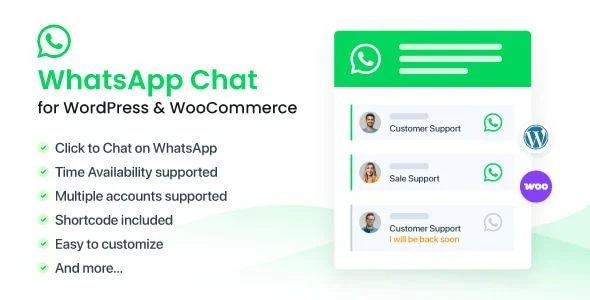
WhatsApp Chat for WordPress Overview & Customer Messaging Layer
WhatsApp Chat for WordPress is a PHP, JavaScript, HTML, and CSS plugin built to embed click-to-chat messaging channels directly into WordPress sites, letting store owners route visitors to named support agents. The package removes the engineering overhead of hand-wiring WhatsApp deep links, agent availability logic, and conditional display rules, because the administrative layer already registers all of those parameters. Within agency delivery pipelines, it operates as a configurable front-end contact layer for WooCommerce storefronts, membership portals, and multilingual content sites.
Technical Specifications & Deployment Matrix
| Engineering Metric | Deployment Specification |
| Base Technology / Framework | WordPress plugin (PHP, JavaScript JS, HTML, CSS), current release 3.8.2 |
| Runtime / Language Requirements | WordPress 5.4.x through 7.0.x; multisite network support |
| Data Exchange / Communication Protocols | WhatsApp link routing with selectable API, Web, or protocol URL targets; mobile opens the native app, desktop opens WhatsApp Web |
| Front-End / Engine Dependencies | Native browser JavaScript on the front end (jQuery dropped in 3.1); Gutenberg block; compatible with Elementor, Elementor Pro, WPBakery, Beaver Builder, Cornerstone, Visual Composer |
| Database / Persistence Footprint | WordPress options-based settings storage; WooCommerce 5.x–8.x, bbPress, BuddyPress, WPML, Polylang, Contact Form 7, Gravity Forms, WPForms, EDD, Jetpack, Dokan interoperability |
Multi-Agent Chat Architecture & Execution Pipeline
The plugin registers support agents as account records and renders them inside a floating widget. Administrators define each agent’s phone number or group chat link, photo, name tag, job title, and availability window in the settings panel. Two widget types govern rendering: an expandable modal listing every agent, and a simple variant triggering one-click chat with a single target. When a visitor selects an agent, the front end constructs a WhatsApp URL and performs device detection, handing mobile users to the native app and desktop users to the web client. Each account also exposes its own shortcode, so the same routing logic can be injected into pages, posts, or template regions, while a dedicated Gutenberg block supplies a live-preview editor for button construction. Availability is time-synchronized against the WordPress timezone setting, switching button color between green (online) and grey (offline) so visitors see an accurate status instead of assuming their messages are being ignored.
Core Technical Capabilities of WhatsApp Chat for WordPress
- Multi-account routing: Multiple agent records coexist inside one widget, letting customers choose a specific person with a visible photo, name, and job title rather than an anonymous inbox.
- Native-script front end: Version 3.1 replaced jQuery with native browser JavaScript, removing render delay and resolving conflicts with jQuery UI tabs and theme button styles.
- Conditional display engine: Widgets target or exclude specific pages, posts, custom post types, and desktop or mobile devices, with a documented filter hook for hiding output on custom post types.
- Analytics event dispatch: Button clicks emit events to Google Analytics, GA4, Google Tag Manager, and Facebook Pixel for conversion tracking.
- E-commerce placement: A button can be appended under the WooCommerce Add to Cart element, including an out-of-stock display filter and Dokan marketplace integration.
On WooCommerce product pages, where interaction patterns such as YITH WooCommerce Quick View Pro compress the inspection funnel, placing the inline chat prompt beside pricing and cart controls lets merchants capture pre-purchase questions at the exact point of hesitation.
Production Implementation & Operational Resilience
Deployment follows the standard plugin lifecycle: upload, activate, configure accounts, and set display rules, with no code changes to theme templates required. The engine was explicitly tested against caching plugins beginning with version 3.0, which matters because most production storefronts sit behind page caches. Version 3.1.2 resolved settings saves on low-memory hosts and optimized page enumeration in the account selection screen, indicating the codebase avoids unbounded queries on large sites. When text fields are left blank, the widget omits empty elements instead of rendering broken markup, and invalid phone numbers or group links trigger an administrative alert before reaching visitors. Multisite networks are supported, RTL layouts render correctly, and role-based permissions added in 3.7 restrict who can modify agent configurations. Security posture has been iteratively hardened through an XSS remediation in 3.4.5 plus fixes responding to Wordfence and CleanTalk reports. Multilingual deployments translate strings through WPML or Polylang without code overrides. For administrators hardening the surrounding stack, particularly storefronts where agents hold elevated roles, pairing the deployment with WP 2FA Pro adds a second authentication factor at the login boundary.
Frequently Asked Questions
Can offline agents be hidden from the widget entirely?
Yes, in the PRO release. Version 3.6.9 introduced a setting that removes offline agents from the widget, keeping only available supporters visible. The base release still lists every configured account and switches the button color to grey outside configured working hours.
Does the widget support multi-line predefined text and descriptions?
Yes. Versions 3.1.5 and 3.1.6 added line-break support for predefined text, chat description, GDPR content notice, and response time text, so multi-line greetings render correctly instead of collapsing into a single unbroken string.
Is there a GDPR consent notice for the widget?
Yes. The widget ships a GDPR notice with a privacy policy link that administrators can enable or disable, and version 3.3.2 fixed cache-related GDPR behavior so the consent element persists correctly across cached page loads.
Can this plugin be installed on a non-WordPress website?
No. The package targets WordPress 5.4.x through 7.0.x; its hooks, settings storage, and Gutenberg block all depend on the WordPress runtime. For decoupled implementations outside WordPress, a separate standalone JavaScript widget package exists as an independent path.
-
3.8.2 LatestNov 3, 2026