Webvibe – Digital Agency Elementor Template Kit
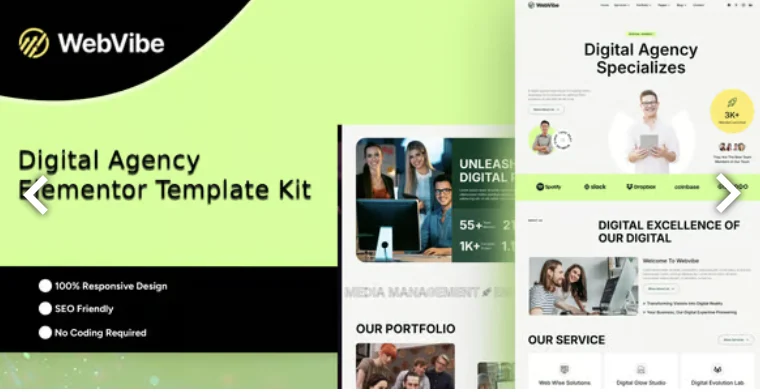
Webvibe Digital Agency Elementor Template Kit Overview & Layout Delivery Architecture
Webvibe Digital Agency Elementor Template Kit is an Envato-format template kit built on Elementor 3.10.x, engineered for digital agencies, creative studios, and freelance designers to ship service and portfolio websites without writing code. The package removes the blank-canvas bottleneck of page-builder projects by supplying twelve-plus pre-structured page templates whose JSON layout data imports directly into the Elementor canvas. Within agency delivery workflows, it operates as the design layer of a WordPress build: teams import the kit, bind global styles, and publish client-ready pages through drag-and-drop editing.
Technical Specifications & Deployment Matrix
The matrix below consolidates the verifiable deployment parameters documented for this kit.
| Engineering Metric | Deployment Specification |
|---|---|
| Base Technology / Framework | Elementor 3.10.x (Envato Template Kit format) |
| Runtime / Platform Requirements | Self-hosted WordPress installation with the Elementor builder active |
| Data Exchange / Import Protocol | JSON layout payload imported via the Envato Template Kit Import plugin or directly through Elementor |
| Front-End / Engine Dependencies | ElementsKit Lite, MetForm, Qi Addons for Elementor |
| Persistence / Data Footprint | No standalone storage layer; imported layouts render as editable Elementor page records inside WordPress |
JSON Layout Pipeline & Design Token Architecture
The delivery pipeline moves prebuilt JSON layout structures from the Envato Template Kit Import plugin into the Elementor editing canvas. Once a template is imported, every section, widget, and container becomes a live, editable node, because the kit exists purely as design data for the builder engine rather than as server-side templating. The imported archive spans the full agency funnel: Home, About, Services, Service Details, Team, Testimonials, rate-plan pages, Portfolio, Portfolio Details, FAQ, 404 Error, Blog, Blog Details, and Contact, supplemented by dedicated Header and Footer blocks.
Typography and color decisions centralize inside the Global Kit Style panel, which functions as a design-token layer: a font family or palette defined once propagates across every template, so rebranding a client site collapses into a single-panel edit instead of per-page overrides. Rendering output is fully responsive, mobile-friendly, and retina-ready, with cross-browser compatibility resolved at the Elementor render layer rather than through manual stylesheet patching.
Studios whose portfolio workflows depend on a theme’s template hierarchy instead of kit assembly can evaluate Evne as an independent WordPress theme delivering comparable grid-driven case-study layouts.
Architectural & Functional Highlights
- Global Kit Style design tokens: fonts and colors are declared once and synchronized across all imported pages, turning a site-wide rebrand into a single-panel operation with predictable downstream results.
- Twelve-plus production page templates: the set covers marketing, service, portfolio, testimonial, blog, and error-handling routes, handing agencies a complete information architecture from the first import.
- MetForm contact pipeline: inquiry and contact blocks are constructed on the MetForm engine, with form structures importable as editable templates directly through the Elementor navigator.
- Responsive and retina-ready output: layouts adapt across viewport breakpoints and render sharply on high-density displays without duplicated asset variants.
Production Implementation & Operational Resilience
Deployment should begin on a staging environment: activate Elementor 3.10.x, then allow the kit bundle to install its companion plugins, ElementsKit Lite, MetForm, and Qi Addons for Elementor, before running imports. Large JSON payloads can strain constrained hosting, so confirm that wp_memory_limit carries adequate headroom before batch-importing the full template set. In agency staging, interrupted imports most often trace back to memory ceilings or a missing dependency plugin rather than corrupted template data.
Error handling is addressed at the layout level through the dedicated 404 Error template, which keeps failed route resolution on-brand instead of falling back to a host default page. When deeper debugging is required, the Elementor Get Help menu item inside WordPress exposes the builder’s diagnostic entry point for tracing render or import faults.
Asset boundaries deserve attention before launch: demo imagery originates from Envato Elements, so production deployments must secure the appropriate usage rights or substitute owned media. Teams standardized on a classic theme workflow rather than kit-based assembly can evaluate Nicol as a standalone creative agency WordPress theme covering similar agency page structures without any import step.
Frequently Asked Questions
Can the Webvibe kit be activated from the WordPress Appearance Themes screen?
No — this is not a WordPress theme. The package contains Elementor design data only, imported through the Envato Template Kit Import plugin or directly inside the Elementor builder after the engine is installed.
Can the imported header and footer apply globally across all pages?
Yes — using Elementor Pro Theme Builder, create a header template, set its display condition to All Site, insert the imported header block, and set each page’s layout to Elementor Full Width so the global elements render.
Can the kit’s contact forms be imported as prebuilt MetForm templates?
Yes — open the Elementor navigator on the target page, locate the MetForm widget, create a new form, then insert the imported form structure from the My Templates tab and update the page.