WaHook – Webhook Automation Module for WhatsML
WaHook Webhook Automation Module Overview & Functional Engine
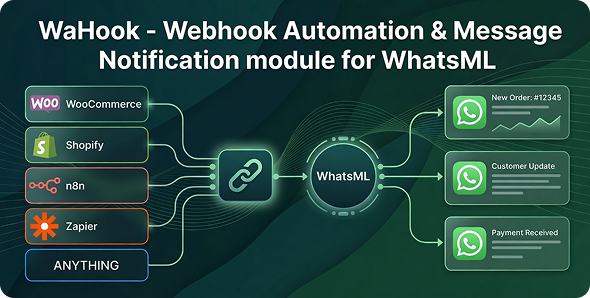
WaHook is a PHP 8.x add-on for WhatsML, engineered for eCommerce operators, SaaS teams, and agencies to route external platform events into automated WhatsApp message delivery. The module closes a structural gap: event-producing systems such as WooCommerce, Shopify, form engines, and CRMs emit webhook payloads, yet converting those payloads into recipient-side notifications normally demands custom API development. Operating inside the host WhatsML installation, this engine exposes generated webhook endpoints, evaluates incoming event data against configured triggers, and dispatches templated WhatsApp messages through the provisioned Cloud API or Web API channel.
Technical Specifications & Deployment Matrix
| Engineering Metric | Deployment Specification |
|---|---|
| Base Technology | PHP 8.x add-on module built for the WhatsML messaging platform |
| Runtime Prerequisites | WhatsML installed; WhatsApp Cloud API or WhatsApp Web API provisioned through WhatsML |
| Communication Protocol | Inbound HTTP webhook requests carrying event payloads from external platforms |
| Front-End Assets | JavaScript (JS/JSON), HTML, CSS with Sass sources, XML configuration |
| Delivery Channel | Automated WhatsApp messaging dispatched via the host API connection |
| Browser Compatibility | Chrome, Edge, Firefox, Safari, Opera, and legacy Internet Explorer 6 through 11 |
| Included Deliverables | Module source files and documentation |
Event-Driven Message Dispatch & Execution Pipeline
Each inbound webhook request is matched against trigger conditions, its payload fields are mapped into message variables, and the rendered template is pushed to the recipient’s WhatsApp number in real time. The pipeline is composed of six operator-defined stages rather than compiled code paths: URL generation, platform connection, event ingestion, trigger construction, template assembly, and automated dispatch. Because every stage is configured through the dashboard, no PHP authorship is required to move an event from an external checkout to a delivered notification.
Architectural & Functional Highlights
- Unlimited Webhook URL Generation: Unique endpoint URLs are minted directly from the dashboard, allowing each connected store or platform to post events to a dedicated address without server-level configuration.
- Universal Event Ingestion: The listener accepts requests from WooCommerce, Shopify, custom websites, SaaS platforms, and any system capable of issuing a standard webhook. For decoupled commerce implementations running on other runtimes, SnapCart – Mobile-Focused Laravel eCommerce System stands as an independent storefront option on a separate Laravel stack.
- Conditional Trigger Engine: Triggers bind to incoming data conditions — order created, order updated, payment received, form submitted, or fully custom events — so dispatch occurs only when the defined criteria are satisfied.
- Dynamic Template Variables: Message templates interpolate webhook data fields such as customer name, order ID, product details, and status updates into the outgoing WhatsApp body, producing event-specific content on every send.
- Smart Data Mapping: Incoming payload fields can be extracted and remapped through the dashboard, letting operators construct automation workflows from unfamiliar JSON structures without writing parsers.
Operational Use Cases & Cross-Channel Automation
Typical deployments concentrate on transactional messaging: WooCommerce order confirmations, Shopify order alerts, payment receipts, form submission notices, lead notifications, and CRM event updates. Agencies running multi-channel outreach often operate email-side trigger logic in parallel to the WhatsApp pipeline; for WordPress-based email automation outside this module’s runtime, Mail Mint Pro – Effortless Email Marketing Automation For WordPress serves as an independent option with its own trigger system and WooCommerce sync layer. Because generated endpoint URLs are stateless HTTP targets, a single endpoint can serve both staging and production environments, and unlimited URL creation permits per-store or per-event segmentation as automation scope expands.
Production Deployment & Implementation Considerations
Deployment requires three environmental facts to be verified before activation: a working WhatsML installation, a provisioned WhatsApp channel through Cloud API or Web API, and at least one source platform capable of emitting webhook requests. The package is strictly an add-on — it cannot execute as a standalone script, and all message delivery depends on the host installation’s API credentials and session state. Endpoint URLs must remain reachable over public HTTP from the emitting platform, which places the module behind whatever TLS termination, reverse proxy, or firewall policy governs the host server.
Customization scope is concentrated in three operator-facing layers: the URL generator, the trigger condition builder, and the message template editor. Teams that need to observe automation performance beyond the module’s own dashboard can pursue an independent reporting surface; Monster – Most Complete Bootstrap 5 Admin Template provides a separate Bootstrap 5 foundation for building such monitoring interfaces outside the module’s codebase. No source-level PHP modification is required for standard workflows, and configuration-driven triggers keep maintenance confined to the dashboard rather than the codebase.
Frequently Asked Questions
Can WaHook be installed and run without WhatsML?
No. The package is an add-on module, not a standalone script. It executes only inside an existing WhatsML installation and relies on that platform’s WhatsApp Cloud API or Web API connection for every outbound message it dispatches.
Does the module accept webhooks from platforms other than WooCommerce and Shopify?
Yes. The listener is platform-agnostic and processes requests from custom websites, SaaS products, and any system capable of sending a standard webhook. Trigger conditions and data mapping are configured per endpoint, so unfamiliar payload structures can be handled without code.
Is programming knowledge required to build an automation workflow?
No. Webhook URL generation, trigger construction, variable mapping, and template authoring are all performed through the module dashboard. A working workflow moves from endpoint creation to automated WhatsApp dispatch entirely through configuration screens.
Are message templates limited to static text?
No. Templates are dynamic and interpolate values extracted from each incoming webhook payload, including customer name, order ID, product details, and status fields, so every recipient receives event-specific content rather than a fixed body.
-
vTimely Updates – Always 100% Free Latest