Universe – Education Responsive WordPress Theme
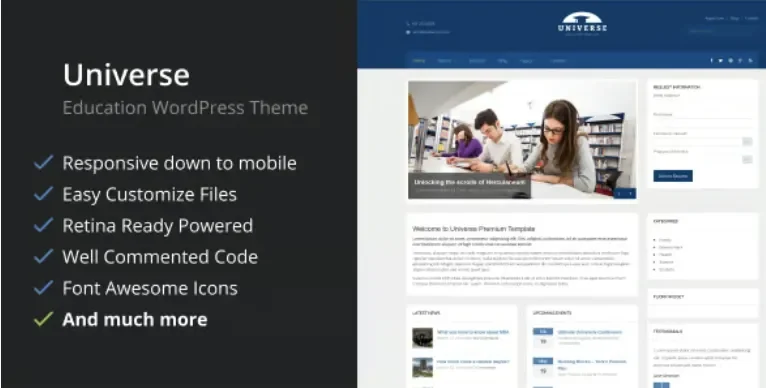
Universe Education WordPress Theme Overview & Responsive Academic Publishing Engine
Universe Education WordPress Theme is a PHP-based responsive theme engineered for academic institutions and delivery agencies to publish courses, events, and departmental content without writing bespoke templates. The package replaces fragmented page assembly by registering five dedicated custom post types that map courses, events, slides, testimonials, and gallery assets onto structured, editor-managed archives. In production delivery, it operates as the presentation layer for university, college, and school websites, driving typography, layout, and skin logic through a centralized options panel while remaining compatible with WordPress releases from 6.0 through 6.7.x.
Technical Specifications & Deployment Matrix
| Engineering Metric | Deployment Specification |
|---|---|
| Base Technology / Framework | WordPress theme package (PHP, CSS, and JS files) built on Bootstrap 4.x |
| Runtime / Version Requirements | WordPress 6.0.x – 6.7.x; tested against the current core release line |
| Browser Compatibility | IE9, IE10, IE11, Edge, Chrome, Firefox, Safari, and Opera |
| Plugin Interoperability | Contact Form 7 for form processing; WPML for multilingual content (tested and approved by the WPML team) |
| Layout & Asset Footprint | Responsive, retina-ready, 4+ column grids; widget-ready regions; four pre-defined skins (blue, red, violet, brown) |
Custom Post Type Data Flow & Front-End Rendering Pipeline
The engine routes structured academic content through a custom post type registry rather than generic page bodies. Courses, events, slides, testimonials, and gallery items are each captured as discrete post types, so an editor publishing a semester course or a campus event writes against purpose-built fields instead of hand-assembling shortcodes or raw HTML. Theme templates intercept the WordPress template hierarchy for these post types, render the matching archive and single views, and expose a filterable gallery with sortable options that reorders entries client-side without reloads.
The homepage follows a fully widgetized construction model: custom widgets are assigned to widget regions, and layout composition happens through drag-and-drop placement rather than template file edits. A theme options panel acts as the control plane for this rendering layer, governing typography selection across more than 600 Google Fonts, layout parameters, logo uploads, code integration points, and custom CSS injection. Sidebar allocation is decoupled from global settings — unlimited sidebars can be created and bound on a per-page or per-post basis, which matters when a faculty landing page and an events listing demand different companion content. Font Awesome icons ship with the package for interface glyphs, and MailChimp integration handles subscriber capture from the front end. For agencies evaluating parallel academic deliverables on the same WordPress stack, Kingster presents an alternative education theme architecture covering comparable university and school use cases.
Architectural & Functional Highlights
- Five Custom Post Types: Courses, events, slides, testimonials, and galleries each receive dedicated post type registration and template binding, isolating editorial data from layout markup and keeping section management granular.
- Centralized Theme Options Control Plane: Typography (600+ Google Fonts), layout, logo, code integration, and custom CSS are managed from one panel, eliminating per-template configuration drift.
- Unlimited Sidebar Assignment: Sidebar instances are created on demand and attached per page or per post, enabling distinct widget compositions across departments and landing contexts.
- Translation & Multilingual Layer: Shipping .po and .mo files support direct string translation, while WPML compatibility (tested and approved by the WPML team) extends the architecture to multilingual deployments.
Production Implementation & Operational Resilience
Deployment follows standard theme installation: upload the package, activate it, and configure the options panel; a free install service referenced in the author documentation mirrors the demo configuration if a reference baseline is preferred. Form handling is delegated to Contact Form 7, whose integration was strengthened in version 1.5 alongside removal of legacy Bootstrap files, reducing CSS fragmentation and conflicting style rules on the rendered DOM tree. Version 1.6 updated the TGM Plugin Activation class to patch an XSS vulnerability, a security-relevant fix agencies should confirm is present before staging any client environment. Version 1.7 added a theme option for the Google Maps API key, addressing the API key requirement now enforced by Google for map embedding, and a marker display toggle introduced in 1.5 controls map pin rendering.
Child theme overrides are supported — compatibility issues were explicitly corrected in the 1.5 release — so secondary development should occur through child theme stylesheets and template copies rather than parent file edits, preserving the update path. Because the architecture deliberately excludes heavy animation payloads and shortcode proliferation, its rendering weight stays low, which limits layout shift on mobile and tablet viewports; the responsive grid adapts column structures to screen width, and high-resolution assets are served for retina displays. SEO-sensitive markup follows coding practices aligned with search engine guidance. For decoupled implementations outside the PHP theme stack, ePathsala exists as an independent Elementor Template Kit path for online education layouts. One documented boundary: the package is not optimized for the Gutenberg block editor, so editorial workflows should rely on the classic editor, widgets, and the registered post types rather than block-based composition.
Frequently Asked Questions
Is Universe optimized for the Gutenberg block editor?
No. The official compatibility attributes list Gutenberg Optimized as not enabled, so content production runs through the classic editor, the widgetized homepage, and the registered custom post types rather than block-based composition.
Can the Google Maps embed be configured with an API key from the admin panel?
Yes. Version 1.7 added a dedicated theme option for entering the Google Maps API key, and a marker display toggle introduced in version 1.5 controls whether a location pin renders on the embedded map.
Does the package ship with translation files for localization work?
Yes. The distribution includes .po and .mo files covering the theme’s string catalog, and the codebase is fully compatible with the WPML plugin, tested and approved by the WPML team for multilingual deployments.