
 My Account
✅ Product Overview
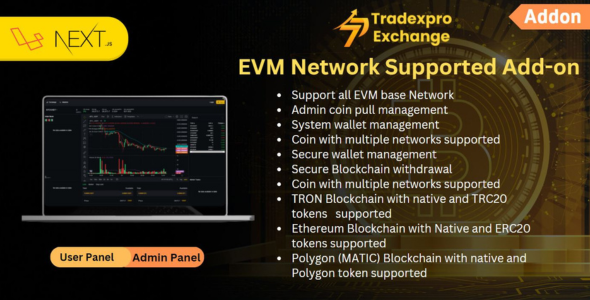
Tradexpro EVM Network Supported Addon is an extension module built to expand the blockchain capabilities of decentralized trading portals and cryptocurrency exchange platforms. This layout kit provides a pre-configured deposit interface, withdrawal fields, and gas fee calculators tailored for smart contract networks. Administrators can set up custom visual blocks on their admin panel to display wallet balances, contract addresses, and network identifiers. The container layouts are fully responsive, keeping transaction tables and deposit buttons readable across multiple device screen sizes.
Integrating Tradexpro-EVM Network Supported Addon allows platform operators to link their existing trading layout with multiple smart contract networks. The backend interface features a clean network management dashboard, custom RPC endpoint fields, and secure contract validation switches to prevent erroneous asset transfers. Users will find designated spacing for displaying active network status, transaction confirmation times, and gas limit settings. These standard interface blocks help traders understand transaction costs easily, minimizing the risk of failed blockchain interactions.
✅ Highlights & Value
For exchange developers, utilizing a dedicated EVM Network Supported Addon ensures that users can connect modern web3 wallet extensions without encountering transaction layout breaks. Every UI component is built to coordinate with native exchange blocks to keep balances and currency dropdowns aligned. This visual organization prevents layout overlaps during sudden network changes, offering a highly stable trading experience. Developers can customize button sizes, border styles, and container paddings directly from the system settings panel with zero custom CSS coding.
- – Multi-Network Connection Panel: Pre-built configuration fields that allow operators to add custom networks by inputting RPC URLs, Chain IDs, and currency symbols.
- Dynamic Gas Estimation Layout: Features automated margin calculators that display estimated network fees dynamically before users confirm their transactions.
- Web3 Wallet Pop-up Blocks: Includes responsive interface overlays that connect directly to Metamask, Trust Wallet, and popular mobile wallet applications.
- Transaction Status Grids: Offers organized layout tables that track wallet address histories, block confirmation counts, and transaction hash links.
✅ Real-World Use Cases
Deploying Tradexpro-EVM Network Supported Addon in an active exchange setup provides immediate wallet connectivity advantages across a range of decentralized transaction scenarios. The block structures adapt cleanly to various cryptocurrency trading environments, keeping the client-facing transaction portal clean and simple. This structural versatility is highly practical when setting up specialized web3 deposit options.
- Stablecoin Payment Integrations: Creating dedicated deposit pages featuring auto-updating wallet connection buttons for fast, low-cost stablecoin transfers.
- Custom Utility Token Gateways: Structuring multi-column grids that display native platform token balances next to direct web3 swap buttons.
- Cross-Chain Exchange Portals: Setting up detailed deposit and withdrawal forms that dynamically swap connection grids based on user network selections.
- Decentralized OTC Desks: Implementing high-contrast verification boxes that allow high-volume clients to securely confirm wallet signatures on the frontend.
✅ Technical & Compatibility
Tradexpro utilizes standardized RPC connection configurations to process deposit and withdrawal triggers directly on the blockchain ledger. The extension code is optimized to prevent slow loading times when polling active node states or loading multiple wallet balances on a single page. Developers can adjust transaction timeout rules, confirmation requirements, and network check intervals directly from the admin panel. This keeps the user interface responsive during periods of heavy blockchain network congestion.
The theme files maintain complete compatibility with default form editors, translation packages, and user authentication extensions. The responsive layouts scale down dynamically, keeping gas sliders and input fields highly functional on smaller touchscreen devices. App administrators can use pre-built block templates to set up modern token deposits without writing custom backend scripts or editing database files. This standardized coding practice ensures that wallet connections remain secure and free from visual conflicts.
✅ FAQ & Tips
How do users switch blockchain networks during a transaction? The addon features a dynamic network selector block that prompts the user’s web3 wallet extension to switch chains automatically. This selection container fits perfectly within standard sidebar columns, preventing layout alignment breaks when users toggle between mainnets and testnets.
To guarantee fast loading speeds on mobile layouts, we recommend setting a reasonable caching interval for network gas price queries. Loading heavy background animations during wallet connections should be avoided to prevent visual stuttering on mobile screens. Keeping the connection buttons clean and lightweight ensures that users experience a seamless transition from clicking to confirming transactions.





There are no reviews yet.