Totally Wild West – HTML5 Game (Construct3)
Totally Wild West Overview & Runtime Architecture
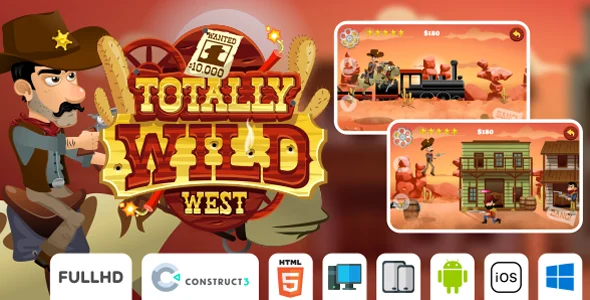
Totally Wild West is a Construct 3 HTML5 action-shooter game, engineered for web publishers and casual game studios to deploy a horseback hunting adventure directly onto any modern website. The package addresses a recurring delivery bottleneck in browser gaming: producing a single build that runs uniformly across desktop browsers and mobile touch environments without separate codebases. Its operational role spans static hosting on a standard web server, direct embedding into gaming portals, and further reworking inside the Construct 3 editor when studios need a reskinned western-themed title for their own catalogs.
Technical Specifications & Deployment Matrix
| Engineering Metric | Deployment Specification |
|---|---|
| Base Technology / Framework | Construct 3 engine, exported to HTML5 |
| Runtime / Environment Requirements | Any modern web browser with HTML5 Canvas support; static web hosting for the exported files |
| Input Handling | Dual control model: keyboard input for desktop sessions and touch input for mobile sessions |
| Render Resolution | High Definition 1920×1080 output |
| Verified Browser Compatibility | Chrome, Firefox, Safari, Opera, Edge, and legacy Internet Explorer releases (IE6 through IE11) |
| Target Platforms | PC, mobile web, Android, and iOS device classes |
| Deliverable File Formats | Native Construct 3 project (.c3p), exported HTML5 build, PDF tutorials, and game imagery (icon, thumbnail, screenshots) |
Execution Pipeline & Core Functional Capabilities
The engine drives all gameplay through Construct 3’s event-sheet system, rendering the 1920×1080 scene graph to an HTML5 canvas that the browser composites at native display resolution. Each frame, the runtime evaluates input events from whichever listener is active, so a keyboard stroke on desktop and a screen tap on mobile dispatch into the same movement and shooting logic. That single-event-sheet design is what allows one build to serve every listed platform without conditional branching per device.
Architectural & Functional Highlights
- Dual-Input Event Dispatch: Touch and keyboard listeners are wired into the same event conditions, producing identical control behavior on mobile web, Android, iOS, and desktop browser sessions from a single compiled build.
- HD Canvas Rendering: The project renders at 1920×1080, giving the exported build high-resolution output on large displays while the engine handles scaling on smaller viewports.
- Full Source Access via .c3p: The Construct 3 project file ships in the package, so developers can open the event sheets, modify gameplay logic, and re-export updated HTML5 builds entirely inside the Construct 3 editor.
- Reskin-Ready Asset Structure: Sprite and image assets are organized for straightforward replacement, letting a studio swap the western theme, characters, and props without rewriting event logic.
- Upload-and-Run Export: The HTML5 output is a server-ready file set, meaning deployment requires only transferring the build to a web host and pointing a page or iframe at it, with no server-side runtime.
Production Deployment & Implementation Considerations
Deployment requirements are minimal by design. The exported HTML5 build needs nothing beyond static file hosting; any web server or CDN-capable environment that can serve HTML, JavaScript, and image assets will run the game, and the browser-side runtime handles all rendering and input locally. The PDF tutorials included in the package walk through the upload and configuration steps, which keeps first-time deployment of the build on a production domain a short, documented procedure rather than a reverse-engineering exercise.
Implementation boundaries are worth noting before scoping a project. The deliverables cover the browser game itself plus its source project, documentation, and promotional imagery, meaning anything beyond the western action-shooter gameplay loop, such as additional levels, monetization hooks, or backend services, sits outside the shipped feature set. Customization scope is defined by the .c3p project: studios with Construct 3 can edit event sheets, adjust difficulty parameters, and execute a full reskin by replacing the included graphics. For studios evaluating additional standalone browser titles to broaden a casual portal catalog alongside this one, Escape Kid supplies a Construct 3 puzzle platformer with the same touch-plus-keyboard control model, while Spect covers the shooter segment with a Construct 2 space build featuring autoresize canvas behavior, each functioning as an independent deployment rather than a merge into this codebase.
Frequently Asked Questions
Does the package include documentation for deployment?
Yes, the download ships with tutorial PDFs that cover the deployment workflow, alongside the Construct 3 source file, the server-ready HTML5 build, and the full set of game imagery including the icon, thumbnail, and screenshots.
Can the game run inside older browsers such as Internet Explorer?
Yes, the vendor documentation lists compatibility across IE6 through IE11 in addition to current versions of Chrome, Firefox, Safari, Opera, and Edge, confirming the build targets a wide browser baseline.
Is the artwork locked, or can the visuals be replaced?
No, the visuals are not locked. The source project is included as a .c3p file and the game is explicitly flagged as easy to reskin, so developers can replace sprites, characters, and theme artwork directly within the Construct 3 editor.