Smart POS-Offline Point of Sale System for Android
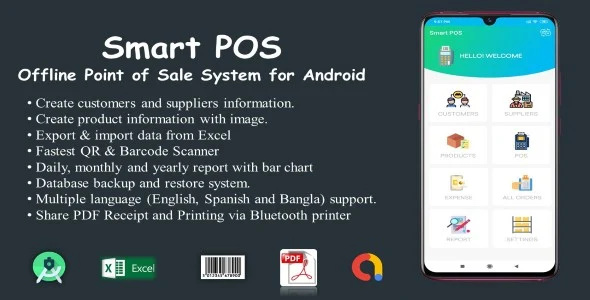
Smart POS Overview & Offline Retail Transaction Engine
Smart POS is a Java-based offline point-of-sale application for Android, engineered for retail developers and independent merchants to run complete sales operations without a network connection. The package removes dependence on cloud-hosted POS backends by persisting products, customers, suppliers, sales, and expense records inside a local SQLite database that remains fully operational on the device. Within production workflows, it functions as a deployable retail transaction engine, delivered as Android Studio source code, a compiled APK, a database file, and documented build assets.
Technical Specifications & Deployment Matrix
The runtime footprint is fully self-contained on the Android platform. Every parameter below is derived from the vendor’s release documentation and changelog history.
| Engineering Metric | Deployment Specification |
|---|---|
| Base Technology / Framework | Android Studio IDE, Java source language |
| Build Toolchain | Gradle 8.10.2, Java 17.0.12 (v7.7 release) |
| Runtime Compatibility | Android 9.0 through Android 13.0 |
| Data Exchange / Communication | Bluetooth thermal POS printing, Google Drive backup import, QR and barcode camera scanning |
| Database / Persistence | Local SQLite database (.db) with offline storage |
| Deliverable Artifacts | .apk, .db, .java, .xml files plus documentation |
Offline Transaction Pipeline & Local Persistence Architecture
The core mechanism is an offline-first cart pipeline that commits every transaction directly to local SQLite storage. A cashier session begins with product lookup, either through category navigation on the POS screen or camera-based QR and barcode scanning, which can also register new products directly into the catalog. Selected items accumulate in the cart, where item counts, tax, and discount values are computed before checkout. Each sale is assigned an order status of Pending, Completed, or Cancelled, and the stock management layer decrements inventory while flagging low-stock items in red on the count screen.
Receipt output flows through a PDF generation module that embeds a barcode on each document. The file can be sent to a Bluetooth thermal POS printer, shared with the customer through Android share intents, or opened in any external PDF reader on the device. Reporting also runs on-device: daily, monthly, and yearly sales and expense data render as bar charts, with a year selector added in version 7.2.
Localization and currency operate through configuration rather than code changes. The interface ships with English, French, Spanish, Bangla, and Hindi translations, and any currency symbol can be attached to monetary displays. For retail operators who also need offline document conversion on their Android deployment, Offline MS Office to PDF exists as an independent custom-code path that converts Word, Excel, and PowerPoint files to PDF without internet dependency.
Architectural & Functional Highlights
- SQLite persistence layer: Products, customers, suppliers, sales, and expenses are stored locally, with database backup to device storage and restore or import from Google Drive.
- PDF receipt and thermal printing module: Receipts are generated as PDF documents with embedded barcodes, printed via Bluetooth POS thermal printers, or shared through native Android intents.
- QR and barcode acquisition pipeline: Camera scanning supports both product registration and catalog search, eliminating manual code entry during high-volume checkout.
- Excel migration engine: Products, customers, and suppliers import from .xls files, while sales, expenses, and the full database export to Excel for external analysis.
Production Implementation & Operational Resilience
Deployment begins in Android Studio with the Gradle 8.10.2 build system and Java 17.0.12 toolchain established in version 7.7, targeting devices from Android 9.0 through Android 13.0. Because the engine runs entirely on-device, there is no server round-trip, no CORS surface, and no network timeout handling to configure; transactional integrity depends on the SQLite commit cycle and the manual backup routine. Merchants should schedule database backups to device storage or Google Drive, since no automatic cloud synchronization exists in this architecture.
Monetization ships pre-wired: banner and interstitial Google AdMob formats are present in the codebase, updated as of version 7.6. Localization is handled through Android resource strings, with translation rendering fixes for lower-end devices applied in version 7.3 and decimal-value arithmetic corrections in version 7.1. The vendor documentation advises evaluating the compiled demonstration build before production rollout to verify device and printer compatibility.
Customization boundaries are set by the delivered .java and .xml artifacts: UI layouts, language strings, currency symbols, and business logic are all editable at source level. For teams that instead require a server-backed Android architecture with remote data hosting, Vehicle Manager with Php Backend – Android (Kotlin) stands as a separate standalone alternative built in Kotlin with a PHP backend, addressing a different persistence model rather than an extension of this codebase.
Frequently Asked Questions
Can sales be processed without an active internet connection?
Yes. All products, customers, suppliers, sales, and expense records persist in a local SQLite database, and checkout, receipt printing, and reporting run on-device. Network access is only relevant for Google Drive backup import and AdMob ad delivery.
Does the package include editable source code files?
Yes. The delivery contains .java and .xml source artifacts, the SQLite .db database file, a compiled .apk, and documentation with screenshots. The codebase opens directly in Android Studio for modification and store build generation.
Can existing product and customer records be migrated from spreadsheets?
Yes. Products, customers, and suppliers import from Excel (.xls) files, and sales, expense, and full database exports write back to Excel, enabling round-trip data migration between the on-device SQLite store and external tooling.
Is Google AdMob advertising already integrated into the build?
Yes. Banner and interstitial ad formats are wired into the codebase according to the changelog, first introduced in version 2.0 and updated in version 7.6 alongside Android 13 compatibility, so ad behavior is present out of the box.
Night Neon Clock Wallpaper – Neon Clock Widget – Live Clock Wallpaper – Smart LED Clock Faces
Cam Scanner – 2023 Smart Android App with Admob Ads

Mosaic Photo Effects – Photo Editor – Mosaic Effect Photo – Mosaically – Smart Mosaic Photo Editor