Offline MS Office to PDF
MS Office to PDF Overview & On-Device Document Conversion Architecture
MS Office to PDF is a native Android application source package, engineered for mobile developers and app agencies to compile, rebrand, and publish a fully offline Office-to-PDF converter on Google Play. The codebase targets the recurring bottleneck of cloud-dependent conversion services, which require user documents to transit remote rendering servers before a PDF is returned. Within agency delivery pipelines, it operates as a self-contained Java and XML project covering Android 9.0 through 12.0, with every stage of the conversion cycle — selection, rendering, and output persistence — executed locally on the device.
Technical Specifications & Deployment Matrix
| Engineering Metric | Deployment Specification |
|---|---|
| Base Technology / Framework | Native Android development — Java application logic with XML-declared layouts and resources |
| Supported Runtime Range | Android 9.0, 10.0, 11.0, and 12.0 (API 28 through API 31) |
| Accepted Input Formats | .docx (Word), .xlsx (Excel), .pptx (PowerPoint), .txt (plain text) |
| Network Dependency | None — the conversion pipeline requires no internet connection at runtime |
| Deliverable Footprint | .java source files and .xml layout/resource files |
Conversion Pipeline & On-Device Execution Flow
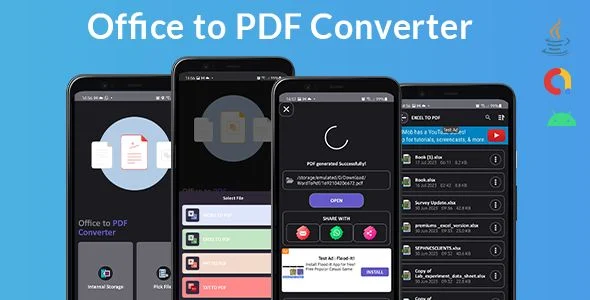
The engine executes a four-stage local pipeline: document selection, format dispatch, PDF rendering, and output persistence. A session begins on the launcher screen, where the user picks a target document type — Word, Excel, PowerPoint, or plain text. The native Android file picker then resolves the chosen file from device storage and hands its reference to the conversion controller, which inspects the extension to route the payload down the correct format-specific branch. Instead of uploading the document to an external renderer, the app parses its structure in memory and re-renders the content — paragraphs, cells, slides, or raw text — into a PDF stream while retaining the source layout. The finished file is written to the app’s storage directory, where the interface exposes it for sharing through Android’s standard distribution mechanism.
Screens are declared in XML layouts, keeping the presentation layer decoupled from the Java classes that carry the parsing and rendering logic. This separation lets reskinning work proceed in the layout files without touching the conversion path. For studios assembling a wider offline-first Android catalog, Dictionary for Android – Offline database applies the same on-device persistence model as a separate standalone release.
Core Technical Capabilities of MS Office to PDF
- Multi-format input dispatch: Four independent input branches handle .docx, .xlsx, .pptx, and .txt files, with the correct branch selected at runtime based on the document type chosen by the user.
- Fully offline conversion path: No stage of the pipeline issues a network request, so document contents never leave the device during processing.
- Layout-fidelity rendering: The renderer preserves the formatting and layout of the source document, so column structures in spreadsheets and slide compositions in presentations carry over into the PDF output.
- Local persistence with share hooks: Converted PDFs land in the app’s own storage, and the interface provides share actions so files can be distributed without a separate file manager.
Production Implementation & Operational Resilience
Deployment follows the standard Android source workflow: import the project into Android Studio, compile the Java sources against the API 28–31 runtime band, and produce a signed release build for store submission. When targeting Android 10 and above, scoped-storage rules govern how output PDFs are written and exposed, so delivery teams should validate the output directory and share flow on each OS version in the supported range rather than relying on a single-device test pass.
Because parsing and rendering occur in memory, resource consumption scales with document complexity: large multi-sheet workbooks and slide-heavy presentations demand more heap than plain text files, and low-RAM devices in the Android 9.0 bracket should be treated as the floor for compatibility testing. Secondary development is bounded by the two-layer structure — visual changes belong in the XML layouts, while conversion behavior lives in the Java classes. The demo build referenced in the sales documentation lets teams verify baseline behavior before modifying the pipeline. For studios planning monetized launches on separate Android tracks, Al-Hamra Logo Quiz Offline Android Source Code with Admob represents an independent source path with integrated ad-based monetization.
Frequently Asked Questions
Does the app accept legacy .doc, .xls, or .ppt files?
No, the documented input set covers the Office Open XML formats only — .docx, .xlsx, and .pptx — alongside plain .txt files. Older binary Office formats fall outside the supported conversion branches.
Can converted PDFs be shared directly from within the app?
Yes, the interface stores every converted file in the app’s storage and exposes share actions, so PDFs can be distributed to other apps or contacts without leaving the conversion workspace or attaching the device to a computer.
Does the package include assets beyond Java and XML source files?
No, the documented deliverable set for this source code consists of .java application files and .xml layout and resource files. Compilation into an installable build therefore takes place inside the purchaser’s own Android development environment.
Is a prebuilt demo build available for testing before deployment?
Yes, the sales documentation references a downloadable demo build, allowing teams to exercise the full Word, Excel, PowerPoint, and text conversion flow on a real device before importing the source into a production workspace.