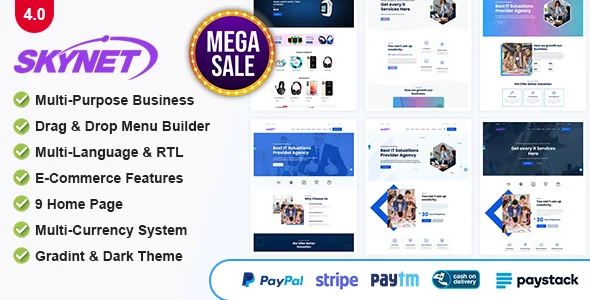
Skynet – Multipurpose Business CMS
Product Overview
Skynet provides a robust Multipurpose Business CMS built directly into your WordPress environment. This system is designed for small to medium-sized businesses, freelancers, and agencies who need to manage client relationships, track projects, and handle financial operations without leaving their WordPress dashboard. It’s particularly suited for service-based businesses that require a centralized hub for all operational data, integrating client communication and project progress into a cohesive workflow.
Upon installation, Skynet introduces several new top-level menu items in your WordPress admin, such as ‘Clients,’ ‘Projects,’ ‘Invoices,’ and ‘Tasks.’ The ‘Clients’ section, for instance, presents a clean table view of all registered clients, displaying their name, contact, and associated project count at a glance. Clicking into a client profile reveals a dedicated page consolidating their projects, invoices, and any recorded notes, rather than navigating disparate screens.
Highlights & Value
- Integrated Client Management: When adding a new client, their details are immediately available across modules. Creating a project or invoice for that client auto-populates their information, reducing manual entry and ensuring data consistency. Their activity feed updates dynamically.
- Streamlined Project Tracking: The project dashboard provides a Kanban-style board where tasks can be dragged between ‘To Do,’ ‘In Progress,’ and ‘Completed’ columns. Progress percentages update in real-time, reflecting individual task status changes without a full page refresh.
- Automated Financial Workflows: Generating an invoice for a completed project or specific tasks pulls data directly from the associated records. Once an invoice is marked ‘Paid,’ the system automatically updates the financial overview and sends a customizable payment confirmation notification to the client.
- Granular User Role Management: Beyond standard WordPress roles, Skynet allows you to define custom roles like ‘Project Manager’ or ‘Team Member.’ Each role can have specific permissions assigned, controlling access to modules like ‘View Invoices’ or ‘Edit Projects,’ which is managed through a clear checkbox matrix interface.
Real-World Use Cases
- Web Design & Development Agencies: Use the system to onboard new clients, create project briefs, assign design or coding tasks to team members, track hours, and issue final invoices, all within the WordPress backend.
- Marketing & SEO Consultants: Manage multiple client campaigns, schedule content creation or audit tasks, log hours spent on each activity, and generate detailed reports for billing, ensuring transparency.
- Freelance Professionals (e.g., Writers, Virtual Assistants): Keep track of various projects for different clients, manage deadlines, submit task updates, and directly bill for completed work without relying on external SaaS tools.
- Small Consulting Firms: Administer client engagements, allocate consultants to specific project phases, monitor budget burn rates, and maintain a centralized repository of client communications and deliverables.
Technical & Compatibility
The core of Skynet – Multipurpose Business CMS integrates seamlessly with WordPress’s database structure, utilizing custom post types and taxonomies for its various modules. This approach ensures compatibility with most well-coded WordPress themes and plugins, as it adheres to WordPress best practices. It’s not a standalone application but rather an extension that enhances your existing WordPress installation’s capabilities.
For users who value control over their digital assets, this design offers significant advantages. You maintain complete autonomy over the software on your servers, allowing for custom modifications or extended functionality without vendor lock-in. Updates are managed directly within your WordPress environment, giving you the freedom to choose when and how to apply them across your sites.
Frequently Asked Questions
Can I integrate my existing WordPress users with Skynet’s client/team roles?
Yes, Skynet extends WordPress’s native user system. You can assign Skynet-specific roles to existing WordPress users, and they’ll see the appropriate dashboard sections based on their permissions.
How does Skynet – Multipurpose Business CMS handle data backups?
Since it uses the standard WordPress database, any routine WordPress backup solution (plugin or server-level) will fully back up all Skynet data. There are no separate databases to manage.