
 My Account
Product Description
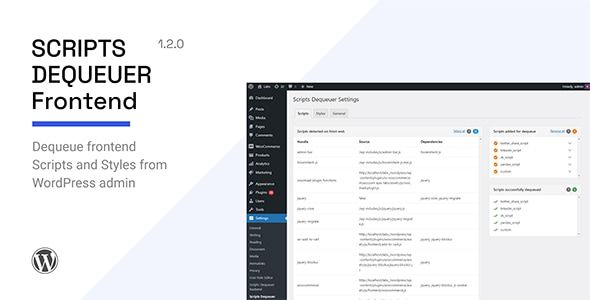
Scripts Dequeuer is a premier WordPress performance plugin designed to give you precise control over your website’s assets. It provides a simple yet powerful interface to selectively disable CSS and JavaScript files on a per-page basis. This tool is an essential addition for any website, from complex e-commerce platforms to content-rich blogs, that suffers from slow loading times caused by an overabundance of plugins and a feature-heavy theme. It empowers you to trim the fat from your pages, ensuring visitors receive only the code they need.
Modern WordPress sites often load dozens of scripts and stylesheets on every single page, regardless of whether they are actually used. A slider script might load on your contact page, or a contact form’s CSS might load on every blog post. This unnecessary bloat slows down your site and can negatively impact user experience and SEO rankings. This is where Scripts Dequeuer becomes an indispensable asset, allowing you to visually manage and dequeue these assets without ever touching a line of code, leading to a cleaner, faster website.
Key Features
- Manage All Enqueued Assets: Get a complete list of all registered CSS and JavaScript files from your active theme and plugins in one convenient dashboard.
- Selective Asset Disabling: Choose exactly where scripts and styles should be disabled. Options include specific pages, posts, custom post types, or even sitewide.
- Granular Control Rules: Create custom rules to prevent assets from loading on specific archives, search results, or the front page.
- Intuitive User Interface: The entire process is managed through a clean and easy-to-understand interface, requiring no programming knowledge.
- Support for Plugins and Themes: Effectively manage assets loaded by third-party plugins and your active WordPress theme.
- Troubleshooting Tool: Quickly identify and resolve script conflicts between different plugins by selectively disabling assets to find the source of the problem.
Use Cases
Imagine an e-commerce store built with a powerful page builder and numerous extensions for popups, reviews, and social sharing. Using Scripts Dequeuer allows you to ensure the script for your homepage’s promotional slider doesn’t load on product pages. Likewise, the CSS for the customer review plugin can be restricted to only load on product pages, not on your blog or about page. This targeted optimization drastically reduces page weight, leading to faster load times and a smoother shopping experience for your customers.
For content-focused sites like blogs or corporate portals, the benefits are just as significant. A plugin for contact forms doesn’t need to load its assets on every single article you publish. This level of granular management, provided by Scripts Dequeuer, ensures that your blog posts are as lightweight and fast as possible. By disabling non-essential assets on a page-by-page basis, you can significantly improve your Core Web Vitals scores and provide a better reading experience for your audience, which can contribute to higher search engine rankings.
Benefits
The most significant benefit of implementing Scripts Dequeuer is the direct and measurable impact on your website’s speed and performance. By preventing unnecessary CSS and JavaScript files from loading, you reduce the number of HTTP requests and decrease the overall page size. This leads to faster rendering times, which positively influences crucial user experience metrics like Largest Contentful Paint (LCP) and First Input Delay (FID). A faster website not only keeps visitors engaged but is also favored by search engines.
Beyond pure speed, the plugin also serves as an excellent diagnostic and maintenance tool. Plugin conflicts are a common headache for WordPress administrators, often caused by multiple plugins trying to load conflicting versions of a script. Troubleshooting becomes much simpler when you can use Scripts Dequeuer to isolate and selectively disable assets to pinpoint the source of an issue. This helps you maintain a stable and efficient website, reducing development friction and preventing frontend errors that could disrupt your visitors’ experience.





There are no reviews yet.