SaaSy – SaaS & App Landing Page Template Kit
SaaSy Overview & Front-End Page Assembly Role
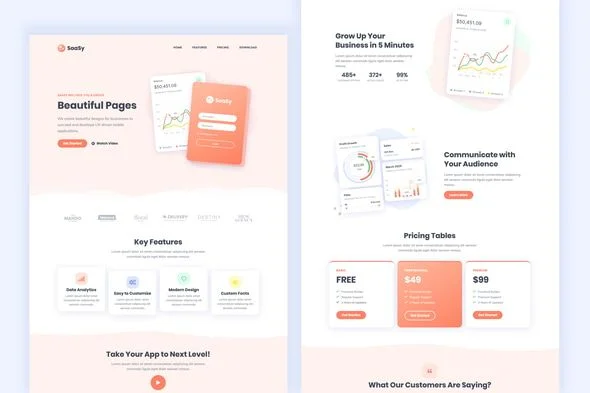
SaaSy is an Elementor Template Kit engineered for SaaS vendors, mobile application teams, and delivery agencies to launch conversion-focused landing pages without touching code. The package attacks the operational bottleneck of hand-assembling hero sections, pricing tables, FAQ accordions, and blog grids from a blank Elementor canvas, which typically consumes days of layout iteration per client engagement. Within production workflows it functions as a pre-built layout inventory: ten full page templates and twenty-six reusable block templates are imported directly into the WordPress page builder, ready for token-level restyling and content substitution.
Technical Specifications & Deployment Matrix
| Engineering Metric | Deployment Specification |
|---|---|
| Base Technology / Framework | WordPress page builder architecture built on Elementor Free (no Pro license required) |
| Runtime / Builder Compatibility | Elementor 2.8.x, 2.9.x, and 3.0.x |
| Data Exchange Format | Importable template payload delivered through the Template Kit – Import plugin (Tools → Template Kit menu) |
| Front-End Engine Dependencies | Elementor, ElementsKit Lite, Essential Addons for Elementor, Contact Form 7 |
| Persistence Footprint | None beyond standard WordPress content storage; layouts render through the Elementor editor, with no server-side rendering layer |
Layout Composition Pipeline & Execution Flow
The kit operates as a structured layout payload rather than a runtime application. Once the Template Kit – Import plugin is activated, each template file is parsed and expanded inside the Elementor editor as widget, section, and container definitions, which the builder then renders as standard front-end markup. Because the entire composition layer lives in the visual editor, every section remains editable after import: typography scales, color tokens, spacing values, and media slots can be re-bound to a brand system through the kit’s global controls. The architecture also leans on its companion widget engines—ElementsKit Lite and Essential Addons—to supply the advanced elements used across the pricing, team, and FAQ sections, while Contact Form 7 handles the inquiry capture on the Contact template. No coding knowledge is required at any point in this chain, since the design decisions are expressed as editable properties rather than source edits.
Architectural & Functional Highlights
- Ten Page Templates: Home, About Us, Services, Team, Prices, Blog Grid, Blog Timeline, Gallery, FAQs, and Contact arrive pre-composed, covering the full informational surface of a SaaS or mobile application launch site.
- Twenty-Six Block Templates: Section-level components can be mixed, reordered, or duplicated across pages, letting agencies assemble variant landing pages from a shared block library instead of rebuilding common sections.
- Elementor Free Execution: The entire kit runs on the free tier of the builder, removing Pro-tier licensing dependencies from the deployment budget while keeping all layouts editable in the visual editor.
- Responsive & Animated Presentation: Layouts ship with smooth scroll-triggered animation behavior and viewport-adaptive rules, so mobile and desktop rendering is handled at the template level rather than through per-breakpoint manual repair.
- Zero-Code Customization Surface: Because every property is exposed in the editor, rebranding reduces to token swaps and asset replacement rather than stylesheet surgery.
Agencies running multi-vertical client rosters will inevitably hit the boundary of a single-industry kit. For engagements that demand a broader section vocabulary across unrelated business categories, Akpager exists as a parallel multipurpose landing page option on the same builder stack, giving studio teams a second layout pool to draw from without switching runtimes.
Production Implementation & Operational Resilience
Deployment begins on a staging environment: install the four listed plugins, activate the Template Kit – Import plugin, and pull the downloaded file in through the Tools → Template Kit menu. One environmental threshold deserves attention during larger imports—the PHP memory allocation (wp_memory_limit) should be raised if the host defaults are conservative, since parsing a multi-template payload with bundled media references can exceed low allocations on shared hosting. After import, each template attaches to a WordPress page and the builder assumes rendering responsibility, so resilience questions center on widget availability rather than server logic: deactivating ElementsKit Lite or Essential Addons will strip their dependent sections of functionality, so both plugins must remain active in production alongside the builder. Error surface is minimal by design—the kit contains no server-side scripts, no custom tables, and no background processes. Customization boundaries are equally clear: style overriding happens through the editor’s global color and typography systems, and media replacement occurs at the widget level. The shipped demo photography is drawn from Envato Elements and must be either licensed separately or swapped for owned assets before a client site goes live. For teams whose deliverables expand beyond a marketing landing page into storefront commerce, GimiGimi provides a separate WooCommerce-oriented kit on the same builder foundation, decoupling the commerce build from this marketing-layer package.
Frequently Asked Questions
Does SaaSy require the paid Elementor Pro plugin to function?
No. The kit is built entirely on the Elementor Free version. It does, however, require ElementsKit Lite, Essential Addons for Elementor, and Contact Form 7 to be installed and active, since dependent sections rely on those plugins’ widget engines.
Can the templates be imported without manually extracting or uploading individual template files?
Yes. After installing and activating the Template Kit – Import plugin, the downloaded file is imported through the Tools → Template Kit menu in the WordPress dashboard, which places the templates directly into the Elementor editing environment.
Can the demo images included in the kit be used on a live client website as shipped?
No. The demo photography originates from Envato Elements and requires a separate license for production use. Teams can either license those images independently or substitute them with owned media during the content-replacement phase.