Resumen – SaaS Resume Builder
Product Overview
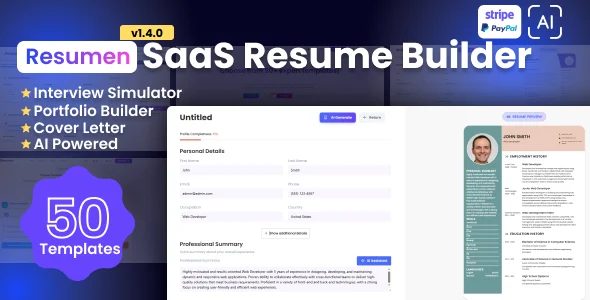
Resumen delivers a robust SaaS Resume Builder directly within your WordPress environment, purpose-built for individuals and organizations aiming to provide a comprehensive, interactive platform for crafting professional CVs and resumes. This comprehensive Resumen – SaaS Resume Builder integrates seamlessly, allowing site visitors to navigate a guided, multi-step process to input their experience, education, skills, and contact details. It’s an ideal tool for career coaches, recruitment agencies, or educational institutions that need to offer a structured, user-friendly resume creation utility without external dependencies.
Once installed and activated, the plugin adds a dedicated menu item to the WordPress admin panel, typically labeled “Resumen Builder.” From here, you configure the various resume fields and sections. Users visiting the frontend access a series of forms, each focused on a specific category like ‘Work Experience,’ ‘Educational Background,’ or ‘Skills.’ The interface consistently provides clear progression indicators, guiding them through each step, and intelligently autosaves their input, allowing them to exit and return later to complete their profiles without losing any entered data.
Highlights & Value
- Dynamic Field Management: Within the backend interface, you gain full control to add, remove, and reorder resume sections and individual input fields. This flexibility ensures you can tailor the data collected precisely to suit specific industry standards, regional requirements, or unique client needs, adapting the builder to almost any professional context.
- PDF Export Functionality: Upon completing their resume, users can effortlessly generate and download a professional-looking PDF document. The system intelligently applies a clean, pre-designed template, ensuring a consistent and polished visual output for all generated files, reflecting a high standard of presentation.
- Frontend User Dashboard: Registered users are granted access to a personalized, secure dashboard. Here, they can manage multiple resume drafts, easily edit existing ones, and review their submission history. This central hub significantly improves user experience and fosters higher engagement with your platform.
- Multi-Language Support: The entire system is engineered with internationalization as a core principle, allowing for straightforward translation of all frontend and backend strings. This is achieved through standard WordPress
.potfiles, making it a critical feature for platforms serving a diverse, global user base. - Integrated Payment Gateways: For those looking to monetize the service, the plugin offers seamless integration with popular payment gateways such as PayPal and Stripe. This capability allows you to charge users a fee to download their final resume, unlock premium templates, or access advanced features, effectively transforming the builder into a direct revenue stream.
Real-World Use Cases
- Freelance Resume Writing Service: Establish a tiered service model where basic resume creation is offered freely, but access to premium templates, advanced formatting options, or expert review services requires a payment, all managed directly through the builder’s integrated payment system.
- University Career Center Tool: Provide students with an intuitive and structured method to build their first professional resumes. This ensures they consistently include all necessary academic achievements, extracurricular details, and contact information before applying for internships or entry-level positions.
- Job Board with Premium Resume Features: Integrate the resume builder seamlessly into an existing job board platform. This allows job seekers to create, store, and update their professional resumes directly on your site, streamlining the application process for both candidates and prospective employers.
Technical & Compatibility
Setting up Resumen involves a straightforward activation process, followed by navigating to its dedicated settings panel to configure the resume steps and associated fields. The backend interface is remarkably intuitive, utilizing drag-and-drop elements for effortlessly reordering sections and standard WordPress meta boxes for configuring individual field options. The plugin primarily relies on custom post types for storing all user-generated resume data and leverages AJAX for seamless, real-time form submissions on the frontend, which significantly minimizes page reloads during the multi-step creation process.
The plugin requires PHP 7.4 or higher and a modern WordPress installation (version 5.x or newer) to function optimally. I’ve personally run it on various shared hosting environments without encountering significant performance bottlenecks for typical usage. However, for high-traffic scenarios or platforms expecting a large volume of concurrent users, a VPS or dedicated server would be a more prudent choice to ensure smooth PDF generation, efficient database operations, and overall responsiveness. The core functionality of the Resumen – SaaS Resume Builder is designed to be self-sufficient, avoiding heavy reliance on external APIs unless you specifically enable third-party payment gateways for monetization.