Pro iOS WordPress App for Blog and News Site – SwiftUI Full Application
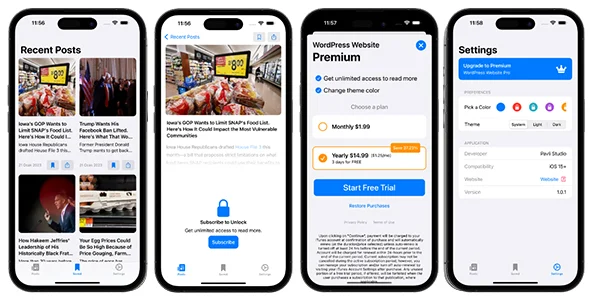
Pro iOS WordPress App for Blog and News Site Overview & Native Content Client Architecture
Pro iOS WordPress App for Blog and News Site is a SwiftUI full application source package, engineered for publishers, news agencies, and app studios to convert an existing WordPress blog or news site into a native iOS client. The package eliminates the cost of building a production-grade iOS reader from scratch by consuming the WordPress REST API and mapping posts, categories, tags, and media library content into a declarative SwiftUI view hierarchy. Within agency delivery workflows, it serves as the deployable mobile layer of a content strategy — ready for brand restyling, ad-network configuration, and App Store submission once the base URL points at the client’s live site.
Technical Specifications & Deployment Matrix
| Engineering Metric | Deployment Specification |
|---|---|
| Base Technology / Framework | SwiftUI (Apple declarative UI framework), native iOS application |
| Runtime / Build Requirements | macOS with Xcode; Apple Developer account for signing and store release |
| Data Exchange Protocol | WordPress REST API over HTTPS, JSON payload deserialization |
| Front-End Dependencies | Native components only — no WebView wrapper or hybrid shell |
| Persistence Footprint | Local cache of previously viewed articles for offline reading |
WordPress Data Pipeline & Execution Flow
The engine operates on a request–decode–render pipeline driven by the WordPress REST API. At launch, view models issue HTTPS requests against the site’s JSON endpoints, and the returned payloads are deserialized into typed model structures that feed SwiftUI’s declarative view hierarchy. Because state and rendering are bound through SwiftUI’s reactive layer, changes in fetched data — a new post, an updated category list, a refreshed media URL — propagate into the interface without manual view-tree manipulation. Category and tag navigation filters the decoded datasets, while the search module forwards user queries to the site’s search endpoints and renders matching results through the same presentation path.
Reader interaction follows a parallel authenticated channel. The login module validates credentials against the WordPress user system, after which comment submission and engagement actions are dispatched with the authenticated session context, mirroring on-site behavior. Push notification delivery follows Apple’s APNs chain: tokens are registered server-side, alerts are broadcast, and the app routes readers from the system notification back into the corresponding article view. Offline behavior is handled at the persistence layer — previously rendered posts are written to local storage and served back when the network is unreachable, with synchronization reconciling state once connectivity returns.
Core Technical Capabilities of Pro iOS WordPress App
- Dynamic content synchronization: Posts, categories, tags, and media library assets are pulled from the live WordPress site through its REST endpoints, so editorial updates appear in the app without any manual republishing step.
- Offline reading cache: Previously viewed articles persist in local storage and remain accessible with no connectivity, with the sync layer refreshing cached state on the next successful request cycle.
- Push notification dispatch: APNs-based alerts announce new posts and news updates, driving re-engagement by deep-linking recipients into the relevant content screen.
- Authenticated engagement: Users log in with their WordPress credentials to comment and interact with content directly from the app, preserving account parity between web and mobile audiences.
- Monetization and discovery: Ad network integration slots provide a per-screen revenue layer, while in-app search and native share-sheet distribution extend article reachability and content discovery.
For studios evaluating separate standalone mobile products outside the publishing vertical, the GenAI v2.0 source package addresses generative AI workloads across iOS and Android as an independent codebase, following a comparable Xcode build-and-sign release cycle on the Apple side.
Production Implementation & Operational Resilience
Shipping a release build requires a macOS environment with Xcode, an Apple Developer account, and a correctly configured bundle identifier, signing certificate, and provisioning profile. App Transport Security enforces HTTPS for all REST traffic, so the source site must expose its JSON endpoints over a valid TLS certificate. Push notification configuration adds APNs key or certificate provisioning before distribution builds can deliver alerts. During agency staging, the recommended workflow points the application at a staging WordPress instance first, verifying category mappings, media resolution, and authenticated comment submission before redirecting the base URL to production.
Resilience is implemented at the data layer. Malformed or truncated JSON payloads fail typed decoding and surface as recoverable states rather than crashes, and failed network requests fall back to the offline cache where previously viewed content exists. Teams delivering multiple standalone iOS products to clients — a time-tracking and billing build such as TIMAX – Time Tracking & Billing Full iOS Application occupies the same delivery lane — can reuse the identical release pipeline: archive in Xcode, validate, and submit through App Store Connect.
Operational boundaries worth documenting before handover: offline access covers only previously viewed articles, not the full archive; the WordPress site must keep its REST API publicly reachable; and server-side security or caching plugins that throttle application traffic should be configured to permit the app’s request patterns. Rebranding is a matter of replacing color assets, typography modifiers, and icon sets rather than untangling a web-view shell, and ad network identifiers are swapped at the configuration layer with per-screen placement toggles.
Frequently Asked Questions
Does the app retrieve content directly from an existing WordPress site without manual duplication?
Yes. The codebase syncs posts, categories, tags, and media library assets from the live site through its REST API, so editorial content published in WordPress appears in the app without re-entering or duplicating it.
Can readers access previously viewed articles without an internet connection?
Yes. The persistence layer caches articles that have already been rendered, and this stored content remains readable offline. The scope is limited to previously viewed posts, not the site’s complete archive, until connectivity is restored.
Is an Apple Developer account required before the app can be released?
Yes. Store submission, code signing certificates, provisioning profiles, and APNs push notification keys are all provisioned through an Apple Developer account, making it a prerequisite for any production distribution build.
Can users post comments on articles from within the app?
Yes. The authentication module lets readers log in with their WordPress credentials, and the authenticated session is then used to submit comments and interact with content exactly as they would on the website.