BMI Pro Calculator for iOS -SWIFTUI with Google Ads Supported
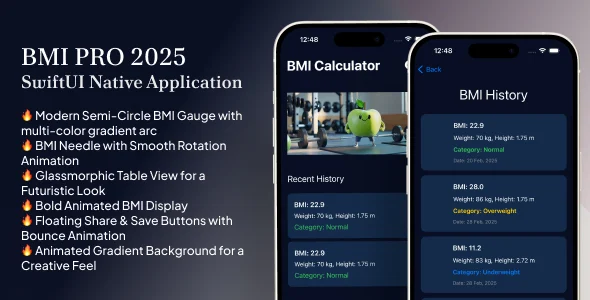
BMI Pro Calculator for iOS Overview & Native SwiftUI Utility Architecture
BMI Pro Calculator for iOS is a native SwiftUI application source package, engineered for indie iOS developers and mobile agencies to ship a monetized body-mass-index utility on the App Store with short revision cycles. The codebase removes the recurring engineering burden of hand-building an animated measurement gauge, a glassmorphic result interface, and a screenshot-sharing layer from scratch for every client engagement. Within production workflows, it operates as a deployable fitness tooling template: teams rebrand the visual assets, bind their own Google AdMob identifiers, and archive a release build without rewriting the measurement presentation logic.
Technical Specifications & Deployment Matrix
| Engineering Metric | Deployment Specification |
|---|---|
| Base Technology / Framework | SwiftUI, with .xib/.nib interface files included in the deliverable |
| Runtime / Language Requirements | Swift; targets iOS 12, iOS 13, iOS 14, and iOS 15 deployment baselines |
| Monetization Layer | Google AdMob SDK integrated via Swift Package Manager (v0.0.2) |
| Ad Formats | Banner ads, interstitial ads, and app open ads |
| Device Targets | Runs on iPhone and iPad with layout and animation parity |
| Share Mechanism | Native UIActivityViewController fed by a captured result-screen screenshot |
| Persistence Footprint | Local, on-device rendering and share flow; no external database dependency |
Semi-Circular Gauge Rendering & Interaction Pipeline
The core interaction pipeline centers on an animated semi-circular gauge that visualizes the computed body-mass-index value.
When a user adjusts height, weight, or measurement inputs, the view layer recomputes the BMI figure and drives the gauge needle through a smooth rotation animation aligned against a multi-color gradient arc. Each arc segment corresponds to a classification band, so the needle position itself communicates the result category before the numeric readout finishes its bold animated reveal. A gradient animated background and circular decorative shapes run underneath, while the classification table renders as a glassmorphic view layer, giving the result panel depth without additional image assets. The engine applies fade-in and scale entry effects to interface elements, sequencing the reveal so the gauge, table, and floating action buttons arrive in staged order rather than a single flat layout pass. For teams building a separate SwiftUI content-streaming product line outside fitness tooling, TunerFM – iOS Radio & Live TV App (Multi Frequency) represents an independent codebase path that shares no runtime coupling with this package.
Core Technical Capabilities of BMI Pro Calculator for iOS
- Animated Semi-Circular BMI Gauge: A multi-color gradient arc with a smoothly rotating needle translates the computed index into positional feedback, replacing static numeric-only output with a state-driven visual meter.
- Glassmorphic Table View & Bold Animated Display: The classification table and BMI readout use translucent layering, bold typography, dynamic layout spacing, and staged entry animations (fade-in, scale) for legible result presentation.
- Screenshot Capture & Share Pipeline: The module captures the BMI result screen as an image and dispatches it through UIActivityViewController, handing off to the native iOS share sheet without third-party SDK involvement.
- AdMob Monetization Layer: Version 0.0.2 integrates the Google AdMob SDK through Swift Package Manager, wiring banner, interstitial, and app open ad formats in line with current official documentation guidelines.
- Gradient Background & Decorative Shape System: An animated gradient background with circular decorative shapes runs continuously behind the result surface, maintained across both iPhone and iPad screen geometries.
Production Implementation & Operational Resilience
Deployment begins in Xcode: after acquiring the source package, the engineering team resolves the AdMob dependency through Swift Package Manager, then replaces the placeholder application and ad-unit identifiers with the production AdMob configuration. Because the share flow delegates entirely to UIActivityViewController, there is no custom networking code to audit; the capture step renders the current result screen state, so exported images always match what the user sees on device. The floating share and save buttons carry bounce animations triggered on interaction, and the layout engine adapts the gauge, table, and spacing to both iPhone and iPad viewports while preserving every animation and styling decision. Error surface area is deliberately small: no server round-trips exist in the measurement path, and ad delivery failures fall back to the AdMob SDK’s own no-fill behavior rather than blocking the utility flow. Secondary development work concentrates on visual token replacement — gradient color values, decorative shape parameters, and typography — since the gauge arc, needle animation, and share pipeline are self-contained view modules. Studios pursuing a separate news and blog reader track for Apple devices can treat Pro iOS WordPress App as an independent SwiftUI full-application path rather than an extension of this fitness codebase. Pre-deployment prerequisites are limited to an active Apple Developer account, a configured AdMob application record, and a deployment target selection within the documented iOS 12 through iOS 15 range.
Frequently Asked Questions
Does the package include interface builder files in addition to SwiftUI declarations?
Yes, the deliverable ships with .xib/.nib files included alongside the SwiftUI implementation, giving developers interface artifacts they can inspect or reference when auditing the view hierarchy during client handover.
Is the Google AdMob SDK wired through CocoaPods?
No, version 0.0.2 integrates the AdMob SDK via Swift Package Manager instead, following the latest official documentation guidelines and covering banner, interstitial, and app open ad formats within that dependency setup.
Can users share their BMI result without installing any third-party sharing component?
Yes, the app takes a screenshot of the BMI result screen and passes it to UIActivityViewController, which presents the native iOS share sheet and routes the image to whichever destination the user selects.
Do the gauge animations and styling survive the iPad screen geometry?
Yes, the layout is optimized for mobile and tablet screens, and the module keeps all animations and styling intact across devices, so the needle rotation, entry effects, and gradient background behave identically on iPad.