POS SaaS Add-on for SalePro – Multi-Tenant Inventory & Billing Module
SalePro POS SaaS Add-on Overview & Multi-Tenant Platform Layer
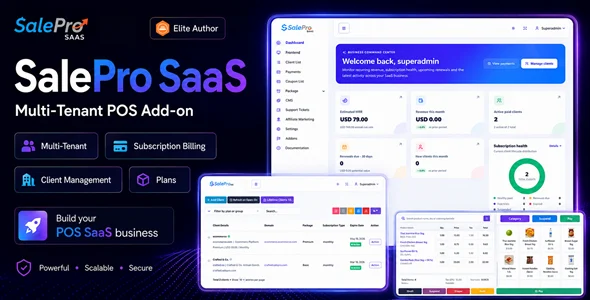
SalePro POS SaaS Add-on is a Laravel-based extension layer engineered for agencies and independent software vendors to convert a single SalePro deployment into a multi-tenant, recurring-billing business platform. A stock SalePro installation serves one business at a time, which prevents any operator from selling the same codebase to multiple paying clients with isolated data; this package removes that constraint by provisioning a separate tenant database, administrator login, subdomain, and module set for each registered business. In production workflows, it acts as the commercial layer of an agency stack: operators define recurring plans, enforce resource limits, collect gateway payments, and supervise every client environment from one centralized Super Admin panel.
Technical Specifications & Deployment Matrix
| Engineering Metric | Deployment Specification |
|---|---|
| Base Technology / Framework | Laravel extension layer installed on top of a compatible SalePro application |
| Runtime / Language Requirements | PHP 8.x on a self-hosted server environment |
| Data Exchange / Communication Protocols | HTTP request routing across tenant subdomains and custom hostnames; 15+ recurring-payment gateway integrations including PayPal, Stripe, Razorpay, Paystack, Mollie, Xendit, M-Pesa, and bKash |
| Front-End / Engine Dependencies | Required SalePro core installation; tenant-facing POS, inventory, purchasing, and eCommerce modules gated per package |
| Database / Persistence Footprint | Separately provisioned tenant database per client, alongside the central platform database administered through Super Admin |
Tenant Provisioning Pipeline & Execution Flow
The provisioning pipeline runs a defined sequence: request intake, validation, tenant creation, and package enforcement. An inbound signup arrives either through the built-in SaaS website CMS or through manual client creation inside Super Admin. The engine then provisions the tenant environment — a business account, administrator credentials, an isolated tenant database, a subdomain such as shop1.yourdomain.com, the enabled module set, and hard resource ceilings. From that point forward, every request routed to the tenant hostname resolves against that client’s isolated dataset, covering users, products, categories, brands, customers, suppliers, warehouses, purchases, POS transactions, payments, expenses, employees, and reports. Package definitions translate directly into runtime governance: monthly and yearly plan rates, free tiers, and configurable trial durations feed a permission matrix that caps warehouse counts, product counts, invoice volume, user seats, and employee seats, while module-level gating determines whether a tenant receives essential POS tooling, multi-warehouse retail scope, eCommerce storefronts, or broader business functions such as double-entry accounting, HRM, restaurant workflows, manufacturing, and repair operations.
Architectural & Functional Highlights
- Per-tenant database isolation: each client operates from a separately provisioned database rather than a shared company dataset, with client database backup, tenant update, and Super Admin database update workflows exposed as administrative operations.
- Package-based resource governance: plan definitions enforce measurable ceilings on warehouses, products, invoices, users, and employees, allowing tiered offerings — Starter, Retail, Commerce, Business, and unlimited allowances — matched to distinct customer segments.
- Recurring revenue collection: 15+ international and regional gateways plus a manual payment method handle plan checkout, with searchable payment history, transaction reference tracking, and exportable payment records inside Super Admin.
- Custom domain routing: operators can map a compatible hostname such as pos.customercompany.com onto any tenant, escaping the wildcard subdomain structure, provided DNS and SSL are configured correctly at the hosting layer.
- SaaS analytics instrumentation: the dashboard surfaces estimated monthly recurring revenue, revenue this month, active paid clients, renewals due, new clients, plan performance, and recent payments, replacing blind client administration with measurable platform health data.
Operators extending the same Laravel-plus-SaaS delivery pattern into adjacent verticals can reference how FindEstate structures a Laravel listing CMS with SaaS tenancy for multi-agency property platforms, since the underlying plan-gating and tenant-scoping mechanics follow comparable architectural principles.
Production Implementation & Operational Resilience
Deployment begins with a verified prerequisite: the add-on is not a standalone application, so a compatible SalePro installation must already run on the target server before the SaaS layer is applied. Hosting preparation includes wildcard DNS resolution for tenant subdomains and, for every custom tenant domain, correctly configured DNS records and SSL certificates at the infrastructure level — a boundary that sits outside the application’s control. Once live, operators administer tenant lifecycle events directly: activating or deactivating clients, renewing plans, changing packages, switching between monthly and yearly plan types, resetting tenant passwords, and managing tenant domains, all without rebuilding environments. Tenant-side commerce runs on the SalePro module set enabled per package, including four eCommerce storefront profiles — Default, Electronics, Fashion, and Grocery — Stock Ledger visibility, sales agent assignment, batch and expiry workflows, and IMEI/serial tracking where supported. The customer-facing SaaS website ships with CMS controls for hero content, feature sections, testimonials, statistics, FAQ, blog, contact forms, custom pages, and footer regions, plus multi-language public content, meta title and description fields for search visibility, and coupon codes with percentage or flat discounts and expiry dates. Gateway availability, merchant eligibility, and transaction charges depend on the payment provider and country, so operators should verify regional coverage before committing to a collection stack. For decoupled implementations outside a SaaS delivery model, Infy POS covers single-store digital inventory management as an independent script, without the tenant provisioning and plan enforcement machinery this architecture carries.
Frequently Asked Questions
Does this package run without an existing SalePro installation?
No, it is not a standalone application. The add-on installs on top of a compatible SalePro deployment and contributes the multi-tenant layer, tenant provisioning, packages, recurring billing, and Super Admin workflows that that base does not provide.
Can a tenant be reassigned to a different plan after provisioning?
Yes. Super Admin can renew plans, change tenant packages, switch between monthly and yearly plan types, activate or deactivate tenants, reset tenant passwords, and manage tenant domains without recreating the underlying environment.
Do tenant-side payment gateways also collect the recurring platform fees?
No. Tenant business gateways such as OPay and Paymob Oman handle customer sales inside each tenant environment, while platform fees flow through the separate SaaS gateway set — PayPal, Stripe, Razorpay, Paystack, Mollie, M-Pesa, and others.
Is the wildcard subdomain scheme the only supported tenant addressing method?
No. A compatible custom domain such as pos.customercompany.com can be assigned to any tenant, provided the DNS records and SSL certificate for that hostname are configured correctly on the hosting side before activation.
-
2.3.1 LatestOct 22, 2026