PMS: Project Management System built with Laravel
Product Overview
PMS, a robust Project Management System built with Laravel, provides a comprehensive platform for managing projects, clients, and teams, ideal for agencies and businesses needing a dedicated backend solution. It’s a self-hosted application designed for those who require full control over their data and project workflows, complementing existing WordPress sites as a powerful operational hub for client and task management.
Setting up PMS involved cloning the repository and running composer install, followed by database migration. The installation wizard handled environment file setup smoothly. I noticed the clean, responsive admin dashboard immediately after login. Navigation is intuitive, with a left sidebar expanding on hover to reveal Clients, Projects, Tasks, and Users sections. Each section loads its respective data table with filtering options at the top.
Highlights & Value
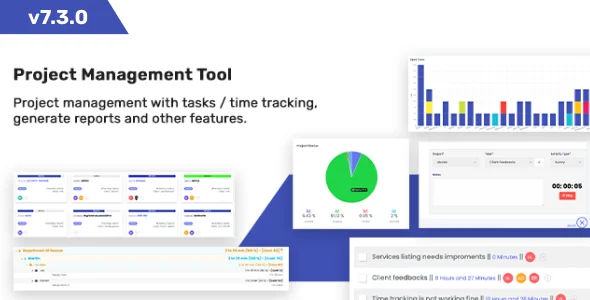
- The Dashboard provides a quick glance at active projects, upcoming deadlines, and pending tasks. It updates in real-time as tasks are completed or new entries are added.
- Client management allows detailed contact information, project history, and direct communication logs, all accessible from a dedicated client profile page. There’s a clear ‘Add New Client’ button that opens a modal for quick entry.
- Project creation flows logically from selecting a client, assigning team members, and defining project phases. Each project page displays progress bars for overall completion and a dedicated file upload area.
- Task management within projects includes assignees, due dates, and status updates (e.g., ‘Pending,’ ‘In Progress,’ ‘Completed’). Drag-and-drop reordering of tasks is possible within the Kanban board view, making workflow adjustments straightforward.
- The invoicing module generates professional invoices based on project hours or fixed fees. You can mark invoices as paid or partially paid, and clients can view them directly from their dedicated portal.
Real-World Use Cases
For businesses and individuals seeking a comprehensive project solution, PMS: Project Management System built with Laravel serves various practical scenarios:
- An independent web developer uses the system to track multiple client website builds, logging development hours against each task and generating invoices directly.
- A digital marketing agency manages its content creation pipeline, assigning articles to writers, tracking editorial review, and monitoring campaign launch schedules.
- A small IT consultancy leverages the system for internal team collaboration on software development, ensuring all bug reports and feature requests are documented and assigned.
- Freelancers needing a centralized hub for all their professional engagements can manage proposals, active projects, and client communications efficiently.
Technical & Compatibility
PMS is a standalone Laravel application, meaning it runs independently of WordPress but can easily integrate with WordPress sites via API or custom links for client portals. It requires a standard LAMP/LEMP stack with PHP 8.1+ and MySQL 5.7+. During my setup, I found it compatible with shared hosting environments that permit SSH access and Composer for dependency management.
The underlying architecture of this Project Management System built with Laravel offers strong extensibility. Developers can customize features, modify the UI, or build integrations without restrictive licensing. This freedom is crucial for tailoring the system to unique business needs and ensures long-term adaptability.
The codebase is well-structured, making it approachable for developers familiar with the Laravel framework. I observed clear separation of concerns, which simplifies modifications. Custom CSS and JS can be added through its theme structure without altering core files, protecting customizations during updates.