Petrix – Personal Portfolio WordPress Theme
Petrix Personal Portfolio WordPress Theme Overview & Portfolio Delivery Architecture
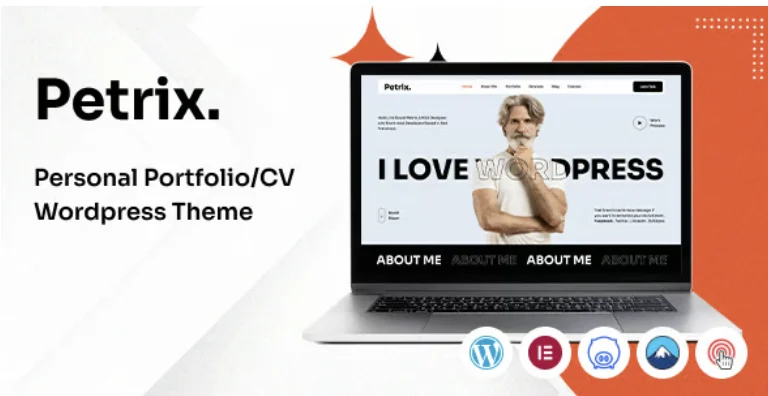
Petrix Personal Portfolio WordPress Theme is a WordPress portfolio and resume theme built on the Bootstrap 5.x framework, engineered for developers, designers, programmers, photographers, and freelancers who need to publish a personal digital presence without hand-coding a theme from scratch. The package addresses a specific production bottleneck: assembling a multi-section personal site (portfolio grids, resume blocks, blog, and contact channels) normally demands bespoke template hierarchy work, which this codebase replaces with prebuilt layouts and a visual page-building pipeline. In agency and independent delivery workflows, it functions as the presentation layer for a self-hosted WordPress install, accepting content through the WordPress 6.0.x through 6.5.x runtime and rendering it through Elementor-driven templates.
Technical Specifications & Deployment Matrix
| Engineering Metric | Deployment Specification |
|---|---|
| Base Technology / Framework | WordPress theme (PHP, CSS, JS files) built on Bootstrap 5.x |
| Runtime / Language Requirements | WordPress 6.0.x – 6.5.x; Gutenberg-optimized output |
| Page Builder & Form Layer | Elementor drag-and-drop builder; Contact Form 7 plugin support |
| Browser Compatibility | Firefox, Safari, Opera, Chrome, Edge |
| Layout & Asset Footprint | Responsive layout, 4+ columns, widget-ready areas, high-resolution assets, fullwidth and standard layouts |
Elementor Rendering Pipeline & Portfolio Execution Flow
The core mechanism is an Elementor-mediated rendering pipeline layered over the native WordPress template hierarchy. Content authored in the WordPress admin is passed into Elementor’s widget and section model, where each portfolio block, resume section, and gallery grid is composed as a draggable structure rather than a hard-coded PHP template. The theme registers custom widget areas that hook into sidebar and footer regions, letting developers inject content through the standard WordPress Widgets screen. Demo provisioning runs through a one-click importer that pulls an included XML file of demo content into the WordPress database, populating posts, pages, and media references so a working portfolio skeleton exists immediately after activation.
Front-end presentation relies on a documented dependency stack: jQuery, Slick Slider for carousel behavior, GSAP for scripted animation, Magnific Popup for lightbox handling, jQuery Isotope for filterable portfolio grids, jQuery CounterUp for numeric counters, and Font Awesome Pro for iconography. Isotope grids power the filterable portfolio layout, recomputing item positions as category filters are toggled. Video content from YouTube and Vimeo embeds through dedicated builder elements, keeping third-party iframes isolated from the main DOM flow. Typography configuration exposes more than 800 Google Fonts, and custom coloring options map hex values into the theme’s styling layer without touching stylesheet source files.
Architectural & Functional Highlights
- One-Click Demo Provisioning: A bundled XML demo-content file plus importer reproduces the reference site structure, reducing initial setup to activation and import steps rather than manual page assembly.
- Elementor Page Composition: Drag-and-drop builder integration allows every section to be restructured visually, with changes serialized through Elementor’s data model instead of requiring template file edits.
- Isotope Portfolio Grids: Enhanced isotope grid logic enables category-based filtering and reflow of portfolio items, driven by jQuery Isotope without page reloads.
- Blog Template Layer: Dedicated blog listing templates and custom single-post styles let a resume site carry news and editorial content alongside portfolio work.
- Custom Error & Identity Handling: A custom-designed 404 template and custom logo support allow brand identity and dead-link states to be configured from the WordPress Customizer rather than via code.
Production Implementation & Operational Resilience
For agency staging or client production environments, deployment follows the standard WordPress theme path: upload, activate, then run the demo importer before replacing placeholder content. The source files arrive organized and commented, which shortens the learning curve when a second developer inherits the project for maintenance or section-level modification. Header skins offer selectable presentation variants, and the pairing of fullwidth and standard layouts accommodates both immersive portfolio showcases and conventional content pages. Cross-browser behavior is verified across Firefox, Safari, Opera, Chrome, and Edge, so layout parity does not depend on a single rendering engine.
Customization boundaries matter at this layer. Because the package operates as a WordPress theme delivering PHP templates, structural changes should occur through the Elementor builder and its registered widget areas rather than by editing core template files directly, which keeps future theme updates from overwriting client work. Styling adjustments route through the custom coloring options and the 800-plus font library, both of which persist independently of page-level layouts. One operational caveat is documented clearly: all preview images ship as dummy placeholders, so any production rollout must supply licensed imagery before client handover. Teams evaluating parallel portfolio solutions on the same platform can compare this package against Dorothea, a photography-oriented portfolio theme, or Lekker, which ships multiple demos and premium plugin bundles for broader multi-client deployments. For decoupled implementations outside WordPress entirely, CraftGrid exists as an Elementor template kit variant targeting studios on a different acquisition path.
Frequently Asked Questions
Are the preview images from the demo included in the downloadable package?
No, all demo images serve preview purposes only and are replaced by dummy placeholders in the purchase files, so you must supply your own licensed photography and artwork before launching a production portfolio site.
Can video content from external platforms be embedded into portfolio pages?
Yes, dedicated builder elements support video embeds from both YouTube and Vimeo, allowing showreel and project footage to be placed inside Elementor-composed sections without writing custom embed markup.
Does the theme include prebuilt blog functionality alongside the portfolio layouts?
Yes, the package ships with blog page templates and custom single-blog post styles, enabling news, case-study, and editorial content to run on the same install as the resume and portfolio sections.
-
1.0 LatestOct 24, 2026