Organia – Organic Food Store WordPress Theme
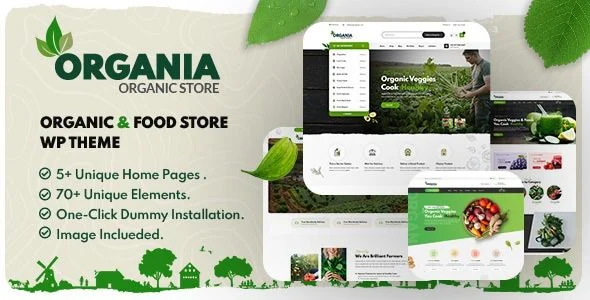
Organia Organic Food Store WordPress Theme Overview & Storefront Architecture Role
Organia Organic Food Store WordPress Theme is an Elementor-driven WooCommerce storefront package engineered for agencies and merchants launching organic food, farm produce, beverage, and natural product shops on WordPress. The package resolves the core bottleneck of storefront assembly—hand-building product grids, category sidebars, and detail templates—by shipping five prebuilt home versions wired through the Unyson framework. In production delivery, it operates as the presentation layer above WooCommerce 5.x through 8.x, with full demo content provisioned through one-click dummy installation.
Technical Specifications & Deployment Matrix
| Engineering Metric | Deployment Specification |
|---|---|
| Base Technology / Framework | Unyson framework on a Bootstrap 4.x grid system |
| Runtime / Language Requirements | WordPress 5.0.x through 6.7.x; PHP, CSS, and JS source files |
| Data Exchange / Communication Protocols | WooCommerce template integration; Ajax search request handling |
| Front-End / Engine Dependencies | Elementor and Elementor Pro; bundled premium slider |
| Database / Persistence Footprint | Native WordPress database schema; widget-ready sidebars |
Elementor Widget Engine & Storefront Rendering Pipeline
At its core, the theme operates as a template-hierarchy override package: inbound requests resolve through the WordPress template hierarchy, where theme PHP files intercept default rendering for shop archives, single-product views, contact pages, and post layouts. Elementor then assumes page composition—each section persists as JSON widget data and renders server-side into DOM markup, with more than sixty custom widgets registered as dynamic bindings to WooCommerce product objects. The Ajax search form dispatches typed query payloads to the backend and returns filtered product matches without triggering a full page reload, keeping list interaction latency confined to the search module. For teams requiring builder-level control over cart and checkout modules beyond the bundled widget set, WooLentor Pro extends the same Elementor and WooCommerce pairing with additional template-building capability.
Architectural & Functional Highlights
- 60+ Elementor widgets: Registered as native builder modules, these blocks map product data, banners, and listing structures into drag-and-drop composition without custom PHP registration.
- 6+ product listing styles with list/grid toggler: Shoppers switch presentation modes through a client-side state control that swaps grid and list markup classes, while six distinct listing templates cover varied catalog layouts.
- Multilevel category dropdown: Introduced in version 2.0, the shop sidebar renders WooCommerce taxonomy hierarchies as nested dropdown nodes, allowing deep catalog navigation without page abandonment.
- One-click dummy installation: The Unyson-based importer provisions demo posts, product records, media attachments, and widget configurations in a single dispatch, collapsing multi-day staging work into one operation.
- Theming and typography layer: An unlimited accent color generator, 1000+ Google Fonts, 1000+ icons, and customizable Google Maps embeds let each deployment diverge visually without touching stylesheet source files.
Production Implementation & Operational Resilience
Deployment targets span WordPress 5.0.x through 6.7.x, and the rendering layer is validated across IE9 through IE11, Firefox, Safari, Opera, Chrome, and Edge. The layout is fully responsive with high-resolution assets, so the same DOM tree reflows across phone, tablet, and desktop viewports without a separate mobile codebase. Structural variation is handled through five header versions and three footer versions, giving each client build distinct navigation geometry while the underlying widget sidebars remain constant.
Version 2.0.4 reflects an active compatibility cadence: change log entries record Elementor and WooCommerce version compatibility verification, a Mailchimp component upgrade, and the addition of two further home versions with newly introduced Elementor widgets in the 2.0 line. Pre-deployment, engineers should confirm the WooCommerce install sits within the supported 5.x–8.x band and that Elementor is active before running the dummy importer. For agencies running parallel builds in adjacent retail verticals, Glowing occupies the cosmetics storefront slot on the same WordPress commerce stack.
Operational boundaries are worth stating plainly: the package is documented as not Gutenberg-optimized, meaning block-editor composition is not a supported authoring path and all page construction routes through the Elementor engine. Customization therefore concentrates on the theme options layer—accent colors, font assignments, map configuration, and prebuilt template selection—rather than core file surgery. A bundled documentation file guides traversal of these options. For decoupled implementations outside the WordPress runtime entirely, Uruana exists as a Shopify-based storefront alternative with its own Liquid template architecture.
Frequently Asked Questions
Does the shop sidebar support hierarchical product category navigation?
Yes, the version 2.0 update enabled a multilevel category dropdown on the shop sidebar, rendering WooCommerce taxonomy hierarchies as nested navigation nodes for deep-catalog browsing.
Are premium media assets bundled with the download package?
Yes, the feature list confirms that a premium slider and premium images are included, so storefront carousels and demo imagery ship with the theme rather than requiring third-party procurement.
Can pages be composed with the native WordPress block editor?
No, the documentation explicitly lists the theme as not Gutenberg-optimized; all layout construction routes through the Elementor page builder, including its support for Elementor Pro extensions.
-
31 July 2025 LatestOctober 4, 2026