Music player | Android | Jetpack Compose
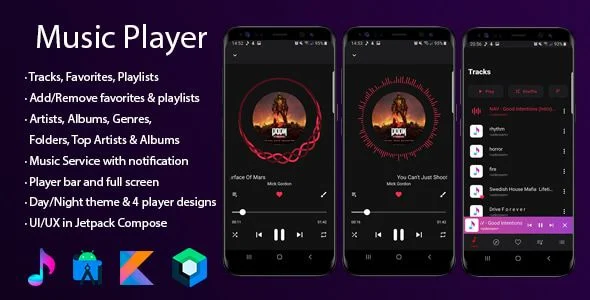
Music Player for Android Overview & Native Playback Architecture
Music Player for Android is a native application source package written entirely in Kotlin on Jetpack Compose, engineered for Android developers and studios that need to ship a production music player targeting Android 9 through Android 17. The codebase resolves two persistent engineering bottlenecks: sustaining background playback and media notification control across seven OS generations, and keeping a local audio library clean through folder-level synchronization rules. Within agency delivery workflows, it operates as a deployable foundation that compiles directly in Android Studio and ships with AdMob banner and interstitial monetization wired into the build.
Technical Specifications & Deployment Matrix
| Engineering Metric | Deployment Specification |
|---|---|
| Base Technology / Framework | 100% Kotlin, Jetpack Compose UI, Material 3 Expressive design system |
| Runtime / Tooling Requirements | Android 9.0 through Android 17 (SDK 37); Android Studio Quail 1 | 2026.1.1 Patch 2 |
| Playback Engine / Media Layer | Media3 ExoPlayer with background music service and system media notification session |
| Persistence & Deliverables | Local .db database file; installable .apk binary included in the package |
| Monetization Layer | AdMob banner and interstitial ad units with documented integration |
Media3 Playback Engine & Library Execution Pipeline
The core execution pipeline routes every audio operation through Media3 ExoPlayer bound to a background music service, which is what allows tracks to keep rendering when the UI layer is dismissed. When the app launches, the library scanner walks device storage against the folder sync configuration, so only folders the user has explicitly included (and none of the ignored ones) are indexed into the local database. ViewModel-driven state then feeds the Compose rendering tree across five browsing dimensions — tracks, artists, albums, genres, and folders — alongside curated views for top artists, top albums, recently added, favorites, and playback history. Playback state is synchronized bidirectionally: the full-screen player, the mini player bar, the floating playback controls, and the system notification all read from and dispatch into the same media session, which prevents divergent track positions across surfaces. Search operates as a live filter over the indexed library, matching on name, album, artist, and genre, with share, playlist, and favorite actions available directly from result rows.
Architectural & Functional Capabilities
- Background Service & Notification Dispatch: The Media3 service keeps audio running outside the foreground UI, while media notification controls and floating controls write transport events (play, pause, skip) back into the shared playback session.
- Folder Sync Governance: Users include or ignore specific audio folders, and the scanner respects those rules on every library refresh, which keeps ringtones, voice memos, and system audio out of the indexed catalog.
- Playlist, Favorites & History State: Tracks can be added to playlists, favorited, sorted, shared, or set as an alarm tone; playback history and recently added views are persisted in the local .db layer.
- Theming & Visual Feedback Layer: Day/Night theming with Dynamic Colors follows system palette changes, and the full-screen player renders real-time animated visualizations in Classic, Wave, Vinyl, and Orbital Icons styles.
- Localization Grid: Ten languages — English, Spanish, French, German, Romanian, Italian, Portuguese, Russian, Bulgarian, and Chinese — are selectable in-app through a language selector with country flags.
For teams assembling additional store-ready Android products on parallel tracks, Kids Doodle Coloring Games represents a separate Android Studio codebase with its own AdMob wiring and reskin workflow, useful when a mobile portfolio needs a casual-game vertical alongside a utility app.
Production Implementation & Operational Resilience
Compilation requires Android Studio Quail 1 (2026.1.1 Patch 2), since the 7.2.2 build targets SDK 37 and depends on the current dependency graph documented in the changelog. Developers opening the project in older IDE versions should expect Gradle and SDK mismatches, so aligning the toolchain before any code modification is a practical prerequisite. The included .apk allows immediate device-level verification of runtime behavior before the source is touched, and the .db file clarifies the persistence footprint the library scanner writes to.
Operational resilience shows up in how the service survives OS-level background restrictions: the changelog records a dedicated fix for the music service on Android 14, confirming that foreground-service lifecycle handling has been patched against platform-enforced process limits. The sleep timer shuts playback down on a schedule, and the alarm-tone feature hands a selected track to the system alarm assignment flow rather than reimplementing audio routing. AdMob integration is documented separately, meaning ad unit identifiers must be replaced with the deployer’s own before a store submission.
Regarding secondary development, the codebase is described as optimized and well-structured with ongoing refactoring passes (TrackViewModel, PlayerFullScreen, PlayerToolbar, and MarqueeText components were each reworked in recent versions), which gives maintainers identifiable seams for extension. For studios exploring separate standalone Android product lines, eBook Reader – pdf / ePub Reader – Android , Admob exists as an independent monetized reading-app source path outside this playback architecture.
Frequently Asked Questions
Does the package include a compiled APK for direct device testing?
Yes, the files-included list contains both an .apk binary and a .db file, so developers can install and verify the running application on a physical device before opening or modifying the Kotlin and Jetpack Compose project.
Can a track be assigned as a device alarm tone from inside the app?
Yes, the v7.2.0 changelog explicitly lists the set-track-as-alarm-tone feature. The application passes the selected audio into the system’s alarm assignment flow instead of writing custom scheduling logic.
Does the interface support languages other than English?
Yes, the language selector covers English, Spanish, French, German, Romanian, Italian, Portuguese, Russian, Bulgarian, and Chinese. The v7.2.1 release added the last four, complete with country-flag icons in the selector.
Can tracks be displayed in a grid instead of a list?
Yes, the v7.2.0 release introduced list-or-grid track rendering as a configurable view mode, letting users switch presentation density without changing any underlying library or database behavior.
Pre-Wedding Music Video Editor | Pre-Wedding Slideshow Video Maker | Android | Admob Ads
Photo Video Maker With Music – Music Video Status Maker – Video Editor – Photo to Video Maker
Video Player- Full Hd Video Player Play All Format Hd Video