Moverhub – Moving Company Elementor Pro Template Kit
Moverhub Overview & Moving Services Website Architecture
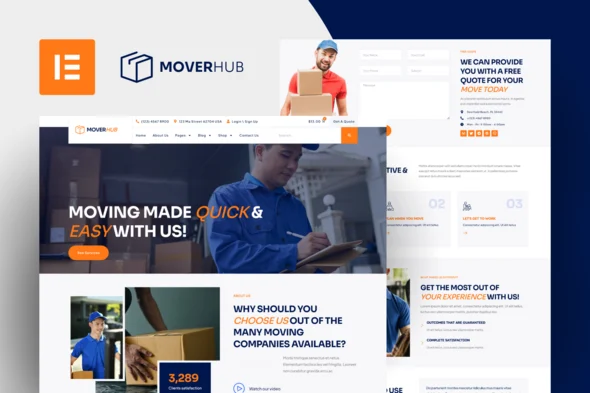
Moverhub is an Elementor Pro Template Kit engineered for moving companies, packers, relocation specialists, and transportation providers that need a conversion-focused website without writing code. The package addresses a recurring delivery bottleneck in agency workflows: producing a consistent multi-page layout system for logistics and storage businesses normally demands extended design and build hours. As an Envato Template Kit, it functions as portable design data for the Elementor page builder, letting teams import a complete page hierarchy, apply global styles, and publish client sites on the free Hello Elementor theme within a single working session.
Technical Specifications & Deployment Matrix
| Engineering Metric | Deployment Specification |
|---|---|
| Base Technology / Framework | Elementor page builder, optimized for the Hello Elementor theme (compatible with most Elementor-supporting themes) |
| Runtime / Version Requirements | Elementor 3.10.x; Elementor Pro upgrade required for certain templates and features (sold separately) |
| Installation / Data Exchange | Kit ZIP imported via the Envato Elements plugin for WordPress or directly through Elementor |
| Front-End / Engine Dependencies | ElementsKit Lite, The Plus Addons for Elementor; WooCommerce (optional, for shop content) |
| Persistence Footprint | No standalone theme files; imported templates are stored under Elementor > Templates > Saved Templates and reused from there |
Global Design Tokens & Template Import Pipeline
The kit operates on a structured import pipeline rather than a theme installation. Its layouts ship as portable Elementor template data, and the recommended sequence begins with the Global Kit Styles import, which writes the site-wide typography, color palette, and spacing tokens into the Elementor site settings before any page is placed.
Once the global tokens are registered, each of the 10+ pre-built templates — Home, About Us, Services, Service Details, Pricing Plans, Team, Testimonial, FAQ, Contact, Archive Blog, Single Post, Search Results, and 404 — can be imported individually. Every layout is constructed with Elementor’s container and widget system, so adjustments happen through visual controls: section reordering, color token reassignment, text replacement, and widget configuration all occur inside the builder canvas without touching PHP templates or stylesheet files. Because everything is 100% responsive and mobile-friendly, breakpoint-level edits for tablet and phone viewports are handled through Elementor’s device preview modes.
Core Technical Capabilities of Moverhub
- Commerce-ready page set: Cart, Checkout, My Account, Single Product, and Archive Product templates map onto WooCommerce storefront views, activated only when the optional plugin is installed.
- Theme Builder integration: With Elementor Pro active, the bundled Header and Footer templates are managed under Templates > Theme Builder, replacing the native theme hierarchy for those regions.
- Plugin requirement automation: An orange banner inside the kit manager flags missing dependencies, and the Install Requirements action provisions ElementsKit Lite and The Plus Addons in one pass.
- Zero-code customization surface: All module edits — service cards, pricing tables, testimonial sliders — are executed through Elementor’s visual controls, removing manual CSS intervention from the delivery workflow.
For teams evaluating a parallel delivery path outside the template-kit ecosystem, Qesco exists as an independent WordPress theme option covering the same freight and transport vertical. Within the Elementor runtime itself, product presentation can be extended further: adding WooCommerce Product Grid List View – Addon For Elementor introduces grid/list toggle layouts for shop archives without custom widget development.
Production Implementation & Operational Resilience
Correct deployment begins at the environment level. Permalinks must be set to Post Name before import so that template URLs resolve cleanly, and the kit ZIP should remain compressed during upload — Safari users need the browser’s automatic file extraction disabled to avoid corrupted imports. Elementor and the Envato Elements plugin should both be at their latest versions before the process starts, and any Elementor Pro requirement must be connected to its account at this stage, not after.
Imported templates land in the Saved Templates library, where each page build reuses the stored data rather than duplicating work. New pages follow a fixed pattern: create the page, switch to Elementor Full Width, hide the page title, then pull the required template from the My Templates tab. The static front page is assigned under Settings > Reading, keeping the home route decoupled from the blog archive. Server-side, larger kits benefit from an adequately raised wp_memory_limit so the JSON payload parses without exhausting PHP memory during bulk imports.
Agencies running parallel client builds in logistics, education, or security verticals can keep separate kits isolated per site; for a cybersecurity-focused build outside this kit’s scope, Oryn serves as a separate Elementor Template Kit targeting that sector. Troubleshooting for import behavior routes through the Elementor > Get Help menu in WordPress.
Frequently Asked Questions
Does Moverhub install as a standalone WordPress theme?
No. The package contains Elementor design data only — not a theme — and must be imported through the Envato Elements plugin or directly via Elementor, running on Hello Elementor or another Elementor-compatible theme.
Is an Elementor Pro upgrade mandatory to use every template?
Yes. The kit is built with Elementor Pro, and specific templates and features require the Pro upgrade, which is not included in the package and must be installed and connected before importing the kit.
Are WooCommerce shop templates included in the kit?
Yes. Cart, Checkout, My Account, Single Product, and Archive Product templates ship in the ZIP, and WooCommerce installs optionally with the kit purely to power that shop content.