EazeMove – Moving Service Elementor Template Kit
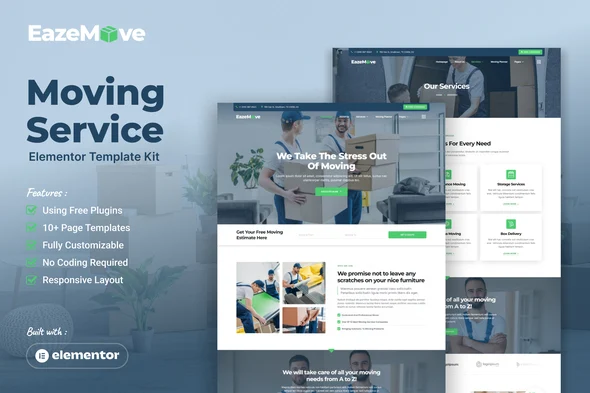
EazeMove Overview & Flex-Container Site Assembly System
EazeMove is an Elementor template kit built for moving, relocation, packing, and cargo service companies that need a complete pre-designed page system without authoring layouts from scratch. The package targets a specific production bottleneck: assembling a coherent multi-page presence — header, offcanvas navigation, quotation forms, service pages, a moving planner, and a rate-plan page — using only free plugin dependencies. Within agency delivery workflows, it operates as import-ready JSON layout data that drops into an existing WordPress installation running Elementor 3.10.x and renders through the builder’s flex container engine.
Technical Specifications & Deployment Matrix
| Engineering Metric | Deployment Specification |
|---|---|
| Base Technology / Framework | Elementor 3.10.x page builder with Flexbox Container layout mode |
| Runtime / Import Channel | WordPress site with the Template Kit Import plugin, or direct import through the Elementor editor |
| Data Exchange / Packaging | Serialized Elementor JSON layout documents distributed inside a Zip archive |
| Front-End Dependencies | ElementsKit Lite (site chrome), Skyboot Icons (glyph library), MetForm (form widgets) |
| Persistence Footprint | No standalone data layer; imported designs reside as Elementor page documents within the site |
Flex-Container Rendering Model & Template Execution Pipeline
EazeMove renders every page through Elementor’s flex container engine, replacing legacy section-and-column nesting with direction-controlled container nodes. The archive holds twelve-plus JSON layout documents covering the homepage, header, offcanvas header, footer, contact form, quotation form, subscription form, single service, services listing, about page, moving planner, rate-plan page, contact page, single post, blog index, and a 404 page, plus the global kit styles. During import, the Template Kit Import plugin parses each document, maps widget nodes to registered Elementor widgets, and writes the resulting structure into the site’s page builder documents.
Because the layout graph is composed of flex containers rather than nested sections, responsive behavior resolves at the container level: direction, wrap, gap, and alignment properties reflow per breakpoint without per-element overrides. Typography and color values are not hard-coded per widget; they inherit from the kit’s Global Styles, so a single token edit propagates across every imported template. Form capture for contact, quotation, and subscription flows is delegated to the MetForm widget layer, while site-wide chrome is wired through ElementsKit’s header-footer module rather than theme template files. Agencies producing adjacent service-sector sites under the same JSON-import workflow will find that parallel assets such as Jetly – Private Jet Charters Elementor Template Kit follow an identical distribution and deployment model.
Architectural & Functional Highlights
- Flex Container Layout Engine: Every template is composed with Elementor’s flexbox container feature, allowing row/column direction switching, gap control, and wrap behavior to be adjusted per container node rather than through nested structural widgets.
- Global Kit Design Tokens: Fonts and colors are centralized in the kit’s global style definitions, so a single typography or palette modification propagates across all twelve-plus imported templates without per-page edits.
- MetForm Capture Pipeline: Contact, quotation, and subscription forms run on the MetForm widget layer, with each form imported as a reusable block template that can be inserted into host pages and customized inside the form builder.
- Cross-Browser & Device Coverage: The layout system is built fully responsive, with container-level reflow logic that maintains structure across desktop, tablet, and mobile viewports and across major browser engines.
Production Implementation & Operational Resilience
Before importing, confirm that the wp_memory_limit directive can absorb the JSON payload of larger templates; constrained allocations can abort mid-import and leave partially written Elementor documents that require cleanup. Icon rendering depends on Skyboot — every library under its settings panel must be enabled, otherwise glyph placeholders appear blank in imported pages. MetForm blocks follow a two-pass sequence: import the form block templates first, then open the host page, right-click to launch the Navigator, select the MetForm widget, create a new form, and insert the previously imported template from the My Templates tab, declining page settings before updating.
Header and footer activation runs through ElementsKit’s Header Footer module: import both templates, create a new header entry scoped to the Entire Site, toggle activation on, load the builder, and attach the imported template plus a navigation menu; the footer repeats the same cycle. Style overrides should stay inside Global Kit Styles rather than per-widget edits to preserve cross-template consistency, while content and imagery remain fully swappable at the node level. For parallel deployments in adjacent service verticals, KeyGenie – Locksmith & Key Maker Service Elementor Template Kit ships through the same import pipeline with an equivalent service-business page set.
Outside the kit-based assembly path, teams standardizing on a conventional theme stack can treat Clenix – Cleaning Services WordPress Theme as a self-contained alternative that carries its own template hierarchy instead of imported JSON documents.
Frequently Asked Questions
Does EazeMove require Elementor Pro to render its templates?
No, the entire dependency chain — ElementsKit Lite, Skyboot Icons, and MetForm — consists of free plugins, so a paid Elementor Pro installation is never needed for any of the twelve-plus templates to import and render correctly.
Can the kit be activated as a standalone WordPress theme?
No. This package contains Elementor design data only, not a theme’s PHP template hierarchy; it is installed through the Template Kit Import plugin for WordPress or imported directly through the Elementor editor interface.
Do the demo images ship ready for production deployment?
No. Preview imagery is drawn from Envato Elements and must be acquired under that platform’s own terms before commercial use, or substituted with first-party assets during the content replacement phase.