Morent – Car Rental Elementor Pro Template Kit
Morent Car Rental Elementor Pro Template Kit Overview & Presentation Layer for Vehicle Booking Sites
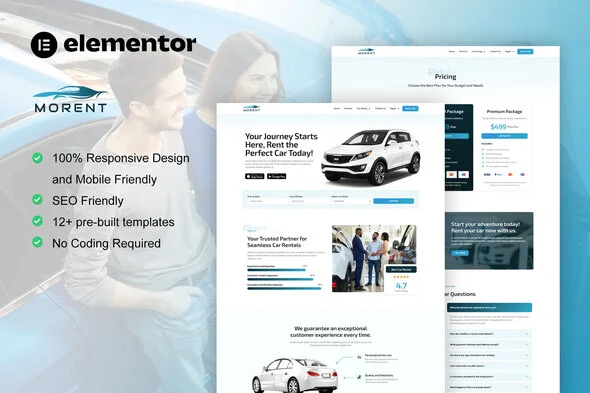
Morent Car Rental Elementor Pro Template Kit is an Envato Template Kit built for the Elementor Pro page builder, engineered for rental agencies and web studios that need to launch vehicle booking websites without writing code. The kit removes the bottleneck of designing a car rental interface from a blank canvas by supplying pre-structured page content — car listing grids, vehicle detail layouts, pricing tables, and service sections — that imports directly into the Elementor editor. Within an agency delivery pipeline it functions purely as the presentation layer: a set of ready-to-edit layouts that a developer drags, reorders, and re-brands for each client engagement.
Technical Specifications & Deployment Matrix
| Engineering Metric | Deployment Specification |
|---|---|
| Base Technology / Framework | Envato Template Kit for Elementor; tested against Elementor 3.8.x and 3.10.x |
| Runtime / Editor Requirements | WordPress running the free Hello Elementor theme; compatible with most themes that support Elementor |
| Data Exchange / Import Protocol | JSON layout data installed via the Envato Template Kit Import plugin or directly through Elementor |
| Front-End / Engine Dependencies | Elementor Pro upgrade required for certain templates and features (not included); Skyboot icon libraries |
| Persistence Footprint | No standalone storage layer — imported layouts persist as standard Elementor page content inside WordPress |
Layout Engine Architecture & Content Pipeline
The kit’s layout data travels as JSON structures that resolve into Flexbox containers inside the Elementor editor. During import, the Envato Template Kit Import plugin parses each template file and materializes its widget tree — containers, nested sections, image widgets, and typography references — into editable page records. From that point forward, rendering is handled entirely by the Elementor front-end engine, and every element remains movable through drag-and-drop operations rather than code edits.
The package includes more than twelve pre-built templates covering the full rental funnel: Home, About Us, Car Listing, Car Detail, Pricing, Services, Contact Us, FAQs, Blog, Archive, Single Post, Team, and an Error 404 page. A Global Style sheet tokenizes colors and typography so a single change propagates across every imported page instead of requiring per-widget edits. The Header and Footer templates rely on Elementor Pro’s theme builder capabilities, which is where the premium upgrade requirement originates.
Core Technical Capabilities of Morent Car Rental Elementor Pro Template Kit
- Flexbox container architecture: Layouts are constructed on nested Flexbox containers rather than legacy section/column stacks, allowing alignment, gap, and direction adjustments to propagate down the widget tree from a single container control.
- Global design tokens: The Global Style template centralizes color palettes and typography scales, so re-branding a client site reduces to swapping token values instead of editing individual widgets across twelve pages.
- Responsive breakpoint handling: Every template ships mobile-friendly, with container-level responsive controls that let developers reflow the car listing and booking interfaces per viewport without duplicating content.
- Full-funnel template inventory: The Car Listing and Car Detail templates pair with Pricing and Services pages, giving studios the complete visitor journey from vehicle discovery through rate comparison in one import operation.
Because the package ships presentation layouts rather than a reservation engine, studios needing native booking flows, WooCommerce cart logic, and dealer inventory management as a self-contained codebase can evaluate Rentic – Car Rental & Dealership WordPress Theme as an independent, theme-based alternative outside the Elementor kit workflow.
Production Implementation & Operational Resilience
Deployment begins on a staging environment: install the free Hello Elementor theme, activate the Elementor Pro upgrade (licensed separately and not bundled with the kit), then run the Envato Template Kit Import plugin against the downloaded zip. Before importing, verify that the hosting environment’s wp_memory_limit satisfies Elementor’s recommended allocation, since parsing large JSON template payloads on constrained shared hosting can abort mid-import and leave partial page records.
One documented operational boundary concerns icon rendering: all icon libraries must be enabled under Skyboot > Settings, otherwise imported widgets that reference icon sets will render without their glyphs. Further troubleshooting guidance is reachable through the Elementor > Get Help menu inside WordPress.
Asset replacement forms the second boundary. The demo imagery originates from Envato Elements collections, so agencies must either license those images separately for live client delivery or substitute their own vehicle photography before launch. Since every image lives in a standard Elementor image widget, swapping assets is a selection-and-upload operation that preserves the surrounding container geometry. For marketplace-scale rental platforms that fall outside the kit’s single-operator scope, Entox – Rental Marketplace WordPress Theme operates as an autonomous theme package with its own listing and booking architecture.
Frequently Asked Questions
Is Morent a standalone WordPress theme that activates from the Appearance menu?
No. The package contains Elementor design data only, not a theme. Layouts are installed through the Envato Template Kit Import plugin or imported directly through Elementor after the Hello Elementor theme is active.
Can the bundled demo images be published on a live client site as-is?
No. All demo images are sourced from Envato Elements and require a separate license for production use, or agencies can replace them with their own photography through standard Elementor image widgets.
Do all icons render correctly immediately after the templates are imported?
No. Icon libraries must be enabled under Skyboot > Settings for the imported widgets to display their full glyph sets; without this step, icon-dependent elements will appear incomplete on the rendered pages.