Investree – Venture Capital & Angel Investor Elementor Pro Template Kit
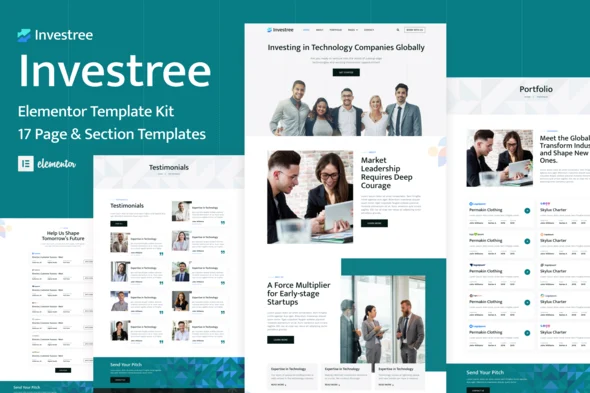
Investree Venture Capital & Angel Investor Template Kit Overview & Architectural Role
Investree is an Elementor Pro Template Kit for venture capital firms, angel investors, and startup financing teams, engineered to publish an investment-grade WordPress presence without custom theme development. The package resolves a recurring delivery bottleneck: converting fund narratives, portfolio track records, and team credibility into a coherent multi-page layout system without hand-written PHP or CSS. Within agency and production workflows, it operates as a ready-made page-content library — 17 templates spanning homepage, portfolio, testimonials, career, team, FAQ, blog, and contact surfaces — that imports through the Envato Elements plugin and renders under the free Hello Elementor theme.
Technical Specifications & Deployment Matrix
| Engineering Metric | Deployment Specification |
|---|---|
| Base Technology / Framework | Elementor Pro page builder; Envato Template Kit distribution format (17 templates) |
| Runtime / Version Requirements | WordPress running Elementor 3.6.x, 3.8.x, or 3.10.x |
| Data Exchange / Import Protocol | Intact ZIP upload via Envato Elements plugin (Elements > Installed Kits > Upload Template Kit Zip) |
| Front-End / Engine Dependencies | Elementor Pro premium upgrade (not included); Hello Elementor theme recommended, most Elementor-capable themes supported |
| Persistence Footprint | No custom database schema; imported layouts persist in Elementor’s Saved Templates library (Templates > Saved Templates) |
Global Design Tokens & Template Import Pipeline
The execution model centers on a Global Kit Styles import that seeds sitewide typography and color tokens before any page template is applied. Import sequence matters: the global styles payload first configures Elementor’s site settings, and each subsequent template — uploaded one at a time — is parsed from its JSON layout structure into native Elementor widgets, containers, and Flexbox/Grid arrangements. Once parsed, each layout lands in the Saved Templates library, from which pages are instantiated: a new page is created, switched to Elementor Full Width with the page title hidden via the builder’s settings panel, and the target template is inserted from the My Templates tab. The homepage is then bound under Settings > Reading as a static front page, decoupling display logic from the post index. With Elementor Pro active, the Global Header and Global Footer templates override the host theme’s native chrome through the Theme Builder, keeping sitewide navigation consistent across every imported surface.
For agencies running parallel client engagements in adjacent sectors, BizNova supplies a consulting-sector kit on the same Elementor runtime when a business advisory deliverable is required alongside the fund site.
Architectural & Functional Highlights
- Global Token Architecture: The Global Kit Styles import defines typography and color values at the site-settings level, so a single token adjustment propagates across all 17 templates rather than requiring per-widget edits.
- 17-Template Layout Inventory: The package includes Homepage, About, Portfolio, Testimonials, Career, Our Team, FAQ, Blog, Single Post, Archive, Contact, plus Global Header and Global Footer — a complete page topology for fund and investor positioning.
- Responsive Container System: Layouts are constructed with responsive container behavior that adapts across viewport widths, eliminating pinch-zoom navigation on mobile audit sessions.
- Utility & Conversion Surfaces: Dedicated 404 Page, Coming Soon, and Popup Banner templates extend coverage beyond marketing pages into pre-launch and error-state scenarios.
- Theme Builder Decoupling: Header and footer operate as Theme Builder templates under Elementor Pro, separating sitewide chrome from page-level content edits.
Production Implementation & Operational Resilience
Before import, verify that permalinks are set to Post Name and the Hello Elementor theme is activated — this pairing prompts Elementor installation when the builder is absent. The orange banner displayed at the top of the kit screen dispatches an Install Requirements action that loads any plugins the layouts depend on, preventing widget-level render failures after import completes. On constrained shared hosting, confirm the wp_memory_limit accommodates Elementor’s import routine; parsing the full ZIP payload through the Envato Elements plugin can exhaust low allocations mid-process. Safari deployments carry a documented edge case: the browser’s “Open safe files after downloading” preference must be disabled so the kit archive is not auto-extracted before upload. Customization boundaries are well defined — style overrides stay within Elementor’s global settings, where colors, typography, and spacing adjust at the token level and propagate to every imported template. Asset replacement is equally bounded: demo images originate from an Envato Elements collection and must be acquired separately or swapped for owned media before launch. For fund partners who need a personal web presence outside the firm’s domain, the HireAlves CV & Portfolio kit functions as a separate deployment path on the same builder stack. Runtime troubleshooting routes through Elementor’s Get Help entry in the WordPress admin menu.
Frequently Asked Questions
Is Investree a standalone WordPress theme?
No — the package contains Elementor page content rather than theme files. It is optimized for the free Hello Elementor theme, though most themes supporting Elementor can render the imported layouts correctly.
Can the bundled demo images ship directly to a production site?
No — demo imagery originates from an Envato Elements collection and must be acquired separately or replaced with your own assets before launch; the kit itself delivers layout structures and styling only.
Does the kit file need to be unzipped before uploading it to WordPress?
No — the archive is uploaded intact through Elements > Installed Kits; Safari users must disable “Open safe files after downloading” in browser preferences to prevent automatic extraction that breaks the upload.