Hotel Management Software Offline With Restaurant POS SYSTEM
Product Overview
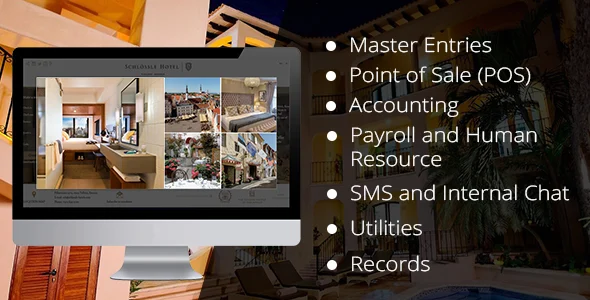
The Hotel Management Software Offline provides a robust, self-contained system for managing lodging operations, fully integrated with a powerful Restaurant POS SYSTEM. This application is designed for hotels, motels, guesthouses, and resorts that require a reliable, in-house solution for everything from guest check-in and room allocation to managing food and beverage orders. It’s ideal for proprietors and staff seeking a centralized platform to handle reservations, guest billing, and restaurant services without constant reliance on an internet connection.
Upon installation on your local server, the dashboard presents a clear overview. The ‘Rooms’ section immediately shows current occupancy, room cleaning status, and upcoming check-ins/outs. When checking in a guest, the system guides you through assigning a room, capturing guest details, and setting the stay duration. The process is intuitive, minimizing training time for new front-desk personnel. Each guest’s folio updates dynamically as services are added.
Highlights & Value
- **Offline Operational Capability:** The system functions entirely within your local network. During a recent internet outage, our front desk continued to process check-ins, check-outs, and restaurant orders without interruption. Data is stored locally and doesn’t require a constant cloud connection for core operations.
- **Integrated Restaurant POS:** The Hotel Management Software Offline With Restaurant POS SYSTEM seamlessly links dining to lodging. Orders taken at the restaurant POS terminal, whether for walk-in customers or hotel guests, are accurately tracked. For hotel guests, a few clicks add these charges directly to their room bill, displayed instantly on their folio.
- **Real-time Room Status:** The visual room status board is a standout feature. It uses color-coding—green for vacant, red for occupied, yellow for cleaning—that updates immediately as guests check in or out. This eliminates manual updates and potential booking conflicts.
- **Granular User Permissions:** We configured distinct roles for reception, restaurant staff, and management. A receptionist sees only necessary booking screens, while kitchen staff view only incoming food orders on their dedicated display. This compartmentalization enhances operational security and workflow efficiency.
Real-World Use Cases
- **Boutique Hotel & Café:** A small boutique hotel uses this to manage its ten rooms and attached coffee shop. Guest check-ins are handled by the front desk, and café orders are taken on a tablet at the counter, automatically linking to room numbers for simplified billing.
- **Motel with Diner:** This system is critical for a roadside motel offering breakfast and dinner. Room bookings are managed efficiently, and diner orders are processed through the Restaurant POS SYSTEM, ensuring all charges are consolidated onto a single bill upon guest departure.
- **Event Venue with Accommodation:** A venue hosting workshops and retreats utilizes the system to book attendee rooms and manage catering orders for meals and breaks. It provides a unified platform for event billing.
Technical & Compatibility
This Hotel Management Software Offline is a PHP-based web application designed for deployment on a local server environment, typically XAMPP or WAMP for Windows, or LAMP for Linux. It uses a MySQL database for all data storage. Installation involves setting up your local server, creating a database, and importing the provided SQL file, then placing the application files in your web server’s directory. Access is browser-based, making it compatible with any device on your local network that can run a modern web browser. The backend structure is clean, allowing developers comfortable with PHP and MySQL to manage and extend its functionality if needed.
During our setup, we found the initial database import straightforward, and file placement was standard for a PHP application. Performance on a dedicated local machine is swift, with pages loading quickly and transactions processing in real-time. Regular database backups are essential, which we automated using a simple cron job on the server.