Findgency – Digital Agency Elementor Template Kit
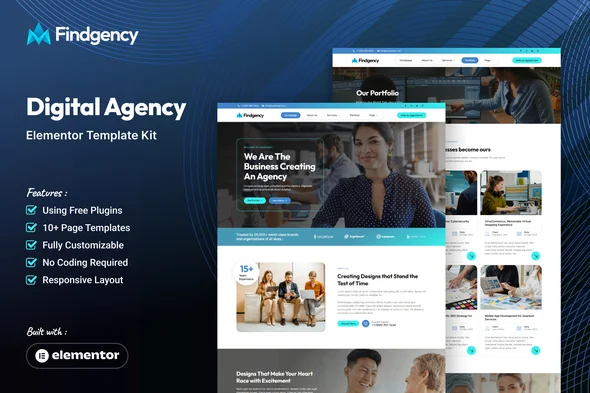
Findgency Overview & No-Code Agency Website Foundation
Findgency is an Elementor template kit engineered for digital agencies, marketing studios, and freelance designers to assemble production-grade agency websites without writing code. The package removes the bottleneck of hand-building layouts from blank canvases by supplying 14 prebuilt templates and forms whose design data imports directly into the Elementor editor. Within agency delivery pipelines, it operates as the presentation layer for digital marketing, SEO, web development, portfolio, and personal brand service sites.
Technical Specifications & Deployment Matrix
| Engineering Metric | Deployment Specification |
|---|---|
| Base Technology / Framework | Elementor 3.10.x page builder, optimized for the free Hello Elementor theme |
| Runtime / Import Requirements | WordPress instance running the Template Kit Import plugin or the native Elementor library |
| Data Exchange Format | Zip archive of JSON design data decoded into widget trees by the Elementor editor |
| Front-End / Engine Dependencies | ElementsKit Lite, Skyboot Icons, and MetForm — all free plugins |
| Persistence Footprint | None shipped separately; imported layouts persist as Elementor design data inside WordPress |
Container-Based Layout Engine & Import Pipeline
The import pipeline parses JSON layout archives and renders each page through Elementor Flexbox containers. Findgency ships as a zip archive containing 14 importable assets: ten full pages covering the Homepage, About Us, Services, Single Service, Portfolio, a rate sheet page, Contact Us, Blog Archive, Single Post, and Error 404, plus a Header, Footer, Menu, Contact Form, and email capture form. Each asset passes through the Template Kit Import plugin or Elementor’s own template library, where the encoded design data is decoded into container nodes and widget trees rather than hand-assembled section stacks. Because the layout model is built on containers, nested elements inherit flex-based alignment, gap control, and direction logic, which keeps spacing mathematically consistent from the homepage down to the 404 page. Global Kit Styles function as the design-token layer: typography scales and color values are declared once and referenced by every template, so adjusting a heading font or primary accent propagates sitewide without opening individual pages. For studios managing multiple client verticals, importing Famosa inside the same Elementor environment supplies a second marketing-agency design system drawn from an identical container architecture.
Architectural & Functional Highlights
- Container layout architecture: Every template is constructed on Flexbox containers rather than legacy section/column structures, delivering predictable alignment, gap, and direction control at each nesting level.
- Global Kit Style tokens: Fonts and colors are defined in one central location and inherited by all 14 templates, allowing a rebrand to propagate through a single edit instead of per-page overrides.
- MetForm-driven form blocks: The contact and email capture forms are MetForm templates that attach to page layouts through the Navigator, keeping form markup modular and reusable across pages.
- ElementsKit header and footer binding: The Header Footer module in ElementsKit Lite maps the imported header and footer templates to the Entire Site scope, with the nav element wired to a selected WordPress menu.
- Responsive breakpoint coverage: Layouts are fully responsive and remain compatible with most Elementor-supported themes, with Hello Elementor serving as the reference environment.
Production Implementation & Operational Resilience
Deployment begins on a staging WordPress instance running the Hello Elementor theme, with the Template Kit Import plugin installed before the archive is uploaded. Large multi-template imports consume editor memory during JSON decoding, so confirming adequate PHP memory headroom (wp_memory_limit) prior to bulk-importing all 14 assets prevents partial imports on constrained shared hosting. After import, Skyboot Icons requires every icon library enabled under its settings panel — leaving libraries off produces templates with missing glyph slots, a common first-run failure resolved entirely within plugin settings. Form wiring follows a defined sequence: the MetForm block templates import first, then the host page loads, the MetForm widget is located through the Navigator, and the imported form template is inserted into the widget before updates are saved. Header and footer activation runs through the ElementsKit Header Footer section, where a new entry scoped to Entire Site loads the imported template and binds the navigation element to a registered menu. All preview imagery originates from Envato Elements and must be sourced separately or swapped for owned assets before a client site goes live. For decoupled implementations outside the WordPress runtime, Cunnet stands as an independent Next.js and TypeScript code path for creative agency portfolios built with GSAP animation and WebGL rendering.
Frequently Asked Questions
Does Findgency require Elementor Pro to run its templates?
No, every template runs on the free edition of Elementor, and all three dependencies — ElementsKit Lite, Skyboot Icons, and MetForm — are likewise free, so no paid tier of the page builder is required to import or edit the included pages.
Can the package be activated as a standard WordPress theme?
No, this is an Envato template kit holding Elementor design data only; it installs through the Template Kit Import plugin or directly inside Elementor and relies on a host theme such as Hello Elementor to provide the site shell.
Do icons fail to display after import unless a setting is changed?
Yes, Skyboot Icons keeps its icon libraries disabled by default, so freshly imported templates render with missing glyph slots until every library is switched on under the Skyboot settings panel inside the WordPress dashboard.