Cunnet – Creative Agency & Portfolio Nextjs Template
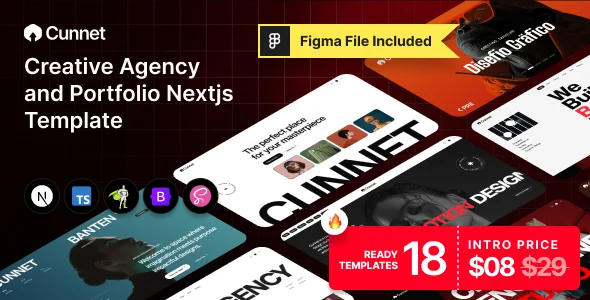
Cunnet Overview & Component-Driven Agency Front-End
Cunnet is a Next.js 16.1.6 and TypeScript creative agency and portfolio template built for agencies, freelancers, and digital studios that need production-ready front-ends with GSAP and WebGL motion layers. The codebase targets the friction points of hand-rolled React builds — unoptimized routing, weak metadata control, and untyped component props — by shipping App Router file conventions, per-route metadata handling, and TypeScript v5 type safety across every module. Within agency delivery workflows, it operates as the presentation layer for portfolio showcases, startup landing pages, and service-business sites that must ship quickly across dark and light display modes.
Technical Specifications & Deployment Matrix
| Engineering Metric | Deployment Specification |
|---|---|
| Base Framework | Next.js 16.1.6 (App Router) running on React 19.2.3 |
| Language / Type System | TypeScript v5 applied across all source modules |
| Styling Architecture | Bootstrap 5.x with SCSS source files and compiled CSS output |
| Animation Dependencies | GSAP with @gsap/react, WebGL 2D/3D rendering, smooth-scroll library, Swiper |
| Content Footprint | 18+ homepages (dark, light, mixed), 92+ pages, 200+ reusable sections, 10+ blog pages |
| Browser Targets | Firefox, Safari, Opera, Chrome, Edge; retina and touch-optimized layouts |
| Persistence Layer | None — static front-end template without server-side data storage |
App Router Rendering & Motion Execution Pipeline
Rendering flows through the Next.js App Router, where each route maps to a typed React component tree. The framework pre-renders pages into an SEO-friendly structure with fast transitions between routes, and metadata is managed per route rather than patched globally. Because the project is organized into modular, reusable components under a fixed folder architecture, a section such as a portfolio grid or service block can be relocated between pages without rewiring its dependencies.
Motion is delegated to a dedicated animation layer. GSAP timelines drive scroll-triggered transitions and split-text typography on DOM and SVG nodes, while a WebGL layer renders interactive 2D and 3D graphics through classes and hooks mounted inside the component lifecycle. A lightweight smooth-scroll library intercepts wheel and touch input so viewport movement stays synchronized with timeline progress. State switching between dark and light modes, cursor styles, and hover effects is handled at the component level, letting display preferences change without forcing full page reloads. For teams standardized on the WordPress runtime instead of a Node build pipeline, Matias stands as an independent theme-based portfolio alternative operating on an entirely different stack.
Core Technical Capabilities of Cunnet
- Typed component architecture: TypeScript v5 enforces prop contracts across every module, keeping refactors predictable as a project scales beyond the shipped 92 pages.
- GSAP timeline engine: Scroll-based transitions and split-text animations run on GSAP with @gsap/react, giving frame-level control over DOM, SVG, and WebGL elements.
- WebGL rendering layer: Interactive 2D and 3D graphics mount through class and hook interfaces, isolating GPU-bound work from the standard React render cycle.
- SCSS token system: Color schemes and scalable typography derive from SCSS variables layered over Bootstrap 5.x, so a rebrand becomes a variable edit rather than a selector rewrite.
- Mode and cursor state toggling: Dark and light presentations plus alternative cursor styles operate as switchable runtime states available across all 18+ homepage variants.
Production Implementation & Operational Resilience
Deploying the package requires a Node.js toolchain: dependencies install through npm or yarn, and the Next.js build command emits a production bundle suited to Vercel or any Node-capable host. The download includes SCSS sources, compiled CSS files, and JS bundles, so overriding a style means editing the SCSS layer and recompiling rather than patching generated output. Form validation runs through React Hook Form, keeping input checking declarative and client-side, while React Toastify dispatches notification states without custom event plumbing. Swiper handles carousel and slider interactions across touch and pointer inputs.
Operational boundaries are explicit. This is a front-end presentation layer — it contains no server-side database, authentication, or CMS, so the shop and blog layouts are static pages awaiting connection to a commerce or headless backend. Demo imagery is licensed for preview purposes only and excluded from the purchase files, meaning production builds must source replacement assets before launch. Layout integrity has been verified across Firefox, Chrome, Edge, Opera, and Safari, and tested on physical tablets and phones, so viewport regressions at common breakpoints are pre-checked. For commerce-focused builds that must remain decoupled from this React runtime, Shofy exists as a separate Vue Nuxt 3 storefront template running on its own framework, positioned as a parallel custom-code path rather than an extension of this codebase.
Frequently Asked Questions
Are the demo images included in the downloaded package?
No, all preview imagery serves demonstration purposes only and is excluded from the final purchase files. Production deployments must replace these assets with licensed or original media before going live.
Does the template ship with a backend or database layer for the shop pages?
No, the shop and blog layouts are static front-end pages. There is no bundled server-side database, CMS, or authentication layer, so dynamic commerce logic requires connecting an external backend after deployment.
Are form validation and toast notifications handled by bundled libraries?
Yes, React Hook Form manages declarative client-side input validation, while React Toastify dispatches notification states, removing the need to hand-roll validation logic or custom event messaging inside the components.
Does typography depend on externally hosted font services?
Yes, the template draws on Google Fonts alongside custom font files, so deployments targeting self-hosted asset delivery should adjust the font loading configuration during project setup rather than relying solely on remote requests.
-
v0.1.0 Latest