Find My Combination – Android
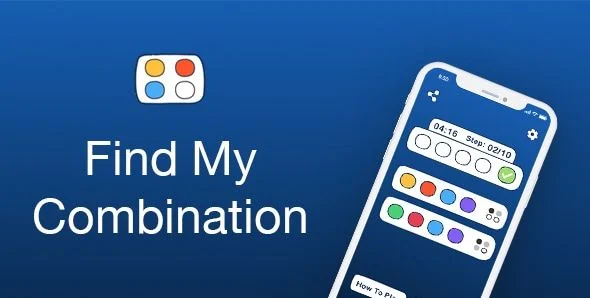
Find My Combination Overview & Game Logic Architecture
Find My Combination is a Java-based Android arcade puzzle source code, engineered for mobile developers and small studios to deploy a color-deduction guessing game with integrated AdMob monetization. The package resolves the common studio bottleneck of shipping a finished logic game from scratch by supplying a complete native codebase — Java classes, XML layout resources, and a compiled APK — authored in Android Studio v3.4.1 and verified against Android 9.0, 10.0, and 11.0 runtimes. In production workflows the project operates as a self-contained Android Studio module that can be imported, rebranded, connected to a publisher’s own AdMob identifiers, and compiled into a store-ready binary without additional backend engineering.
Technical Specifications & Deployment Matrix
| Engineering Metric | Deployment Specification |
|---|---|
| Base Technology / Framework | Native Android development in Java with XML layout resources, authored in Android Studio v3.4.1 |
| Runtime / Language Requirements | Android 9.0, Android 10.0, and Android 11.0 device runtimes; Java application layer |
| Data Exchange / Communication Protocols | AdMob SDK ad-request traffic over standard mobile network protocols |
| Front-End / Engine Dependencies | Android SDK toolchain, Gradle build system, and the AdMob advertising library |
| Database / Persistence Footprint | Round state is held in memory per session; no external database or server persistence layer is required |
Code-Deduction Game Loop & Execution Pipeline
The core mechanism is a hidden-combination deduction loop driven by a New Game initialization routine. When a player taps the New Game button, the activity generates a secret color sequence and resets the round counter, after which each submitted row of color choices is evaluated against the hidden combination for both color accuracy and positional placement. The interface tracks submissions on a 0/10 attempt scale, meaning a round concludes either when the player reconstructs the exact sequence or when ten failed guesses exhaust the allowance. Feedback is rendered back into the native XML view hierarchy after every submission, so the player continuously narrows the possibility space through logical estimation rather than random selection.
Because the package targets the kids and arcade segments, onboarding is handled by a built-in How To Play screen that explains the color-and-position rules before the first round begins. This reduces early abandonment among younger players who have not encountered deduction-style mechanics before. For teams assembling a broader mobile games portfolio on the Android platform, evaluating parallel titles such as RISKY ROOMS — a Buildbox 2 dungeon puzzle source with AdMob units and Google Play-ready builds — provides a comparison point for studios weighing multiple engine approaches within the same monetization model.
Core Technical Capabilities of Find My Combination
- Round State Engine: A New Game handler initializes the secret combination and resets the guess counter, enforcing a ten-attempt ceiling per round and re-rendering the board state through the activity lifecycle on every submission.
- Guided Onboarding Module: A dedicated How To Play screen documents the guessing rules inside the app itself, removing the need for external tutorial hosting or first-launch server content.
- AdMob Monetization Layer: The advertising SDK is wired into the project so publishers can insert their own ad unit identifiers and begin serving impressions once the application is recompiled.
- Native Source Deliverables: The distribution includes editable .java classes and .xml layouts alongside a compiled .apk, permitting direct device testing before any code modification takes place.
Production Implementation & Operational Resilience
Deployment begins by importing the project into Android Studio v3.4.1 or a compatible installation, running a Gradle sync, and replacing the placeholder AdMob application and ad unit identifiers with the publisher’s production values before generating a signed release APK or App Bundle. Verification should cover physical devices or emulators spanning API levels corresponding to Android 9.0 through 11.0, since those are the runtimes the original build was authored against. Behavior on Android 12 or later is outside the documented compatibility envelope and warrants regression testing before submission to modern store channels.
One operational boundary deserves attention: the project was authored on Android Studio v3.4.1, so opening it in considerably newer IDE versions may trigger Gradle and Android Gradle Plugin migration prompts that must be resolved before a clean build succeeds. The game itself carries no server dependencies — round logic, feedback rendering, and the tutorial screen all execute locally on the device, which keeps the runtime footprint confined to the application process and the AdMob network calls. Studios that also maintain a children’s learning lineup on a separate iOS track can treat Honey Word Puzzle Game as an independent SwiftUI word-title path for kids, without attempting to merge the two codebases across platforms.
Frequently Asked Questions
Does the download include a compiled APK in addition to the editable source files?
Yes, the deliverable contains a ready-to-install .apk file alongside the raw .java classes and .xml layout resources, allowing immediate on-device testing before any recompilation or rebranding work is performed inside Android Studio.
Is there an in-app tutorial that explains the rules to first-time players?
Yes, a dedicated How To Play guide is built directly into the interface, walking new users through the color-and-position guessing mechanic before their first round begins, which lowers onboarding friction for younger or first-time players.
Can the color palette and round parameters be modified after acquiring the package?
Yes, because the complete Java source and XML resources ship with the project, developers can adjust color definitions, layout markup, and gameplay values directly within Android Studio and then rebuild the application into a new binary.
Is the game positioned toward a specific player demographic?
Yes, the store listing tags the title within the kids, puzzle, and arcade categories, and its deduction mechanic is explicitly framed as a mindful exercise that trains estimation power during repeated rounds of play.
Hidden Camera Detector – CCTV Finder – Spy Camera Detector – Camera Finder – Anti Spyware Detector
Item Finder MarketPlace Full Android Application v1.19
Metal Stud Detector – Stud Finder – Light Detector – Metal Detector Finder – Wall Stud Finder