Eatery Pro – Responsive Restaurant WordPress Theme
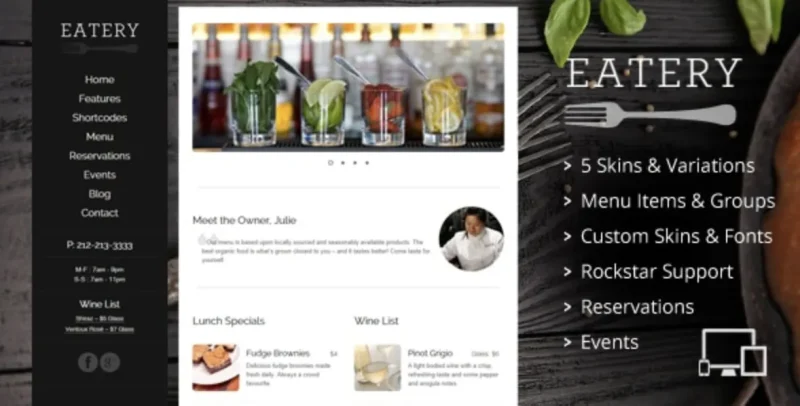
Eatery Pro Overview & Restaurant Content Architecture
Eatery Pro is a PHP, HTML5, and CSS3 restaurant WordPress theme engineered for agencies and freelance developers to launch dining, café, and pub websites with native menu, reservation, and event functionality. The package targets a recurring bottleneck in restaurant builds: its food-menu engine, reservation form, and contact form all ship as built-in shortcodes, removing the assembly and configuration of multiple third-party plugins for these core workflows. Within agency delivery, it operates as a self-contained production asset — six theme skins, WPML compatibility, and importable XML demo content support rapid client staging and multilingual rollouts.
Technical Specifications & Deployment Matrix
| Engineering Metric | Deployment Specification |
|---|---|
| Base Technology / Framework | WordPress theme (PHP, HTML5, CSS3, JS), classic TinyMCE content toolbar; Gutenberg not optimized |
| WordPress Version Support | WordPress 5.6.x through 6.2.x |
| Browser Compatibility | IE11, Chrome, Edge, Firefox, Safari, Opera |
| Localization / Data Layer | Fully translatable strings; WPML-tested multilingual pipeline; demo content XML import |
| Layout Engine | Responsive, semi-fluid, or fixed layout modes; 2-column structure; widget-ready regions |
| Deliverable Footprint | Layered PSD (all skins labeled), PHP/CSS/JS source files, documentation |
Food Menu Engine & Execution Pipeline
Menu rendering runs through a shortcode pipeline rather than hard-coded page templates. Food menu items are registered as an admin-manageable content type, filterable in the dashboard for efficient back-end sorting, then injected into any page, sidebar, or widget area via the food menu shortcode. Each site can host multiple distinct menus rendered in tabbed view, full view, or a combination, with an optional single-item click-through template that can be enabled or disabled globally.
The pricing layer supports up to five labeled values per item (for example Small, Large, Half, Glass), a global currency symbol positioned before or after the price, and per-item toggles that suppress prices or images entirely. Specials or any menu items can be surfaced directly in sidebar regions. A parallel events system adds date-managed listings on pages or through a sidebar widget, while the reservation form and contact form are native — no plugin dependency — with 12- or 24-hour clock options and a phone field. Because configuration flows through shortcodes inserted from the content toolbar, layout logic stays portable across pages rather than locked into a single template hierarchy. For teams standardizing on Elementor-based editing with WooCommerce storefronts, Restro – Restaurant Bar WordPress Theme exists as an independent theme option on a different editing stack.
Core Technical Capabilities of Eatery Pro
- Food Menu Shortcode Engine: Menu data, multiple price slots, currency placement, tabbed/full rendering, click-through templates, and sidebar specials are all controlled from shortcode parameters and theme options without custom PHP.
- Native Forms & Events Pipeline: Reservation and contact forms run entirely within the theme, and events publish to pages or widgets with configurable time formats.
- Layout Mode Switching: Responsive, semi-fluid, and fixed layout modes are selectable, and the slider accepts arbitrary dimensions on any page, plus a custom header image band option.
- Localization & WPML Layer: All strings are translation-ready, with WPML-tested behavior including corrected date localization on translated sites.
- Styling Subsystem: Six skins, Google Fonts with suggested pairings, font and sizing controls in Theme Options, and 18 social icons including restaurant-relevant networks.
Production Implementation & Operational Resilience
Deployment follows the standard WordPress theme upload path, followed by XML demo content import (a copy/paste demo alternative is also included) and skin selection. Because the theme is not Gutenberg-optimized, content editing should run through the classic editor, where the TinyMCE toolbar exposes shortcodes for sliders, photo galleries, audio and video embeds, columns, buttons, tabs, toggles, dropcaps, pullquotes, rulers, highlights, and Google Maps. Google Maps embeds depend on a configured Maps API key, reflecting the API requirement changes addressed in version 2.3 of the codebase; Google Analytics Universal tracking is wired through theme options. Resilience measures include a corrected XSS vulnerability in the prettyPhoto lightbox, enhanced child theme support for secondary development, per-page hide/show controls for page titles, and a custom logo option with unrestricted height. The layered PSD supports design-stage customization before changes are ported into theme options. For dining brands where menu storytelling and booking flows call for a different visual direction, Basilico | Restaurant & Cafe WordPress Theme stands as a separate theme-level alternative rather than a merged component.
Frequently Asked Questions
Does the download include layered design source files for a custom design workflow?
Yes. The package ships a layered PSD file labeled with all six theme skins, alongside the PHP, CSS, and JS source files and importable XML demo content for staging a populated site quickly.
Can the food menu suppress prices and images on individual items?
Yes. Pricing display can be toggled per item or across all items, images can be applied to all, some, or no menu entries, and up to five labeled price values per item are supported with configurable currency placement.
Is the theme optimized for the WordPress block editor?
No. The theme is explicitly not Gutenberg-optimized; its shortcode toolset is inserted through the classic TinyMCE content toolbar, so production editing should run in the classic editor environment.