Digon | Photography Theme for WordPress
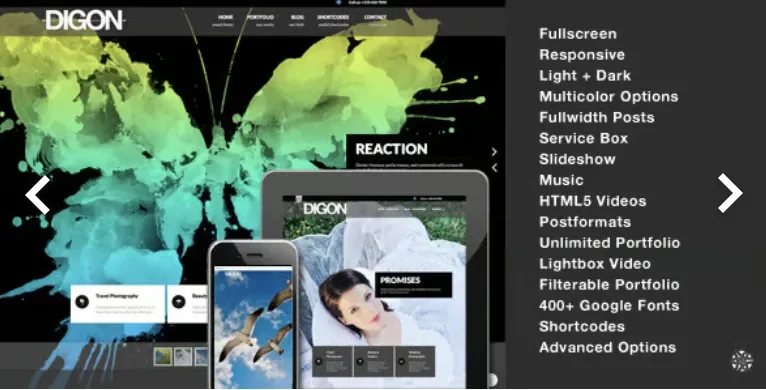
Digon Photography Theme Overview & Fullscreen Studio Presentation Layer
Digon Photography Theme is a responsive fullscreen WordPress theme engineered for photographers and creative studios to publish portfolio-driven sites with fullwidth visual presentation. The package resolves the bottleneck of media-heavy display by routing fullscreen slideshows, self-hosted HTML5 video powered by VideoJS, and Vimeo or YouTube background video through a single templating engine, with per-page password protection applied at the fullscreen, portfolio, and page level. Within agency delivery workflows it operates as the presentation layer of a self-hosted WordPress build: install the theme, import the bundled XML demo data, and configure layouts, skins, and typography through advance theme options without editing template files.
Technical Specifications & Deployment Matrix
| Engineering Metric | Deployment Specification |
|---|---|
| Base Technology / Framework | WordPress theme package (PHP, CSS, JS) with layered PSD source files included |
| Runtime / Version Requirements | WordPress 3.8 through 4.8.x; browsers IE8, IE9, IE10, IE11, Firefox, Safari, Opera, Chrome |
| Data Exchange & Localization | WPML compatible, internationalization ready, XML demo data import, theme options import/export |
| Front-End Dependencies | Supersized slideshow engine, VideoJS, Tubular JS for YouTube, FlexSlider, Quicksand filtering, prettyPhoto lightbox, jPlayer audio |
| Persistence Footprint | WordPress database via Portfolio custom post type, multiple widget sidebars, theme options storage |
Fullscreen Rendering Engine & Template Pipeline
The core mechanism is a template-hierarchy override system that maps fullscreen, portfolio, and blog contexts onto dedicated PHP includes.
Inbound page requests are resolved against WordPress template hierarchy rules, then dispatched to fullscreen page templates that support captioned and uncaptioned modes, per-page audio activation, and video headers sourced from self-hosted HTML5 files, Vimeo, or YouTube. The fullscreen mainpage renders service boxes that respond to hover events by revealing their representing image, an interaction pattern that keeps the landing viewport free of clutter until the visitor signals intent. Portfolio content lives in a custom post type with its own taxonomy lister page, and Quicksand-driven filtering animates 1, 2, 3, or 4 column portfolio grids without page reloads. Blog output splits into fullwidth lists and 2-column sidebar layouts, with separate post list templates for each post format—standard, gallery, image, video, audio, quote, aside, and link. A shortcode generator embedded in the editor emits lightbox-enabled blocks in small, medium, and large portfolio sizes, plus audio, slideshow, and responsive Google Maps shortcodes. Extending shortcode coverage beyond the bundled generator, the plugin-layer module WP Shortcodes Plugin – Shortcodes Ultimate runs alongside the theme for teams that need a broader component library during content production.
Core Technical Capabilities of Digon Photography Theme
- Fullscreen media pipeline: Supersized slideshows, VideoJS HTML5 playback, Tubular-powered YouTube backgrounds, and per-page audio are wired through registered script and style enqueues, with touch swipe support added for mobile slideshow navigation.
- Portfolio custom post type architecture: Dedicated post type with taxonomy lister, attachment thumbnails, slideshow/image/video headers, related portfolio blocks, and password-protected portfolio entries handled natively by WordPress authentication.
- Advance theme options with import/export: Color pickers drive light and dark skin variations across multiple color schemes, a 400-plus Google font selector controls typography, and settings can be exported between staging and production environments.
- Widgetized sidebar layer: Multiple sidebars support address blocks, social icons, Flickr gallery, Twitter (API 1.1 widget), recent posts, popular posts, and video widgets, plus left-sidebar page and contact templates.
Production Implementation & Operational Resilience
Deployment follows the standard theme activation path, and the included 73-page PDF help guide documents the build sequence with screenshots, while the XML demo data file reproduces the reference site structure so agencies can start from a populated state rather than empty post tables. Theming decisions are centralized in the options framework rather than hardcoded stylesheets, which keeps client-specific color schemes and font pairings transferable via the import/export mechanism when migrating between staging and live servers. Error handling surfaced in the changelog shows browser-specific hardening: the Quicksand filter received a dedicated IE10 fix, fullscreen slideshow titles were corrected for WordPress 3.5 rendering, and the lightbox received a responsive rewrite for mobile viewports. Operational boundaries are explicit: the compatibility matrix terminates at WordPress 4.8.x, the package is not Gutenberg-optimized, and demo images purchased from Photodune, music from DanoSongs, and Blender Foundation videos are excluded from the download, so production media must be sourced separately. For studios evaluating a decoupled design path outside the PHP theme runtime, Rayan exists as an independent Elementor Template Kit covering comparable photography and portfolio use cases. Agencies that require photo proofing and premium gallery workflows on the same WordPress platform can also adopt Grand Photography WordPress Pro as a parallel theme package during project scoping. Customization within Digon itself stays inside the options layer, shortcode generator, and the layered PSD files supplied for design reference.
Frequently Asked Questions
Are the photographs, music, and videos shown in the demo included in the download package?
No. All demo images were purchased from Photodune, music comes from DanoSongs, and videos belong to the Blender Foundation; none of these assets ship with the theme, so production media must be licensed separately.
Can fullscreen pages and portfolio entries be password protected without installing an additional plugin?
Yes. Password protection is built into the fullscreen page templates and the portfolio custom post type, relying on native WordPress authentication rather than any third-party membership or access-control plugin.
Does the theme support WordPress 5.x and Gutenberg block editing?
No. The official compatibility matrix covers WordPress 3.8 through 4.8.x and the package is explicitly listed as not Gutenberg-optimized, so current-core deployments should be validated on a staging environment before production rollout.