Dentcys – Dental Clinic Elementor Template Kit
Dentcys Dental Clinic Elementor Template Kit Overview & Front-End Layout Architecture
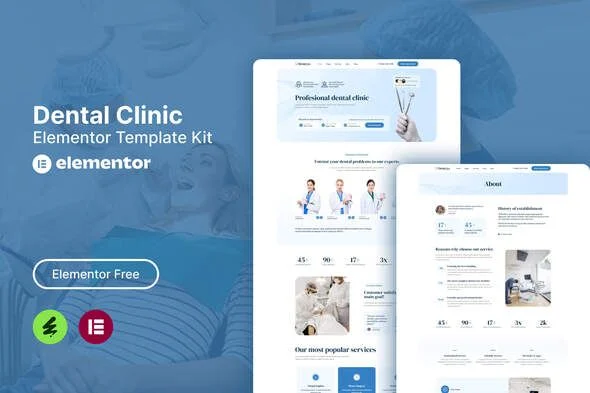
Dentcys Dental Clinic Elementor Template Kit is an Envato Template Kit built for the Elementor page builder, engineered for dental clinics, dentistry practices, and health-center agencies to launch a patient-facing website without writing code. The package removes the layout bottleneck of composing dental service, team, and appointment pages from a blank canvas by shipping pre-built structures that deserialize directly into the Elementor editor as editable content. Within agency delivery workflows, it operates as a drop-in page-content layer optimized for the free Hello Elementor theme, covering the full patient-acquisition funnel from service presentation through appointment intake.
Technical Specifications & Deployment Matrix
| Engineering Metric | Deployment Specification |
|---|---|
| Base Technology / Framework | Elementor 3.10.x page builder; Envato Template Kit distribution format containing page content, not a standalone WordPress theme |
| Runtime / Environment Requirements | WordPress installation running the free Hello Elementor theme; compatible with most themes that support Elementor rendering |
| Data Exchange / Import Protocol | Compressed kit archive uploaded via the Envato Elements plugin (Elements > Installed Kits); no manual unzip required |
| Front-End / Plugin Dependencies | Elementor (free), The Plus Addons for Elementor, Ultimate Addons for Elementor Lite, MetForm, Icon Element |
| Persistence / Storage Footprint | No custom database tables or backend writes; imported layouts persist as standard Elementor page content within WordPress |
Template Composition & Dental Practice Delivery Pipeline
The core mechanism is a one-way import pipeline: the Envato Elements plugin ingests the kit archive and materializes each layout inside the Elementor editor. Before any import runs, clicking the Install Requirements button provisions the five dependent plugins, ensuring widget and form renderers are active when layout data arrives. Each content template—Home, About, Services, Team, FAQ, Facilities, Appointment, Blog, Single Blog, and Contact—imports as an editable page, while the Header and Footer blocks attach to the site’s global chrome regions.
Form capture follows a separate binding sequence. After importing a MetForm template, the practice edits the target page in Elementor, clicks the MetForm widget in the intended column, creates a new form, then pulls the imported template from the My Templates tab via the grey folder button and inserts it. This maps appointment, contact, and newsletter fields to pre-configured widgets without a single line of custom form code.
Core Technical Capabilities of Dentcys
- Full-funnel page inventory: Sixteen ready templates—ten content pages, global Header/Footer chrome, and four form modules—map the complete patient journey from first visit to booked consultation.
- MetForm appointment pipeline: Contact, Newsletter, Appointment, and Appointment-landing forms bind through widget-level template insertion, converting patient scheduling into configured front-end capture instances.
- Global design tokens: Typography and color values resolve through Elementor’s global settings, so a single token adjustment propagates across every imported container without per-section restyling.
- Responsive container architecture: Layouts ship with viewport-adaptive behavior embedded in the kit’s structure, so dental pages reflow across mobile and desktop resolutions without breakpoint rework.
Production Implementation & Operational Resilience
For staging and client deployments, the primary environmental constraint is PHP memory allocation. Deserializing large layout payloads while activating five plugins in a single pass can exhaust low default wp_memory_limit values on shared hosting, so raising the limit before import is a sensible precaution. The documented procedure also advises against importing more than one template at a time; sequential imports prevent payload collisions and yield the most reliable results. If an import or edit fails, the fallback support path lives under Elementor > Get Help in the WordPress menu.
Customization boundaries are defined by the Elementor editor itself. Style overriding happens through global tokens and per-widget settings, and asset replacement is limited to swapping the placeholder imagery: demo images originate from an Envato Elements collection and carry no transferable rights, so production sites must substitute licensed or practice-owned photography. No server-side extension points, hooks, or child-theme mechanisms exist because the kit is pure page content rather than theme code.
Where a practice outgrows kit-level layouts and needs theme-level control over templates and hierarchy, Mediverse – Health Medical Clinic WordPress Theme exists as an independent theme-route alternative for clinic deployments on the same platform.
Operational layers that sit entirely outside the Elementor runtime—such as internal patient-data administration—are a different engineering problem. For decoupled implementations beyond the public website, Doclinic – Medical Responsive Bootstrap Admin Dashboard provides a standalone custom-code dashboard path built on a separate Bootstrap stack.
Frequently Asked Questions
Does Dentcys require a paid Elementor Pro license to run its layouts and forms?
No, the kit runs entirely on free plugins—Elementor free, The Plus Addons for Elementor, Ultimate Addons for Elementor Lite, MetForm, and Icon Element—so no paid page-builder subscription is required to import, edit, or publish any included template.
Can every template in the kit be imported simultaneously in one batch operation?
No, the documented procedure advises against importing more than one template at a time; sequential imports through the Envato Elements plugin prevent payload conflicts and produce the most reliable layout deserialization results across pages, headers, and forms.
Are the demo images displayed in the kit licensed for live production use?
No, demo imagery is sourced from an Envato Elements collection and ships without transferable usage rights; production deployments must either license those images from Envato Elements or replace them with practice-owned photography before publishing.