Cybra – Digital Cyber Security Elementor Template Kit
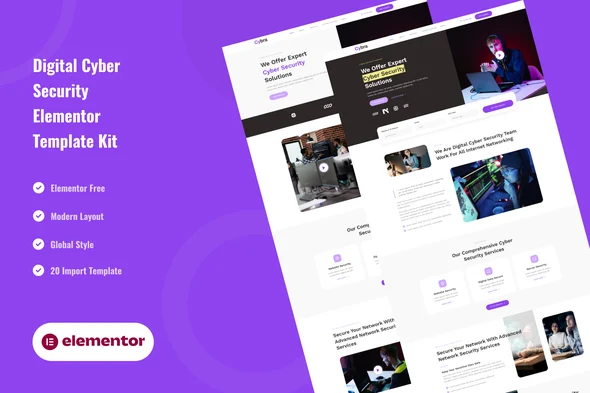
Cybra Digital Cyber Security Elementor Template Kit Overview & Architectural Role
Cybra Digital Cyber Security Elementor Template Kit is an Envato-format Elementor kit built for cybersecurity firms, IT protection consultants, and digital defense service providers who need to publish a structured, conversion-oriented website without writing code. The kit removes the bottleneck of translating security-sector credibility into a coherent page system by supplying 21 import-ready layouts—two homepage variants, service detail pages, pricing packages, testimonials, galleries, FAQs, and a 404 page—delivered as JSON layout data rather than as a WordPress theme. Within agency workflows it operates as a portable layout layer that renders through the Elementor engine, works with most themes, and is tuned for the free Hello Elementor theme.
Technical Specifications & Deployment Matrix
| Engineering Metric | Deployment Specification |
|---|---|
| Base Technology / Framework | Envato Template Kit running on Elementor 3.10.x (free version; no Pro upgrade required) |
| Runtime / Environment Requirements | WordPress with the Envato Elements plugin; optimized for the Hello Elementor theme |
| Data Exchange / Import Protocol | Zip kit archive uploaded via Elements > Installed Kits or pulled through a connected Elements subscription |
| Front-End / Engine Dependencies | ElementsKit Lite and MetForm, both installed through the Install Requirements prompt |
| Persistence Footprint | Templates stored under Elementor > Templates > Saved Templates; no external database layer |
JSON Layout Architecture & Global Design Token Pipeline
The core mechanism distributes every page as a structured JSON layout payload that the Envato Elements plugin parses and converts into native Elementor widget trees. The import sequence is deterministic: upload the unzipped kit archive, acknowledge the orange banner to install ElementsKit Lite and MetForm, import the Global Kit Styles first, then import remaining templates one at a time. Each imported document lands in the Saved Templates library, where new pages pull layouts through the My Templates tab after the page is switched to Elementor Full Width with the native page title hidden.
Visual consistency is governed by the Global Style Kit, which centralizes typography scales and the purple-based color palette as editable design tokens; a single token adjustment propagates across all 21 templates instead of requiring per-section edits. Global headers and footers are assigned sitewide through the ElementsKit Header Footer module, while form logic—contact, question, subscribe, and analyze flows—is carried by four bundled MetForm templates inserted via the Navigator, Edit Form, and My Templates pathway. Agencies standardizing on this import runbook across verticals can reuse the identical deployment sequence for unrelated kits such as Nutrithy – Healthy Food & Nutrition Elementor Template Kit, collapsing cross-client onboarding documentation into a single repeatable procedure.
Core Technical Capabilities of Cybra
- 21 JSON layout documents: Two homepages, About Us, Team, Services, Service Detail, Pricing, Contact, Testimonials, Gallery, FAQs, 404, Blog, Single Post, style kit, header and footer blocks, plus four MetForm templates, all importable without Pro-tier widgets.
- Global design token system: The Global Style Kit exposes site-wide typography and color variables, so brand changes require token-level edits rather than per-page manual restyling.
- ElementsKit sitewide chrome: Header and footer blocks attach through the Header Footer module with an Entire Site activation toggle, decoupling site chrome from any single page template.
- MetForm data-capture layer: Contact, question, subscribe, and analyze forms are prebuilt form templates that bind to pages through the widget’s template insertion flow.
- Multi-breakpoint rendering: Sections adapt across desktop, tablet, and smartphone viewports with consistent layout fidelity, and markup renders consistently across major browsers.
Production Implementation & Operational Resilience
In client staging environments, import one template per operation rather than batching, since each JSON payload triggers widget-tree reconstruction and plugin dependency checks that consume PHP memory; verify adequate wp_memory_limit headroom before beginning a full 21-template import on constrained shared hosting. Elementor Pro installations gain an alternative chrome-management route: headers and footers can be routed through the Theme Builder instead of ElementsKit, so the kit accommodates both free-stack and Pro-stack agency configurations without layout rework.
Two operational boundaries deserve pre-deployment attention. First, the demo imagery referenced by the live preview comes from an Envato Elements collection; those assets are not cleared for production reuse and must either be acquired under a separate Envato Elements entitlement or replaced with client-owned media before launch. Second, page setup depends on two explicit settings—Elementor Full Width and hidden page title—applied through the builder’s gear icon; skipping them produces misaligned hero sections and duplicated titles. When a security client’s scope widens into content marketing and lead generation, agencies commonly pair the kit build with MaxReach – SEO & Digital Agency WordPress Theme, which supplies the full-theme infrastructure—search-optimized landing systems and case-study layouts—that a layout-only kit intentionally does not provide. Troubleshooting guidance for the import pipeline is reachable through the Elementor > Get Help menu inside WordPress.
Frequently Asked Questions
Does Cybra require an Elementor Pro subscription to render all included layouts?
No, the kit runs entirely on the free Elementor 3.10.x engine and requires no Pro upgrade; every widget, section, and MetForm block imports and renders without gated Pro widgets, keeping deployment dependencies limited to the kit itself.
Are the header and footer configurable without Elementor Pro’s Theme Builder?
Yes, Cybra ships global header and footer blocks managed through the ElementsKit Header Footer module; you create a new element, select Entire Site, toggle activation on, then import the header template through the gray folder icon to apply it sitewide.
Which plugins does the kit install automatically during import?
Yes, when the orange banner appears during kit import, clicking Install Requirements deploys ElementsKit Lite and MetForm directly; both run in free mode and power the menu blocks, site chrome, and the four MetForm templates bundled inside the package.
Does the package include a 404 error page and multiple homepage variants?
Yes, the 21 import-ready templates cover two distinct homepage designs, a dedicated 404 error page, single post layouts, team and gallery pages, plus the global style kit, giving a full information architecture for a security services site.
Can the demo imagery from the live preview be deployed on a client site as-is?
No, the preview images come from an Envato Elements collection and are not bundled for production reuse; each must be acquired under a separate Envato Elements entitlement or replaced with client-owned assets before the site goes live.