Nutrithy – Healthy Food & Nutrition Elementor Template Kit
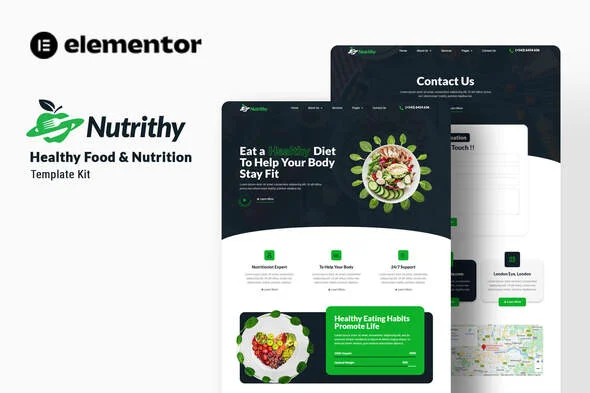
Nutrithy Healthy Food & Nutrition Elementor Template Kit Overview & Layout Composition Architecture
Nutrithy Healthy Food & Nutrition Elementor Template Kit is an Envato Template Kit engineered for nutritionists, dietitians, catering services, and wellness brands to assemble a complete Elementor website without hand-building individual layouts. The kit addresses the blank-canvas bottleneck by shipping eleven pre-structured templates—Home, About Us, Team, Services, Benefit, plan, FAQs, Blog, Single Blog, 404, and Contact Us—as portable layout content rather than a full theme package. Within agency delivery workflows it operates as an import-ready content layer that installs through the Envato Elements plugin and renders on the free Hello Elementor theme or most Elementor-compatible alternatives.
Technical Specifications & Deployment Matrix
| Engineering Metric | Deployment Specification |
|---|---|
| Base Technology / Framework | Elementor 3.10.x page builder; Envato Template Kit format, not a WordPress theme |
| Runtime / Theme Requirements | WordPress with the free Elementor plugin; optimized for Hello Elementor, compatible with most Elementor-supporting themes |
| Data Exchange Protocol | Zip-packaged kit file uploaded via the Envato Elements plugin under Elements > Installed Kits |
| Front-End Plugin Dependencies | Elementor, ElementsKit Lite, Jeg Elementor Kit, Metform |
| Persistence Footprint | Imported layouts stored under Templates > Saved Templates; no theme-level files ship with the kit |
| Typography Stack | Lato and Roboto, bound to Global Kit Styles design tokens |
Template Import Pipeline & Layout Execution Mechanics
Nutrithy executes as a set of JSON layout payloads that the Envato Elements plugin parses and converts into native Elementor widget trees at import time. Sequence determines the outcome: the Global Kit Styles file must be imported first so typography and color tokens cascade into every subsequent template; skipping that step leaves widgets rendering with default styles. Imported pages appear under Templates > Saved Templates, ready for insertion into a new page after switching page settings to Elementor Full Width and hiding the native title through the gear icon panel. Form handling flows through Metform: once the metform block template is imported, right-clicking the page opens the Navigator, the Metform widget is selected, and the stored form template inserts through the My Templates tab of the form builder. Header and footer regions render separately through the Jeg Elementor Kit Header Template module, where an All Site condition publishes the global chrome. Teams running parallel culinary engagements can reuse this same pipeline with Delitruck, a food truck and restaurant kit that follows the identical Envato Elements upload and import sequence.
Core Technical Capabilities of Nutrithy
- Global design token cascade: Lato and Roboto typography plus the color palette bind to Global Kit Styles, so a single token edit propagates across all eleven imported templates instead of requiring per-widget changes.
- Metform form pipeline: Contact and inquiry forms import as block templates, attach to the Metform widget via the Navigator, and persist edits through the Update & Close cycle inside Elementor.
- Conditional header and footer rendering: Jeg Elementor Kit applies an All Site display condition to header templates, decoupling global chrome from individual page layouts.
- Full page-set coverage: Eleven discrete importable templates spanning home, about, team, services, benefits, plans, FAQs, blog, single post, 404, and contact let teams stage pages selectively.
Production Implementation & Operational Resilience
Deployment starts by installing the Envato Elements plugin from the Plugins > Add New screen and uploading the kit archive without extraction. The orange banner at the top of the Installed Kits screen must be cleared through Install Requirements before any import, because missing plugin dependencies leave ElementsKit and Metform components rendering as broken widgets. Importing one template at a time keeps each JSON payload within typical PHP memory allocations; on shared hosting where wp_memory_limit is low, raising the allocation beforehand prevents partially written layouts. Each new page must be set to Elementor Full Width with the page title hidden through the gear icon settings, or native theme chrome wraps the containers and distorts spacing.
Customization operates within defined boundaries: color and typography adjustments should target the imported Global Kit Styles tokens rather than individual widget overrides to keep all eleven templates visually consistent. Demo imagery originates from Envato Elements, so image usage rights must be secured or assets replaced before a client handover. Where a project requires a complete theme architecture with the native WordPress template hierarchy instead of kit-based content, HealthFirst addresses nutrition and recipe workflows at the theme layer. Elementor Pro subscribers gain an additional path, customizing headers and footers under Theme Builder instead of the Jeg Elementor Kit module.
Frequently Asked Questions
Does Nutrithy function as a standalone WordPress theme?
No, the kit ships page content for the Elementor page builder only and requires a host theme; the free Hello Elementor theme is the optimized pairing, though most themes supporting Elementor will render the layouts correctly.
Should the downloaded kit archive be extracted before upload?
No, the archive must be uploaded intact through the Envato Elements plugin under Elements > Installed Kits; extracting it beforehand breaks the Upload Template Kit flow and prevents the plugin from reading the packaged layout files.
Can contact forms be attached through the Metform widget?
Yes, after importing the metform block template, open the page in the Elementor editor, enable the Navigator through a right-click, select the Metform widget, and insert the stored form via the My Templates tab before updating.
Does the import flow handle plugin dependencies automatically?
Yes, the orange banner at the top of the Installed Kits screen exposes an Install Requirements action that loads Elementor, ElementsKit Lite, Jeg Elementor Kit, and Metform before the first template import executes on the site.
Are the bundled demo images cleared for production use?
No, demonstration imagery is sourced from Envato Elements, so image usage rights must be obtained separately or the assets swapped with your own photography before the site is deployed to a live public production environment.