Crazy Fishing HTML5 Game Construct 2/3
Crazy Fishing Overview & Arcade Source Architecture
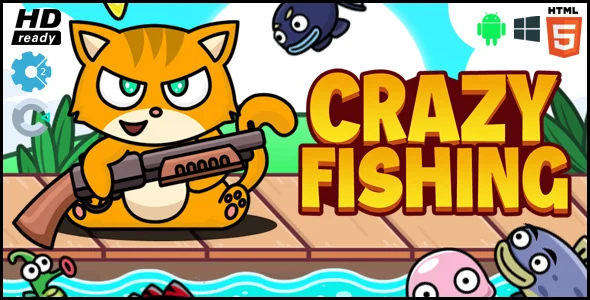
Crazy Fishing is a Construct 2/3 HTML5 arcade game source package, engineered for casual-game studios and independent developers who need a physics-driven, portrait-format fishing shooter deployable across desktop and mobile browsers. The package removes the cost of authoring event logic, projectile physics, and a 20-plus-item upgrade economy from scratch by shipping complete, commented project files for both engine generations. Within agency and production pipelines, it operates as a reskinnable release base for arcade portfolios, playable web campaigns, and native webview distribution.
Technical Specifications & Deployment Matrix
| Engineering Metric | Deployment Specification |
|---|---|
| Base Technology / Framework | Construct 2 and Construct 3 event-sheet engine |
| Runtime / Browser Matrix | HTML5 + JavaScript; verified on IE6 through IE11, Firefox, Safari, Opera, Chrome, and Edge |
| Display / Viewport | HD 720x1280px, portrait orientation |
| Input Layer | Unified touch and mouse control handling |
| Source Deliverables | JavaScript JS, HTML, layered PNG; .capx and .c3p project files plus modification documentation |
| Engine Dependencies | Required third-party plugins bundled inside the source package |
Physics-Driven Catch Loop & Upgrade Execution Pipeline
The core mechanism is a drop-and-shoot catch loop: the player lowers a hook, fires at passing sea life, and banks coins that feed a persistent upgrade tree. Input events dispatch through the Construct event sheet into the integrated physics engine, where hook descent, projectile trajectories, and sprite collisions are resolved each tick on the HTML5 canvas. Validated collisions emit coin rewards into the run economy, and those coins unlock gear tiers that mutate runtime variables — line length extends reachable depth, gun tiers widen destructive output, and support items clear obstacles on the route to the seabed treasure.
Because every upgrade is expressed as editable values inside the event sheet rather than hard-coded branches, tuning difficulty curves requires no structural re-architecture. Sound calls route through the engine’s native audio system, while the fixed 720×1280 canvas keeps sprite atlases and collision boxes pixel-consistent across devices. For teams weighing standalone collections built outside the Construct runtime, Game Bundle 1 operates as a separate HTML5 mobile-game package with its own deployment profile.
Architectural & Functional Highlights
- Physics-driven catch pipeline: hook descent and projectile behavior run through Construct physics behaviors, producing trajectory-based gameplay rather than scripted animation sequences.
- Data-driven upgrade economy: more than 20 upgrades modify measurable runtime variables — line distance, weapon tier, and support items — directly from the event sheet.
- Dual-runtime source parity: parallel .capx and .c3p projects let teams continue development in either engine generation without a manual port.
- Unified input abstraction: touch and mouse events feed the same control handlers, so a single build serves mobile and desktop sessions.
Production Implementation & Operational Resilience
Deployment follows a standard Construct export: the compiled HTML/JavaScript output uploads to any static host and executes without server-side processing, since all game state lives client-side. The portrait viewport should be preserved in host-page CSS to avoid letterboxing, and audio playback initializes after the first user interaction to comply with modern browser autoplay gates. For distribution beyond the web, the cross-platform export path supports wrapping the build inside native webview containers for app-store delivery.
Reskinning is bounded to the asset layer: layered PNG sources allow sprite replacement without touching event logic, and the well-organized, commented project structure shortens the ramp for developers inheriting the codebase. Bundled third-party plugins remove a common build-breaker — no external plugin acquisition is needed before compilation. One operational boundary deserves emphasis: the architecture targets portrait exclusively, so landscape reorientation would require layout rework rather than a configuration change. For decoupled implementations on a different engine stack, Knife Shot demonstrates a comparable arcade loop authored in Phaser 3 as an independent codebase.
Frequently Asked Questions
Does the game support landscape orientation?
No. The viewport and layout system are engineered for portrait at 720x1280px; adapting to landscape would require reworking layouts rather than toggling a project setting.
Are both Construct 2 and Construct 3 project files included in the package?
Yes. The deliverables contain a .capx file for Construct 2 and a .c3p file for Construct 3, so development can continue in either engine without a manual conversion step.
Can the artwork be replaced without editing the event logic?
Yes. Graphics arrive as layered PNG files, and the included modification documentation plus commented source files guide sprite swaps that leave the event sheets untouched.
Do the third-party plugins require separate acquisition before building?
No. All required third-party plugins ship inside the source package, so the project compiles from the delivered files without additional plugin downloads.