Capie – Minimal Creative WooCommerce WordPress Theme
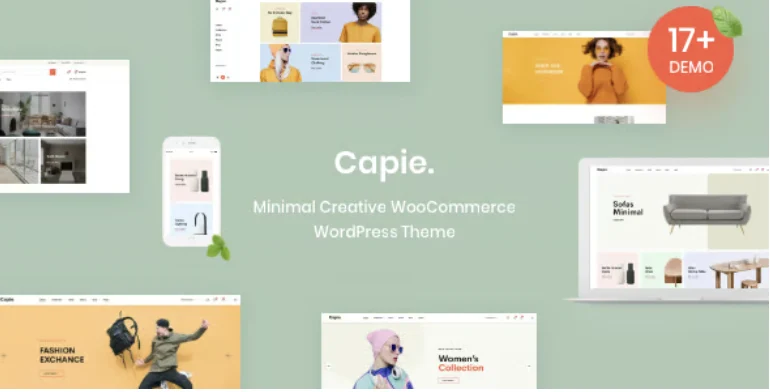
Capie Minimal Creative WooCommerce WordPress Theme Overview & Storefront Rendering Foundation
Capie is a minimalist WooCommerce WordPress theme built on PHP, HTML5, CSS3, and Bootstrap, engineered for store owners and agencies launching furniture, fashion, watch, accessories, cosmetics, and bookstore catalogues. The package resolves the bottleneck of hand-coding storefront components by shipping 17+ prebuilt homepage layouts, a header builder, a footer builder, and Revolution Slider-driven hero sections that install through one-click demo import. Within agency delivery pipelines, it operates as a production-ready storefront foundation whose typography, colors, and backgrounds are adjusted through Theme Options rather than direct template edits.
Technical Specifications & Deployment Matrix
| Engineering Metric | Deployment Specification |
|---|---|
| Base Technology / Framework | WordPress theme (PHP files), Bootstrap framework, HTML5 and CSS3 with CSS3 animations |
| Runtime / Compatibility Range | WordPress 5.0.x through 6.9.x; browsers IE11, Firefox, Safari, Opera, Chrome, Edge |
| Commerce Engine Dependency | WooCommerce 3.6+ through 10.x.x; Gutenberg optimized; Elementor compatible |
| Data Exchange / Interaction Layer | Ajax add-to-cart, wishlist, compare, quickview; live search with autocomplete; WPML multilingual support with .pot translation file |
| Deliverable File Footprint | PHP, HTML, CSS, and JS files; widget-ready regions; demo content importable in one click |
Template Hierarchy, Builder Integration & Storefront Execution Pipeline
Capie renders storefront pages by overriding the WordPress template hierarchy with WooCommerce-aware PHP templates. When a shopper requests a product archive or single-product URL, the engine resolves the matching template override, enqueues its Bootstrap-based CSS and JS assets, and delegates content regions to Elementor or Gutenberg depending on how the page was composed. Four or more product detail layouts and four or more shop layouts give merchandisers distinct structural variants for catalog presentation without touching code. The active release (v1.0.58) continues a patch history of WooCommerce, security, and font updates stretching back to the initial May 2019 build, which indicates an actively maintained codebase rather than a frozen one.
Commerce interactions run through an asynchronous layer: add-to-cart, wishlist, compare, and quickview operations dispatch Ajax requests that update cart state without a full page reload, keeping the DOM tree intact and limiting layout shifts during shopping flows. Variable products expose color attribute swatches directly in listing contexts, and shop archives toggle between grid view and list view. A sticky menu plus megamenu and multi-level dropdown system governs navigation depth, while live search queries product data with autocomplete as the visitor types. Blog content renders through two template modes, grid and list, and social sharing features attach distribution actions to posts and products.
Core Technical Capabilities of Capie
- Header and Footer Builders: five header styles and five footer styles are assembled through builder interfaces instead of hand-edited PHP partials, allowing each demo variant to carry distinct navigation and footer geometry.
- Ajax Commerce Layer: cart, wishlist, compare, and quickview requests execute without page reloads, reducing round-trip friction in high-traffic catalog browsing and checkout preparation.
- Typography and Color Control: system fonts and Google fonts, plus unlimited colors and backgrounds, are configured through Theme Options, decoupling visual identity changes from template source edits.
- One-Click Demo Import: demo content for the 17+ homepage layouts deploys in a single action, collapsing multi-day staging setup into minutes for agency client previews.
- Slider System: five distinct homepage sliders powered by Revolution Slider provide configurable hero presentation layers across the bundled demos.
For fitness-vertical retail deliverables that fall outside this theme’s furniture and fashion demo set, Deadlift Pro exists as a separate WooCommerce-supporting WordPress theme within the same deployment class.
Production Implementation & Operational Resilience
Deployment on a staging or client production server starts with the one-click demo import, which populates products, menus, and widget regions so agencies can present a working storefront before content replacement begins. Visual rebranding then happens entirely in Theme Options: fonts, colors, and backgrounds are redefined there, which keeps palette changes isolated from template internals and survivable across routine patch installations. Browser coverage spans IE11, Firefox, Safari, Opera, Chrome, and Edge, and the responsive layout adapts across mobile, tablet, and desktop viewports; the mobile sidebar menu received its own revision in the v1.0.8 update cycle, reflecting attention to small-screen navigation behavior.
Operational boundaries worth noting before launch: the five homepage sliders depend on Revolution Slider, so environments lacking that plugin lose the hero variants while the rest of the layout system continues functioning. WooCommerce compatibility extends from version 3.6 through the 10.x series, and the theme is Gutenberg optimized alongside its Elementor support, giving two viable page composition paths. Multilingual storefronts are handled through a bundled .pot file for string translation or through WPML for full multilingual catalog operation, which matters for cross-border furniture and fashion retailers managing parallel language trees. Validated HTML5 output keeps markup predictable for downstream caching and optimization layers, and the SEO-optimized structure gives indexing crawlers a clean document hierarchy. On the agency side, where non-commerce client briefs appear alongside retail projects, Burido serves as an independent minimal multipurpose WordPress theme covering portfolio and corporate builds without WooCommerce overhead.
Frequently Asked Questions
Does the package include raw source files rather than compiled bundles only?
Yes, the ThemeForest deliverable contains PHP files, HTML files, CSS files, and JS files, giving developers direct access to template markup, stylesheet logic, and JavaScript behavior for debugging and secondary development work.
Can the full demo content be installed without manual database seeding?
Yes, demo content is available through one-click import, which provisions the 17+ homepage layouts, menus, and widget configurations so a working storefront replica exists immediately after theme activation on a fresh WordPress installation.
Is the theme prepared for multilingual storefront deployment out of the box?
Yes, Capie ships translation-ready with a .pot file and supports WPML for multilingual operation, allowing furniture, fashion, and bookstore catalogs to run parallel language versions under a single WordPress installation.
-
1.0.58 LatestNov 2, 2026