BuildPress — Multi-purpose Construction and Landscape WordPress Theme
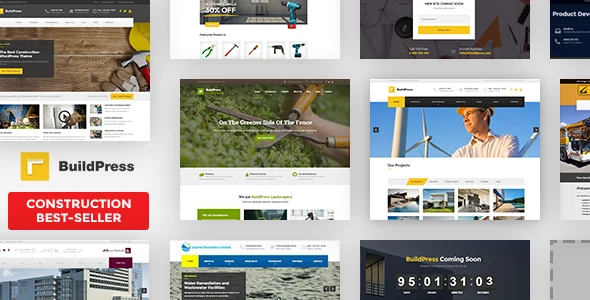
BuildPress Overview & Multi-Purpose Design Framework
BuildPress is a multi-purpose WordPress theme engineered for construction firms, contractors, and landscaping businesses that need project portfolios, service catalogs, and inquiry pipelines without custom development. The package addresses a recurring industry bottleneck — assembling trade-specific layouts from generic corporate templates — by shipping four pre-built variants: BuildPress Classic, BuildPress Light, Landscape, and RTL, all driven by Elementor with Page Builder by SiteOrigin support retained. In agency staging and production workflows, it functions as a deployable design framework that shortens the path from installation to a client-facing construction website.
Technical Specifications & Deployment Matrix
| Engineering Metric | Deployment Specification |
|---|---|
| Current Release | v6.2.2 |
| Base Framework | Underscores starter framework |
| WordPress Compatibility | 6.0.x through 7.0.x |
| Page Builder Engines | Elementor, Elementor Pro, Page Builder by SiteOrigin; Visual Composer supported but not bundled |
| Commerce Layer | WooCommerce 6.x.x and 7.x.x |
| Multilingual & Direction Support | WPML compatible; 8 bundled translations; automatic RTL activation |
| Browser Targets | Firefox, Safari, Opera, Chrome, Edge |
| Layout & Resolution | Responsive layout, high-resolution assets, 4+ column structures |
| Widget Architecture | Widget-ready with custom widgets and configurable sidebars |
| Distributed Files | PHP files, CSS files, JS files |
| Block Editor Status | Not Gutenberg-optimized; builder-driven composition expected |
Rendering Architecture & Execution Pipeline
BuildPress renders pages through Underscores-based template hierarchy overrides, delegating visual composition to drag-and-drop page builder engines. Theme logic stays separated from layout construction: the base framework governs template selection, enqueueing, and widget regions, while the builder layer handles DOM assembly inside the content canvas. Layout states — front page, regular page, shop, and blog — are bound to the WordPress Customizer, so structural changes propagate through the live-preview interface rather than requiring template file edits.
Architectural & Functional Highlights
- Dual builder pipelines: BuildPress Classic runs on Page Builder by SiteOrigin, while the Light, Landscape, and RTL variants adopt Elementor and Elementor Pro, letting teams preserve an established builder workflow or migrate forward without rebuilding every template.
- One-click demo import: demonstration content installs through a server-side importer rather than manual XML upload routines, populating pages, posts, and widget configurations in a single operation and reducing the most failure-prone step of theme setup.
- Real-time Customizer layout control: front page, regular page, shop, and blog layouts switch through the Customizer with live preview, eliminating save-and-refresh iteration cycles during client review sessions.
- Bundled Essential Grid engine: the premium Essential Grid plugin ships inside the package, powering portfolio presentation across multiple grid formats for completed-project showcases.
- Commerce and localization layer: WooCommerce integration covers storefront deployment for materials or services, while eight bundled translations (English, German, Russian, Dutch, French, Spanish, Turkish, Slovenian), WPML compatibility, and automatic RTL activation extend reach into multilingual markets.
Agencies managing parallel contractor builds under separate brand identities can take an independent standalone design path through the Construction – Business & Building Company WordPress Theme, which serves the same building-company vertical as a distinct template package rather than a derivative of this codebase.
Production Deployment & Implementation Considerations
Target environments should run WordPress 6.0.x or later, up to 7.0.x. Commerce deployments require WooCommerce 6.x.x or 7.x.x, multilingual networks depend on WPML, and the Elementor-driven variants assume Elementor or Elementor Pro is active before demo import. The distribution arrives as PHP, CSS, and JS assets verified against Firefox, Safari, Opera, Chrome, and Edge.
Implementation boundaries are documented directly in the specification. The package is not Gutenberg-optimized, so block-editor-first teams must plan around builder-driven composition or the classic editor workflow. Visual Composer is fully supported yet not bundled, which means it must be provisioned separately if that editor is preferred. Demo photography is copyrighted by third parties and imports in blurred form, so production imagery has to be licensed independently after deployment.
Customization scope remains open at the code level: the codebase follows WordPress coding standards, accepts child-theme derivation for update-safe overrides, and exposes custom widgets plus configurable sidebars for layout divergence. Contact Form 7, Custom Sidebars, Jetpack, and FancyBox for WordPress are supported without additional bridging. For decoupled Elementor-only implementations outside a full theme runtime, Tvam – Construction Elementor Template Kit supplies JSON-based layout structures as a lighter alternative for builders and architects.
Frequently Asked Questions
Does BuildPress ship with optimized support for the Gutenberg block editor?
No. The official specification lists Gutenberg optimization as absent, so page composition is expected to run through Elementor, Elementor Pro, Page Builder by SiteOrigin, or the classic editor workflow instead of native block layouts.
Are the demo images delivered in full resolution with the theme files?
No. The photography displayed in the live demonstration is copyrighted by third parties, so the demo content imports those images in blurred form, and production deployments must source properly licensed imagery separately.
Does the theme switch to right-to-left layout automatically?
Yes. When WordPress detects an RTL installation language, BuildPress activates right-to-left text direction handling without manual configuration, a behavior consistent across the current v6.2.2 release.
-
v7.0.0 Latest
-
v6.2.2