BluePOS – Android POS (SaaS, Offline/Online, Multi-Store, Role Access, API, Bluetooth Printer)
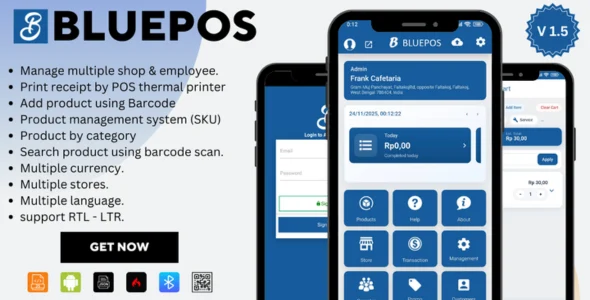
BluePOS Android POS Overview & SaaS Retail Transaction Engine
BluePOS Android POS is a Software-as-a-Service point-of-sale application built for Android devices, engineered for retail and service operators to process transactions from any standard phone or tablet without dedicated hardware. The system addresses two structural bottlenecks in retail technology: terminal cost barriers and connectivity dependency, resolving the latter through an offline transaction mode that queues sales locally and reconciles them against the central server when the network recovers. In production workflows, it functions as the client-facing terminal layer of a two-tier architecture, pairing with a web-based administrative backend where operators configure products, monitor inventory, and consolidate reporting across every registered branch.
Technical Specifications & Deployment Matrix
| Engineering Metric | Deployment Specification |
|---|---|
| Base Technology / Framework | Native Android application paired with a web-based SaaS administrative backend |
| Runtime / Language Requirements | Android OS device acting as POS terminal; modern browser for admin dashboard access |
| Data Exchange / Communication Protocols | REST API with JSON payloads; Bluetooth pairing for thermal printer output |
| Front-End / Engine Dependencies | Bluetooth-enabled thermal receipt printers; no proprietary card terminals required |
| Database / Persistence Footprint | Local device storage for offline transaction queuing; centralized server-side persistence for synced records |
Offline-First Transaction Sync & Execution Pipeline
BluePOS routes each sale through a state-aware pipeline that begins on the device and terminates at the central server. When a cashier initiates a transaction, the application validates the cart against locally cached product and pricing data, records the sale to on-device storage, and dispatches a Bluetooth print job to the paired thermal printer for receipt generation. Under normal connectivity, the transaction payload is serialized and pushed to the server over the REST layer, where inventory deltas, customer ledger entries, and branch-level sales figures are written in a single reconciliation pass. When connectivity drops, the device continues accepting sales from its local cache and holds the outbound queue until a network probe succeeds, at which point the queued records upload in sequence and the central inventory state converges with branch-level activity. For agencies building out a broader Android deployment portfolio, the same terminal distribution model applies to content and utility apps, such as Android Weather App with AdMob Integrated, which ships as ready-to-publish source code for monetized Play Store releases.
Core Technical Capabilities of BluePOS Android POS
- Offline and Online Dual-Mode Operation: Sales continue during internet outages by writing transactions to local device storage, with automatic synchronization to the central server restoring data parity once connectivity returns, eliminating lost revenue windows during ISP failures.
- Multi-Store Consolidated Management: A single administrative backend aggregates inventory levels, sales figures, and employee records across every branch, allowing an operator to compare store performance and reallocate stock without logging into separate per-location systems.
- Role-Based Access Control: Permission matrices distinguish cashier, manager, and administrator roles, restricting destructive operations such as voids, refunds, and configuration edits to authorized tiers and preserving an audit trail of who executed each transaction.
- Bluetooth Thermal Printer Integration: The terminal pairs with a range of Bluetooth-enabled thermal printers, dispatching receipt and order print jobs directly from the device without intermediate print servers or USB dependencies.
- Exposed REST API: Documented API endpoints allow developers to bridge the POS dataset into accounting platforms, e-commerce storefronts, or ERP systems, turning transaction records into an integration source rather than a closed silo.
Production Implementation & Operational Resilience
Deployment follows a standard SaaS provisioning flow: register the administrative account, define stores and user roles in the backend, pair each Android terminal to its assigned branch, and connect the Bluetooth printer through the device pairing dialog. Because terminals cache product catalogs locally, rollout across multiple locations does not require simultaneous network availability; each device syncs independently, which makes staged store-by-store onboarding practical for agency client deliveries. Operational resilience depends on the sync queue behaving predictably: administrators should verify that post-outage reconciliation completes without duplicate transaction records before treating branch reports as authoritative, and should confirm that printer pairing survives device reboots at each station. The REST API extends the platform into adjacent back-office workflows; for teams that need to digitize supplier invoices, purchase orders, or signed delivery receipts into the surrounding web infrastructure, integrating Document Scanner Pro provides document capture and sharing capability that feeds document-driven record keeping alongside the transaction dataset. Secondary development centers on the API layer rather than terminal modification: external systems can read sales, inventory, and customer records and write back through the documented endpoints, subject to the authentication and permission model configured per role in the backend. Teams extending the platform should treat the customer and supplier database as the canonical relationship store, since purchase history and supply-side records are tracked there rather than in external systems.
Frequently Asked Questions
Does BluePOS process sales when the internet connection is completely unavailable?
Yes, the terminal writes transactions to local device storage during outages and queues them for upload, so cashiers keep serving customers and the server receives every record automatically once connectivity returns.
Can one administrative backend manage several store branches simultaneously?
Yes, the backend consolidates inventory, sales, employee, and reporting data across all registered locations, and administrators can compare branch performance from a single login without maintaining separate installations per store.
Is specialized POS hardware required to run the system?
No, the system runs on standard Android phones or tablets and prints through Bluetooth-enabled thermal printers, so businesses avoid dedicated terminals and can repurpose existing consumer devices as checkout stations.
Can external accounting or ERP software pull transaction data from BluePOS?
Yes, the exposed REST API allows developers to retrieve sales, inventory, and customer records and integrate them into accounting platforms, e-commerce systems, or ERP pipelines, subject to the permission configuration set per role.
Should operators treat branch reports as final immediately after a network outage?
No, reports should be reviewed after the sync queue finishes reconciling offline transactions with the server, since queued records upload only once connectivity is restored, and verification prevents acting on incomplete figures.

Myfriend – Friend Chat Post Tiktok Follow Radio Group ecommerce Zoom Live clone social network app

Shradhanjali Card Maker – RIP Post Maker – Tribute Post Maker – Funeral Card Maker – Condolence Card
Super POS-Multi Store Point of Sale System for Android with Web Admin Panel