Always on Display – AOA – Always On AMOLED – Always on display clock widget – Super AMOLED on Screen
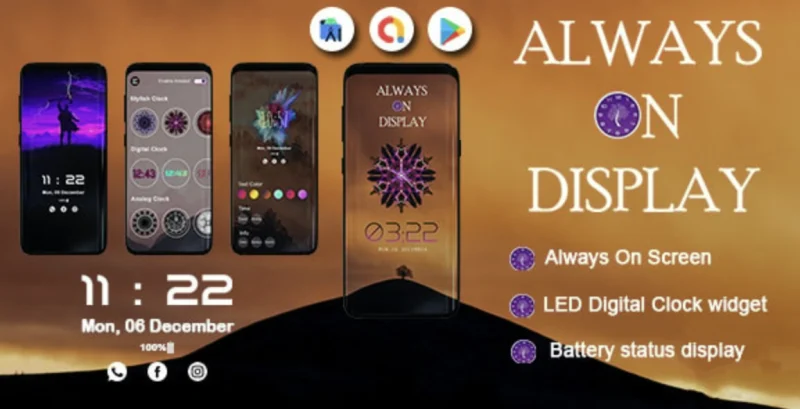
Always on Display AOA Overview & Ambient Display Rendering Architecture
Always on Display AOA is a native Android application source code, engineered for mobile developers and agencies to ship an AMOLED-powered ambient display product with integrated AdMob monetization. The codebase resolves a persistent mobile UX bottleneck: keeping glanceable information such as time, date, notifications, weather, battery level, and music controls visible on a sleeping screen without waking the device or draining its battery. Within production workflows, the package functions as a deployable, re-brandable foundation suitable for Play Store releases, client deliverables, and utility-app portfolio expansion.
Technical Specifications & Deployment Matrix
| Engineering Metric | Deployment Specification |
|---|---|
| Base Technology / Framework | Native Android application (Java source with XML layouts) |
| Runtime / Language Requirements | Android 9.0, 10.0, 11.0, and 12.0 |
| Data Exchange / Communication Protocols | AdMob / AdSense ad serving SDK; on-device notification and media control signals |
| Front-End / Engine Dependencies | AMOLED or Super AMOLED display panel (pixel-selective lighting required for battery efficiency) |
| Database / Persistence Footprint | Local .db storage; compiled .dex and .so artifacts; prebuilt .apk included |
AMOLED Pixel-Selective Rendering & Execution Pipeline
The core mechanism keeps a limited screen region active during sleep mode while all other pixels power down. Because AMOLED panels illuminate each pixel individually, the rendering layer activates only the LEDs required to draw the clock face, date, battery indicator, notification icons, or custom text, leaving the remaining panel in an off state. The app was designed around a 0% CPU target and low system resource consumption, which allows the ambient view to persist indefinitely without imposing measurable load on the foreground runtime. Information continues to render even when the screen is locked behind a password, so the ambient layer operates above the security barrier rather than requiring an unlock event. Notification and edge lighting events are dispatched to the display layer as they arrive, producing a glow-along-the-bezel effect that signals incoming messages without a full wake cycle. Weather data and music control surfaces are projected onto the same black-screen canvas, consolidating multiple glanceable data sources into one persistent view that replaces the need to check a smartwatch.
Studios evaluating a parallel deliverable on an independent track can also examine Digital Clock LWP, a separate always-on-display clock implementation that addresses the same ambient viewing use case as a standalone codebase.
Core Technical Capabilities of Always on Display AOA
- Pixel-selective ambient rendering: Only the LEDs backing the active clock, text, and graphic regions draw power, which is the documented reason the always-on view avoids significant battery drain on AMOLED hardware.
- Dual clock template engine: A template collection spanning analog clock faces and LED digital clock styles lets developers configure the persistent display without rebuilding the rendering layer.
- Notification and edge lighting pipeline: Incoming notification events trigger edge glow effects and on-screen notification summaries, keeping the sleeping screen informative without wake gestures.
- AdMob / AdSense monetization integration: Ad serving hooks are wired into the application flow, enabling revenue generation from the deployed utility without additional ad-layer engineering.
- Customization layer: Text, colors, styles, on-screen quotes, and live clock wallpapers are adjustable at runtime, and the module doubles as a neon night clock wallpaper provider.
Production Implementation & Operational Resilience
Deployment begins with the included .apk for immediate device validation, followed by source-level work using the .java and .xml files for logic and layout modifications. Compiled .dex bytecode and .so native libraries ship alongside the source, allowing teams to reproduce the build pipeline or re-sign the package for store distribution. Branding and visual identity are handled through the included layered PSD and layered PNG assets, so designers can replace clock faces, backgrounds, and iconography without touching rendering code. The local .db file defines the persistence footprint for user preferences and configuration state.
Operationally, the architecture carries one environmental boundary teams must verify before client rollout: the battery-efficiency model depends on AMOLED panel behavior, since LCD backlights illuminate the full screen regardless of pixel color. Devices without AMOLED or Super AMOLED panels will still render the ambient view but will not benefit from the pixel-off power savings that anchor the design. Pre-deployment testing should therefore confirm the target device fleet uses compatible panel technology. For teams diversifying a utility portfolio toward a separate native iOS track, QR Scanner/Generator exists as an independent Swift codebase path outside the Android runtime. Secondary development on this package is bounded by its Android 9.0–12.0 compatibility window; targeting newer API levels requires recompiling against updated SDKs and revalidating notification-listener permissions, background execution rules, and battery-optimization whitelisting, which Android enforces progressively across versions.
Frequently Asked Questions
Does the package include editable design source files for rebranding?
Yes, the deliverables contain layered PSD and layered PNG files alongside the Java and XML source, allowing design teams to modify clock faces, backgrounds, and visual assets without altering application logic.
Can the display show information while the device is locked with a password?
Yes, the ambient layer renders time, date, and notification data on top of the locked screen, so glanceable information remains visible even when the device is protected by a password or security lock.
Does the app require a smartwatch to deliver glanceable information?
No, the package projects clock, date, weather, battery level, and notification data directly onto the phone or tablet screen during sleep mode, which the documentation positions as removing the need for a separate smartwatch device.
Are both analog and digital clock templates available?
Yes, the template collection includes analog clock designs and LED digital clock styles, and both categories expose customizable color and text styling through the runtime configuration layer.
Online Learning Mobile App | UI Kit | ReactNative | Figma FREE | Edumy
MyTaxi – Complete Flutter Taxi App | Full Taxi Booking Solution with Intercity & Parcel
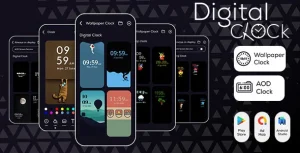
Digital Clock LWP – Digital Clock AOD – Always On Display – Live Wallpaper – Best Clock On Display