All Social Media in One | A Multi-site Android Application with AdMob & FCM PUSH Notification
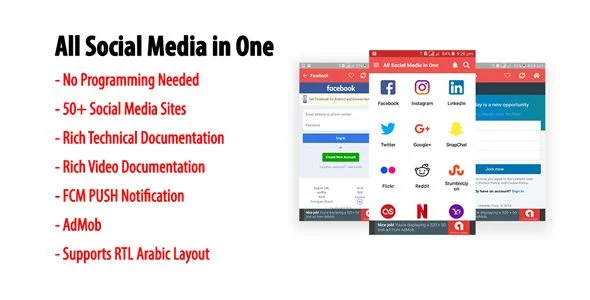
All Social Media in One Overview & WebView Aggregation Engine
All Social Media in One is a native Android multi-site application source code, engineered for solo developers and mobile agencies to ship an aggregated social-web portal without writing production Java. The package removes the boilerplate of building separate WebView clients for every platform by centralizing an unlimited site registry inside a JSON-formatted internal database. Within agency delivery workflows, it operates as a configurable white-label shell: publishers register destinations, attach icons, assign categories, and compile a signed release binary ready for Google Play submission.
Technical Specifications & Deployment Matrix
| Engineering Metric | Deployment Specification |
|---|---|
| Base Technology / Framework | Native Android application built from .java sources and .xml layout resources under a Gradle build system |
| Runtime / OS Requirements | Android 9.0, Android 10.0, Android 11.0, and Android 12.0 |
| Data Exchange / Communication Protocols | JSON-formatted internal database (.db); Firebase Cloud Messaging (FCM) push notification delivery |
| Front-End / Engine Dependencies | WebView rendering container with zoom controls, Material color theme, navigation drawer |
| Database / Persistence Footprint | Local .db site registry with favorites/bookmark storage; layered PNG icon assets; HTML documentation |
JSON-Driven Site Registry & Execution Pipeline
The engine runs on a JSON-formatted internal database that defines every destination the shell can reach. Each registry entry carries the target URL, its display icon, and its category assignment, so the home grid, drawer, and category filters are all generated from that single data source instead of hard-coded layouts. When a user selects a destination, the tap event is dispatched to the WebView rendering layer, which loads the remote site inside the native container. A zoom control layer, introduced in V1.1, applies granular viewport scaling to loaded pages, while refresh and home button events route through the activity lifecycle before returning control to the container. Favorites write to local persistence, so bookmarked destinations survive session restarts without any server-side account layer.
Because the registry is data rather than code, extending the catalog is an append operation: add an entry with its URL, icon, and category, then rebuild. The enhanced search facility filters registry entries as the user types, narrowing the visible catalog before a WebView session even begins. Push messaging arrives through Firebase Cloud Messaging, letting publishers broadcast announcements to every installed device without embedding messaging logic in the app layer.
Architectural & Functional Highlights
- JSON Site Registry: Supports an unlimited number of sites and categories, with each destination defined as a data entry rather than a UI-layer code change, keeping catalog growth decoupled from layout engineering.
- Enhanced Search & Favorite Persistence: An indexed search facility filters the registry in real time, while the favorites list writes bookmarks to the local .db store so user curation persists across app restarts.
- FCM Push Notification Channel: Firebase Cloud Messaging handles message delivery to installed devices, enabling broadcast announcements through Google’s push infrastructure rather than custom socket code.
- Zoom Control Layer: Fully functional zoom controls introduced in V1.1 let users scale WebView content per site, compensating for destinations that ship desktop-grade viewport sizing.
- Icon & Theming Layer: Per-website icon insertion and a Material color theme give each registry entry a distinct visual identity inside a consistent native shell, including mirrored RTL Arabic layouts.
For studios assembling a portfolio of standalone Android utilities outside this aggregation shell, AM Radio occupies a parallel niche, applying a comparable native codebase profile to multi-channel radio streaming rather than social-web portals.
Production Implementation & Operational Resilience
Deployment targets span Android 9.0 through Android 12.0, and the V1.3 revision upgraded the build.gradle files and adjusted AndroidManifest.xml to match the current Gradle toolchain, which reduces friction when compiling against modern Android Studio versions. The source was also updated in V1.2 to comply with current Google Play policies, a practical safeguard for agencies submitting client builds: policy-aligned ad behavior and an updated privacy policy baseline lower the risk of store rejection during review. The navigation drawer exposes a More Apps slot for cross-promoting a publisher’s other titles, and a recurring rate-this-app dialog is wired into the session flow to compound store ratings over time.
Operational boundaries are worth stating plainly. Every destination renders inside a WebView, so the experience is bounded by each remote site’s own mobile behavior, network conditions, and its stance on embedded browsing; the zoom layer mitigates layout scaling but cannot rewrite third-party DOM. The JSON database must be edited and the project recompiled to change the catalog, since the registry ships inside the binary rather than being fetched at runtime. Teams widening a release pipeline beyond social aggregation can treat My QR Code Generate & Scanning App as a decoupled Android 15-ready utility occupying a separate tooling niche, with no shared runtime dependency on this codebase.
Frequently Asked Questions
Does building a functional app require writing Java code?
Yes, in the sense that no programming is needed. Site registration, category assignment, and icon mapping are performed through the JSON-formatted internal database, so a publisher can assemble a working catalog without modifying the production Java logic.
Does the package ship a ready-to-install APK alongside the source files?
Yes, the deliverables include a compiled .apk for direct device testing, together with .java sources, .xml resources, the .db registry, layered PNG assets, and HTML documentation covering the build and configuration procedure.
Do full-screen ads fire on every user click?
No. Since the V1.2 update, interstitial frequency is throttled so full-screen impressions appear only after three or more clicks, limiting disruptive ad exposure and keeping ad behavior aligned with current Google Play advertising policies.
Can the interface render right-to-left Arabic layouts out of the box?
Yes, the UI layer ships with RTL Arabic layout support, mirroring navigation and content containers for Arabic-speaking audiences without requiring additional layout rewrites in the Java source tree.
Santa Video Call Prank for Christmas Android App with Admob Ads & FB Mediation
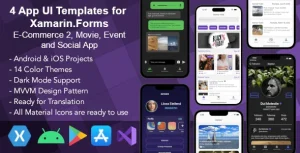
4 App UI Templates for Xamarin Forms: E-commerce, Movie, Event, Social
oobenn Instagram Style Social Networking Android App