AI Mock Interviewer – React Native (Android & iOS)
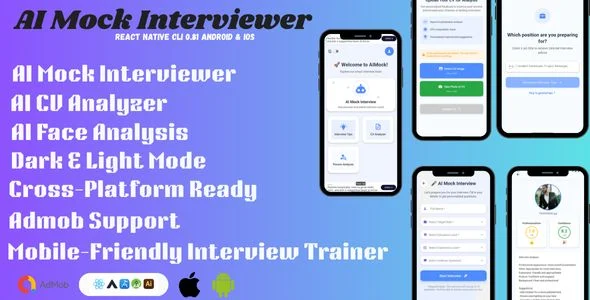
AI Mock Interviewer Overview & Cross-Platform Interview Training Architecture
AI Mock Interviewer is a React Native mobile application source package, engineered for app publishers and agencies to deploy a cross-platform interview preparation product on Android and iOS from a single JavaScript codebase. The template resolves the recurring engineering bottleneck of consolidating AI-driven interview simulation, CV parsing, and facial expression analysis — three subsystems that normally demand separate services — inside one deployable runtime. Within agency delivery pipelines it operates as a production-ready foundation: studios rebrand the interface, attach their own Firebase project, configure AdMob units, and publish release builds to both app stores.
Technical Specifications & Deployment Matrix
| Engineering Metric | Deployment Specification |
|---|---|
| Base Framework | React Native cross-platform runtime (single codebase for Android and iOS) |
| Delivered Source Files | JavaScript JS, CSS, LESS, Sass, Stylus, PHP, HTML |
| Native Layer Compatibility | Kotlin 1.x; Android 9.0 through Android 15.0 |
| Backend & Persistence | Firebase (authentication, secure backend, real-time data handling) |
| Monetization Layer | Google AdMob ad unit integration |
| UI Configuration | Four onboarding screens; dark and light theme modes; responsive layouts |
AI Interview Execution Pipeline & Session Architecture
The engine routes every practice session through a four-stage pipeline: identity verification, role-targeted question delivery, live behavioral capture, and a consolidated AI review. First-time users progress through four onboarding screens before reaching the Firebase-gated authentication flow, which covers sign-up, login, and password recovery. Once authenticated, a session begins by accepting the user’s target job role; the interview module then generates questions and returns instant feedback on each answer, with client-server exchanges serialized as JSON between the app and the AI processing layer. During active sessions the face-analysis subsystem reads the device camera feed, scoring expressions, confidence markers, and body-language cues, while the CV analyzer accepts uploaded resumes and returns ATS-oriented structural recommendations. Each session terminates in a final AI review that aggregates answer quality and behavioral telemetry into a documented performance evaluation.
Core Technical Capabilities of AI Mock Interviewer
- AI Mock Interview Engine: Generates role-specific question flows and returns instant per-answer feedback, letting candidates rehearse realistic interviews and correct responses within the same session cycle.
- AI CV Analyzer: Parses uploaded CV documents and returns structural recommendations oriented toward applicant tracking system (ATS) compatibility, improving resume pass-through rates before real applications are submitted.
- AI Face Analyzer: Processes the device camera input during practice sessions to assess expressions, confidence indicators, and body language, feeding nonverbal performance data into the final review stage.
- Firebase Authentication Layer: Manages the complete credential lifecycle — sign-up, login, and forgot-password recovery — against Firebase identity services with real-time data handling for session persistence.
- AdMob Monetization & Theming: Ships with Google AdMob ad slots ready for unit-ID configuration, plus dark and light mode switching so the UI adapts to system-level theme preferences across both platforms.
Role-personalized interview tips extend the pipeline by supplying preparation guidance keyed to the selected job function. For development teams that also require a separate React Native deliverable with server-driven content management, Newsline exists as an independent news-app package with its own React.js and Node.js admin panel, occupying a distinct product lane without sharing this codebase.
Production Implementation & Operational Resilience
Deployment begins with provisioning your own Firebase project and binding the authentication and real-time database services to the app, after which Android release builds can be compiled against the documented compatibility band — Android 9.0 through Android 15.0 on a Kotlin 1.x native layer — while iOS builds compile from the same JavaScript source through React Native’s platform bridge. Ad unit identifiers must be inserted into the AdMob configuration before store submission; shipping with placeholder units will block monetization in review builds. The responsive layout system renders across the full device matrix on both operating systems, and the dual-theme mode is selectable at runtime rather than fixed at build time.
Operationally, the AI subsystems depend on the service configuration defined within the source, so any AI provider changes must be made in the JavaScript layer rather than through native patches. Onboarding flow modifications, theme token overrides, and screen reordering all occur in the shared JS components, keeping a single source of truth for both platforms. For studios evaluating an independent Android-native template outside the React Native runtime entirely, My Status Cleaner & Saver for WhatsApp and WA Business represents a decoupled, separately maintained codebase occupying a different utility category.
Frequently Asked Questions
Are the deliverables editable source files or compiled binaries?
No, the package does not ship compiled binaries. Deliverables include editable JavaScript JS, CSS, LESS, Sass, Stylus, PHP, and HTML files, giving developers direct access to modify layouts, styles, and application logic before producing store-ready builds.
Does the app run on older Android devices, or is a recent OS version required?
Yes, older devices are supported. The documented compatibility range spans Android 9.0 through Android 15.0, with the native layer built on Kotlin 1.x, so the deployed app covers both legacy handsets and current-generation Android releases.
Does the template include a complete password recovery flow?
Yes. The authentication screens cover sign-up, login, and forgot-password functionality, all processed through the integrated Firebase backend, so credential lifecycle management is available out of the box without additional auth services.
Does the package include introductory screens for first-time users?
Yes. Four onboarding screens are included and presented to first-time users ahead of the authentication flow, providing a structured introduction to the mock interview, CV analysis, and face analysis features before account creation.