FinHit – Wallet & Banking PWA Mobile Application
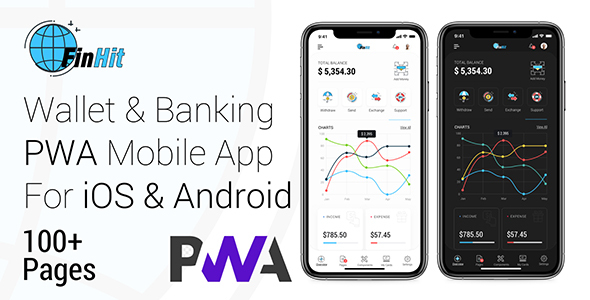
✅ Product Overview
FinHit is a comprehensive, mobile-first template designed for building a responsive Wallet & Banking PWA Mobile Application. It serves as an ideal foundation for personal finance dashboards, micro-banking interfaces, or any web application requiring secure financial tracking and management. This template targets developers, fintech startups, or individual entrepreneurs looking to deploy a sophisticated financial web app quickly, offering a polished user experience right out of the box.
Upon initial load, the dashboard presents a clear balance summary at the top, typically followed by recent transaction cards. Tapping a transaction card usually reveals a modal with more details—date, amount, category, and recipient. The navigation bar sits firmly at the bottom of the screen, making it effortless to switch between Home, Transactions, Accounts, and Settings views without a full page refresh, enhancing the native app feel.
✅ Highlights & Value
Deploying the FinHit – Wallet & Banking PWA Mobile Application means your users can ‘install’ the app directly to their device’s home screen on Android or iOS, behaving much like a native application. It launches quickly from its icon and offers a full-screen experience, effectively removing browser chrome and cleaning up the user interface. The interactive charts, for instance, dynamically update when you filter transactions by a specific date range, providing immediate visual feedback. The account switching functionality is notably smooth; selecting a different account from the dropdown immediately reflects the associated balance and transaction history on the dashboard without a page reload.
- Responsive design adapts flawlessly, shifting elements like transaction lists from multi-column grids on tablets to single-column stacks on smaller phone screens.
- A prominent dark mode toggle provides an immediate, eye-friendly inversion of the color scheme, conveniently saving the user’s preference across sessions via local storage.
- The modular SCSS structure significantly aids in rapid theme customization; changing a primary color variable in
_variables.scsspropagates globally across the application. - Offline support for core pages ensures basic functionality even without an internet connection, thanks to efficient service worker caching.
- Authentication flows include well-structured login and registration forms, complete with client-side validation that displays error messages clearly below input fields.
✅ Real-World Use Cases
- Personal Finance Tracker: Users can log daily expenses, categorize them, and visualize spending patterns through the integrated charts. The ‘Add Transaction’ button opens a clean, guided form for quick data entry.
- Micro-Banking Interface: For credit unions or fintech startups, this Wallet & Banking PWA Mobile Application serves as a robust front-end for account management, balance checks, and basic fund transfers, designed to connect seamlessly to a custom backend API.
- Internal Expense Reporting Tool: Businesses can adapt it for employees to submit expenses, upload receipts (via a straightforward file input field), and track reimbursement status within a familiar app environment.
✅ Technical & Compatibility
FinHit is built with modern web standards: HTML5, CSS3 (specifically SCSS for maintainability), and JavaScript, leveraging contemporary web components for its interactive elements. The project structure is clear and organized, with separate directories for CSS, JS, and individual HTML pages. It integrates efficiently with any backend system capable of providing data via RESTful APIs; simply updating the API endpoints in the JavaScript configuration handles all data fetching and submission. Compatibility extends to all modern web browsers including Chrome, Firefox, Safari, and Edge, performing consistently across both Android and iOS devices.
The codebase for the FinHit – Wallet & Banking PWA Mobile Application is clean and semantic. When adapting it for a WordPress environment, it typically functions as a standalone PWA integrated via a custom page template, or its individual components can be selectively extracted and used within a theme’s structure. For instance, the transaction list component could easily fetch data from a custom post type or WooCommerce orders via AJAX requests, making it versatile for WordPress developers.

MyTaxi – Complete Flutter Taxi App | Full Taxi Booking Solution with Intercity & Parcel
Sticker Maker for WhatsApp – Stickers in WhatsApp – Sticker Maker-WhatsApp – Sticker Maker for WA
Voice Calculator – Speaking Calculator – Calculator – Voice Typing Calculator – Talking Calculator